| GENERAL DESCRIPTION |
The Malfunction
Indicator Lamp (MIL), which is located in the instrument cluster, comes on
to notify the driver that there may be a problem with the vehicle and that
service is needed. Immediately after the ignition switch turns on, the
malfunction indicator lamp is lit to indicate that the MIL operates
normally and goes off after starting
| DTC DESCRIPTION |
ECM sets DTC P0650 if
the ECM detects that the MIL control line is open or short circuit to
ground or battery line.
| DTC DETECTING CONDITION |
| Item |
Detecting
Condition |
Possible
Cause | ||||||||
| DTC Strategy |
|
| ||||||||
| Enable Conditions |
| |||||||||
| Threshold Value |
| |||||||||
| Diagnostic Time |
| |||||||||
| MIL On Condition |
|
| SCHEMATIC DIAGRAM |
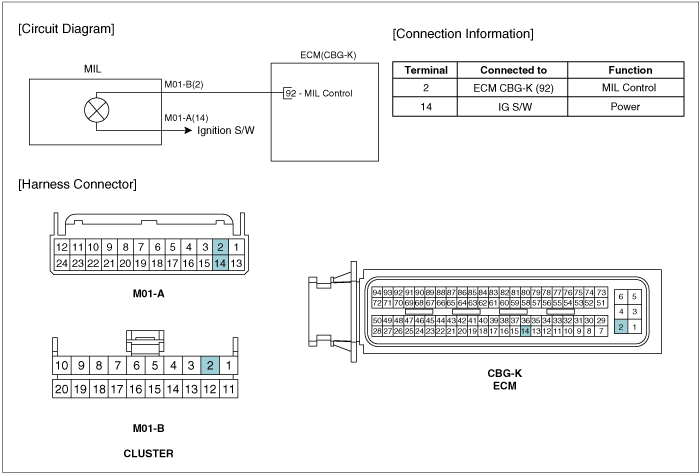
| CONTROL CIRCUIT INSPECTION |
| 1. |
Ignition
"OFF" |
| 2. |
Disconnect ECM
connector |
| 3. |
Ignition "ON" & Engine
"OFF" |
| 4. |
Using a suitable wire, jumper the terminal
92 of the ECM harness connector to chassis
ground. |
| 5. |
Is MIL bulb illuminated?
▶ Go to next step as below
▶ Remove instrument cluster and inspect MIL
bulb. If it is burned out, replace bulb. If bulb is okay, locate
source of open between bulb and Meter Fuse. Repair as necessary and
go to "Verification of Vehicle Repair"
procedure |


| 6. |
Remove wire from ECM harness
connector |
| 7. |
Does MIL bulb go out?
▶ Check for poor connection between ECM and
component: backed out terminal, improper mating, broken locks or
poor terminal to wire connection. Repair as necessary and go to
"Verification of Vehicle Repair" procedure
▶ Check for source of short to GND between
bulb and ECM. Repair as necessary and go to "Verification of Vehicle
Repair" procedure |
| VERIFICATION OF VEHICLE REPAIR |
After a repair, it is
essential to verify that the fault has been corrected.
| 1. |
Connect scan tool and select "Diagnostic
Trouble Codes(DTCs)" mode. |
| 2. |
Press F4(DTAL) and confirm that "DTC
Readiness Flag" indicates "Complete". If not, drive the vehicle
within conditions noted in the freeze frame data or enable
conditions. |
| 3. |
Read "DTC Status"
parameter. |
| 4. |
Is parameter displayed "History(Not Present)
fault"?
▶ System performing to specification at this
time. Clear the DTC
▶ Go to the applicable troubleshooting
procedure. |