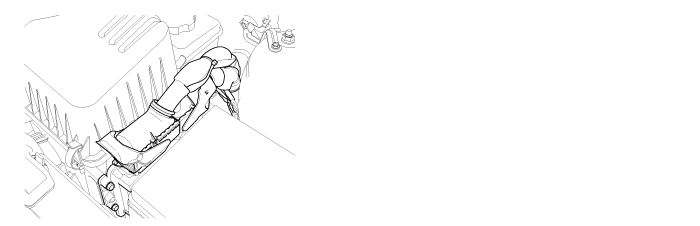
A communication line
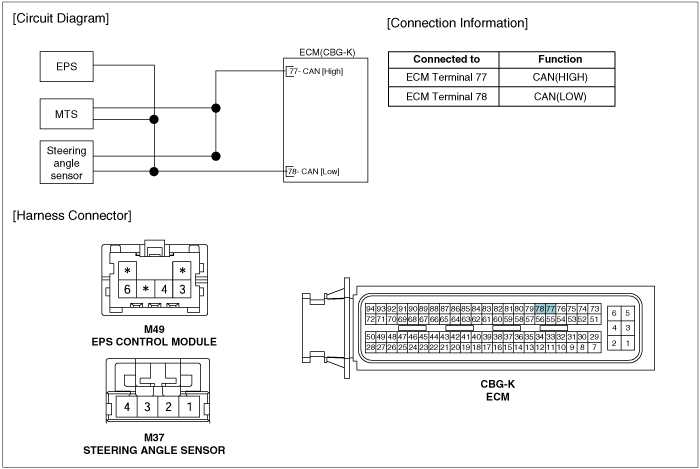
exists between the Engine Control Module(ECM) and the Transaxle Control
Module(TCM). The communication is through a Control Area Network(CAN).
Without CAN communication, an independent pin and wiring is needed to
receive a sensor information from a ECM. The more information to be
communicated, the more wirings is required. In case of CAN communication
type, all the information need to be communicated among control modules
such as ECM and ABS control module use CAN lines.
The ECM determines CAN
communication error and sets DTC U0001 if communication with other control
devices (e.g. ABS) via CAN is impossible or ECM detects that communication
time via CAN exceeds threshold value.
The ECM determines CAN
communication error and sets DTC U0001 if communication with other control
devices (e.g. ABS) via CAN is impossible or ECM detects that communication
time via CAN exceeds threshold value.
Item
|
Detecting
Condition
|
Possible
Cause
|
DTC Strategy
|
| •
|
Check CAN message transfer
status | |
| •
|
Open or short in CAN
line |
| •
|
Poor connection or damaged
harness |
|
Enable Conditions
|
|
Threshold Value
|
| •
|
20 wrong messages received by
ECM | |
Diagnostic Time
|
| •
|
20 wrong messages received by
ECM | |
MIL On Condition
|
|
| 1. |
Connect scan tool and select "Diagnostic
Trouble Codes(DTCs)" mode. |
| 2. |
Press F4(DTAL) to select DTC information
from the DTCs menu. |
| 3. |
Confirm that "DTC Readiness Flag" indicates
"Complete". If not, drive the vehicle within conditions noted in the
freeze frame data or enable
conditions. |
| 4. |
Read "DTC Status"
parameter. |
| 5. |
Is parameter displayed "History(Not Present)
fault"?
| - |
History (Not Present) fault :
DTC occurred but has been
cleared. |
| - |
Present fault : DTC is occurring
at present
time. | |

▶ Fault is intermittent caused by poor
contact in the sensor's and/or ECM's connector or was repaired and
ECM memory was not cleared. Thoroughly check connectors for
looseness, poor connection, bending, corrosion, contamination,
deterioration, or damage. Repair or replace as necessary and then go
to "Verification of Vehicle Repair" procedure.

▶ Go to next step as
below. |
| 1. |
Connect scan tool and select "Diagnostic
Trouble Codes(DTCs)" mode. |
| 2. |
Press F4(DTAL) to select DTC information
from the DTCs menu. |
| 3. |
Confirm that "DTC Readiness Flag" indicates
"Complete". If not, drive the vehicle within conditions noted in the
freeze frame data or enable
conditions. |
| 4. |
Read "DTC Status"
parameter. |
| 5. |
Is parameter displayed "History(Not Present)
fault"?
| - |
History (Not Present) fault :
DTC occurred but has been
cleared. |
| - |
Present fault : DTC is occurring
at present
time. | |
▶ Fault is intermittent caused by poor
contact in the sensor's and/or ECM's connector or was repaired and
ECM memory was not cleared. Thoroughly check connectors for
looseness, poor connection, bending, corrosion, contamination,
deterioration, or damage. Repair or replace as necessary and then go
to "Verification of Vehicle Repair" procedure.
▶ Go to next step as
below. |
