
EPS CM controls EPS
solenoid current accurately according to vehicle speed. EPS CM monitors
that operating voltage supplied as IG S/W is too high or too low on "power
supply terminal". If excessive high voltage or low voltage is detected,
EPS CM stops current supply to solenoid to prevent unexpected operation or
damage.
EPS CM sets this code if
ASP(Absolute Steering Position) zero setting is not done when EPS CM
losses steering angle signal due to EPS alinment replace etc. EPS CM stops
"damper" and "return"control due to loss of steering angle
signal.
Item
|
Detecting
Condition
|
Possible cause
|
DTC
Strategy
|
|
| •
|
ASP setting is not
done | |
Enable
conditions
|
|
Threshold
value
|
|
Fail
Safe
|
| •
|
Steering angle sensor signal is not
available. | |
Restoration
conditions
|
| •
|
ASP Setting is done
well | |
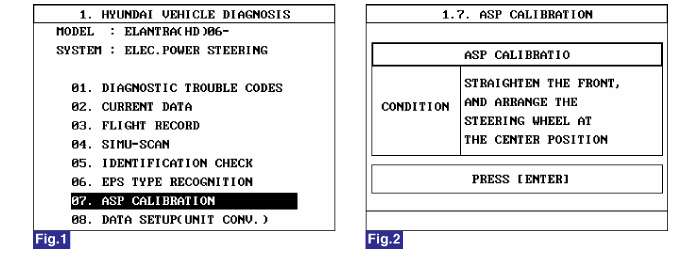
| ■ Steering angle
calibration |
| 1. |
Perform steering angle sensor
calibration.
| (1) |
Ignition "ON" & Engine
"OFF". |
| (2) |
Set the steering wheel so that the
wheels point straight ahead |
| (3) |
Connect scantool to Data Link
Connector(DLC). |
| (4) |
Go in Power Steering System. (figure
1). |
| (5) |
Perform steering angle sensor
calibration. (figure 2). |
| (6) |
Go to "Compnent
Inspection"Precedure.
|
| (7) |
Are any DTCs present ?
|

|
▶
Substitute with a known-good steering column & EPS
unit assembly check for proper operation.
If problem is corrected,
replace steering column & EPS unit assembly and then
go to"Verification of Vehicle
Repair"procedure.
|
|

|
▶
Fault is intermittent caused by faulty EPS CM or was
repaired and EPS CM memory was not cleared.
Go to "Verification of
Vehicle
Repair"procedure.
|
| |
| Verification of Vehicle
Repair |
After a repair, it is
essential to verify that the fault has been corrected.
| 1. |
Connect scantool and select "Diagnostic
Trouble Codes(DTCs)" mode. |
| 2. |
Using a scantool, Clear
DTC. |
| 3. |
Operate the vehicle within DTC Detecting
Condition in General Information. |
| 4. |
Are any DTCs present ?
|
|
▶ Go to the
applicable troubleshooting procedure.
|
|
|
▶ System
performing to specification at this
time.
|
|