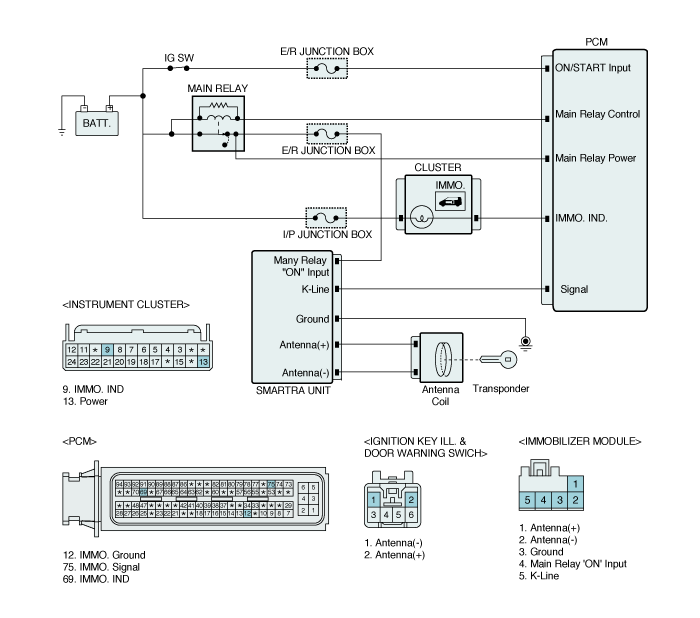
The vehicle immobilizer
system consists of the ECM, the SMARTRA3 and ignition keys with built-in
transponder.
The ECM carries out the
check of ignition key by special encryption algorithm with SMARTRA3 and
Transponder. The encryption algorithm (between ECM and SMARTRA3) is the
one offered from BOSCH. The encryption algorithm (between ECM and
Transponder) is Hitag type 2 which is a high level system. With IGN On,
the ECM executes the key Authentication after SMARTRA3 authentication. The
Engine can be started when the key authentication is confirmed by the
SMARTRA3.
The Key teaching
procedure starts with ECM request of PIN from Scanner. The "virgin"ECM
stores the PIN and the key Learning can be started. The "learnt"ECM
compares the PIN from tester with the vehicle password in Transponder. If
the data are correct, the key Learning can be started.
Scanner requests the
Learning of the first key, the SMARTRA3 is registered at first and then
the first key is registered by ECM. If the SMARTRA3 status is learnt and
PIN number is different, the SMARTRA3 will return the incorrect PIN data
to the ECM. In this case,The ECM can’t excute the key learning
process.
The ECM sets DTC P1674
if transponder key that can't be register(Transponder not in the password
mode or whose transport data has been changed) is inserted for
registration procedure.
Item
|
Detecting
Condition
|
Possible Cause
|
DTC
Strategy
|
|
|
Enable
Conditions
|
| •
|
IG ON (On Registering TP
Procedure) | |
Threshold
value
|
| •
|
Key not in 'VIRGIN' Status or with
invalid ID code | |
Detecting
time
|
|
| Diagnostic Circuit
Diagram |
| 1. |
Check transponder status
| (1) |
IGN "ON" & Engine "OFF" with key
intended to register |
| (2) |
Monitor the "KEY STATUS" Parameter on
the Scantool.
Specification :
'VIRGIN' or 'LEARNT'
|
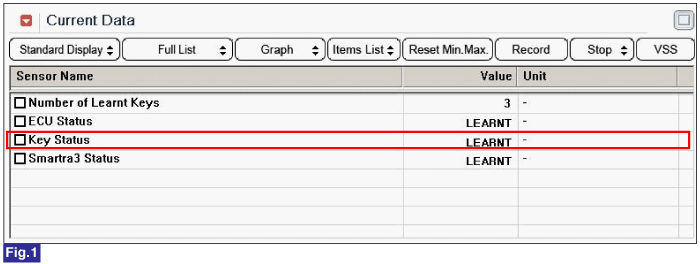
Fig.1) The current data in abnormal
state |
| (3) |
Is the measured voltage within
specifications?
|

|
▶
Check connectors for looseness, poor connection,
bending, corrosion, contamination, deterioration, or
damage. Repair or replace as necessary and then go to
"Verification of Vehicle Repair"
procedure.
|
|

|
▶
Substitute with a known-good transponder and check for
proper operation. If the problem is corrected, replace
transponder and then go to "Verification of Vehicle
Repair"
procedure.
|
| |
| Verification of Vehicle
Repair |
After a repair, it is
essential to verify that the fault has been corrected.
| 1. |
Connect scantool and select "Diagnostic
Trouble Codes(DTCs)" mode and then clear
DTC. |
| 2. |
Operate the vehicle and monitor the DTC on the
scantool. |
| 3. |
Are any DTCs present?
|
|
▶ Go to the
applicable troubleshooting procedure.
|
|
|
▶ System is
performing to specification at this time.
|
|