| General Description |
In contrast to the
initial one-stage airbag systems, newer restraint systems involve complex
logic to select, or alternatively suppress, various levels of safety
system deployment.
Inherent to an advanced
Restraint System is the ability to discern information regarding passenger
occupancy.
It is intended that
these inputs be provided through the weight measuring OC system.
The object of such
safety system is to reduce the risk and level of injuries by automatically
adapting the airbag(s) and seat belt pretensioner to the driving status of
the vehicle, its occupants, and the crash severity.
The current OC system
covered in this specification continually senses and classifies the front
passenger side seat.
OCS is utilizing a
robust weight measuring technology. Thus, if any of the following
conditions occur, ‘command zero’ and ‘accuracy check’ should be
performed
The weight
classification ECU or any of the sensors is replaced.
The vehicle is brought
to the repair shop due to an accident or a crash even though the severity
seems to be minor.
The passenger airbag ON
indicator is not illuminated when the passenger seat is not
occupied.
The passenger airbag ON
indicator is delayed more than 10 seconds to be turned off when an adult
passenger seats in.
The passenger seat is
removed from the vehicle and re-assembled.
Any accessories (side
table, seatback table and seat cover, etc) are replaced or
installed.
| DTC Description |
The SRSCM sets DTC B1324
if there is any error in communication between Weight Classification
System ECU and SRSCM.
| DTC Detecting Condition |
| Item |
Detecting
Condition |
Possible cause | |||||||
| DTC Strategy |
|
| |||||||
| Enable Conditions |
| ||||||||
| Threshold Value |
| ||||||||
| Diagnostic Time |
Qualification |
| |||||||
| De-Qualification |
| ||||||||
| Diagnostic Circuit Diagram |
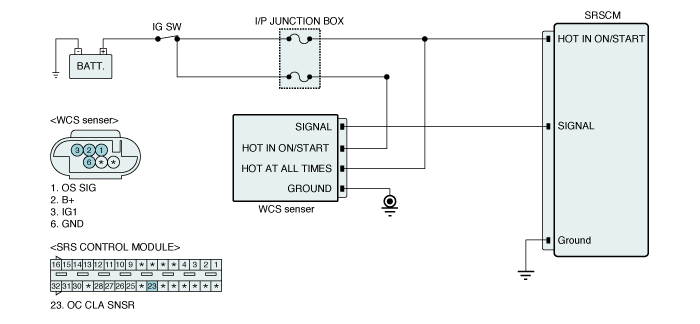
| Monitor Scantool Data |
| 1. |
Ignition "OFF", connect
scantool. |
| 2. |
Ignition "ON"& Engine "OFF", select
"Diagnostic Trouble Codes(DTC)"
mode. |
| 3. |
Monitor diagnostic trouble code and present of
trouble code. |
| 4. |
Using a scan tool, clear the DTC.
|
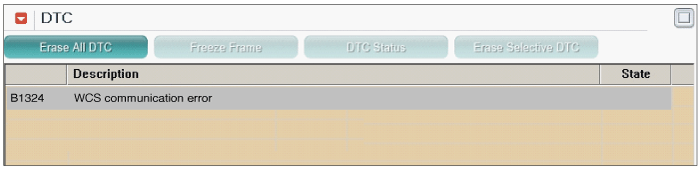
| 5. |
Is DTC present problem ?
|


| Terminal and Connector Inspection |
| 1. |
Many malfunctions in the electrical system are
caused by poor harness and terminals.
Faults can also be caused by interference from
other electrical systems, and mechanical or chemical
damage. |
| 2. |
Thoroughly check shorting bar/shorting bar
release pin and connectors for looseness, poor connection, bending,
corrosion, contamination, deterioration, or
damage. |
| 3. |
Has a problem been found?
|
| Power Circuit Inspection |
| 1. |
Check for an open or short circuit in the WCS
Power Circuit.
|
| Communication K LINE Inspection |
| 1. |
Ignition "ON" & Engine "OFF" and Using a
scan tool, clear the DTC. |
| 2. |
Ignition "OFF".
|
| 3. |
Disconnect the battery negative cable, then
disconnect the positive cable, and wait at least one
minutes. |
| 4. |
Disconnect the WCS MODULE from the WCS wiring
harness. |
| 5. |
Disconnect the SRSCM from the WCS wiring
harness. |
| 6. |
Measure resistance between of the WCS
Communication K LINE wiring connector and BCM harness
connector.
|
| 7. |
Is the measured resistance within
specifications?
|
| WCS Reset |
| 1. |
Ignition "OFF", connect
scantool. |
| 2. |
Ignition "ON"& Engine "OFF", select Weight
Classification System and select "WCS Reset"
mode. |
| 3. |
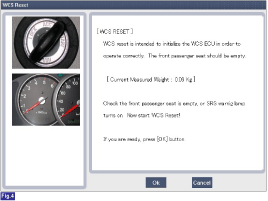
You will see comments and current weight
measured. |
| 4. |
Make sure the measure weight is caused by
occupant or tools or interference. |
| 5. |
And then press "ENTER"
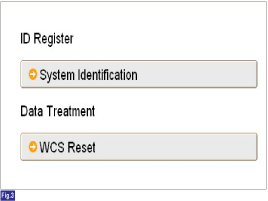
Fig 1) Select System
Fig 2) Weight Classification System
Select
Fig 3) Weight Classification System
Reset
Fig 4) EMPTY Data
|
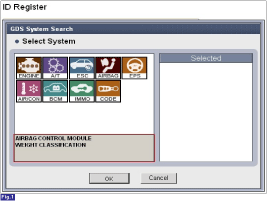
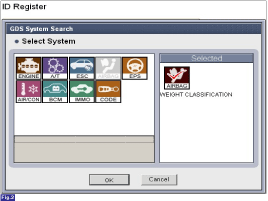
| 6. |
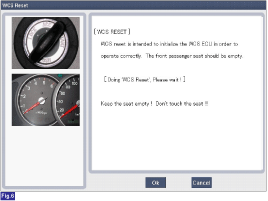
The ‘WCS Reset’ operation will take 3~10
second. |
| 7. |
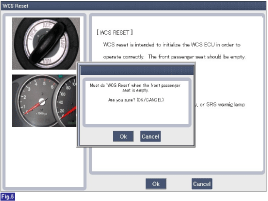
Make sure that there should not be vibration
or weight adding to the passenger front seat.
Fig 5) Weight Classification System
Reset
Fig 6) Weight Classification System
Reset
|
| 8. |
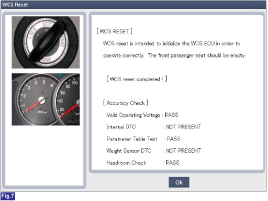
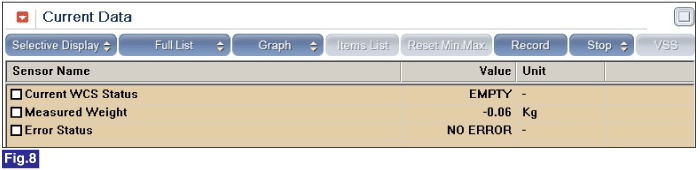
If the ‘WCS Reset’ operation is finished
successfully, you will see the following screen.
Fig 7) Normal Data
Fig 8) Current Data
|
| 9. |
Is the displayed parameter the same as the
above 7 figure?
|
| Verification of Vehicle Repair |
After a repair, it is
essential to verify that the fault has been corrected.
| 1. |
Connect scan tool and select "Diagnostic
Trouble Codes(DTC)" mode |
| 2. |
Using a scan tool, clear the DTC.
|
| 3. |
Operate the vehicle within DTC Enable
conditions in General information. |
| 4. |
Are any DTC present ?
|