Every air bag module has
its firing circuit that ignits powder to deploy air bag according to
signal of SRSCM.
SRSCM checks every air
bag module when ignition "ON". Once any fault is detected, it is erased
only by scantool.
The SRSCM sets DTC B1395
if there's any short circuit in harness of every firing circuit to one
another.
Item
|
Detecting
Condition
|
Possible cause
|
DTC Strategy
|
| •
|
Check current(PWM
type) | |
| •
|
short circuit in squib
harness. |
|
Enable Conditions
|
|
Threshold Value
|
| •
|
Only check during start-up phase(Short
between adjacent squib
circuits) | |
Diagnostic Time
|
Qualification
|
|
De-Qualification
|
|
| Diagnostic Circuit
Diagram |
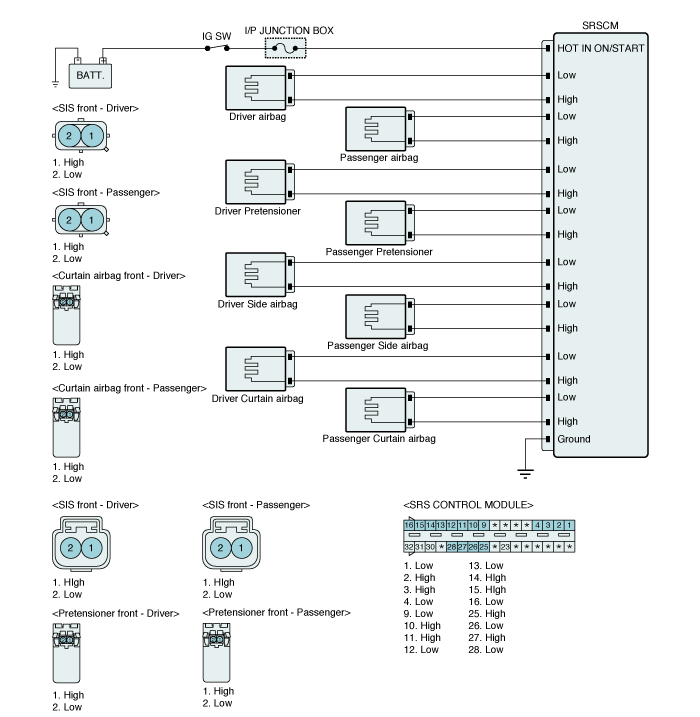
| 1. |
Ignition "OFF", connect
scantool. |
| 2. |
Ignition "ON"& Engine "OFF", select
"Diagnostic Trouble Codes(DTC)"
mode. |
| 3. |
Monitor diagnostic trouble code and present of
trouble code. |
| 4. |
Using a scan tool, clear the DTC.
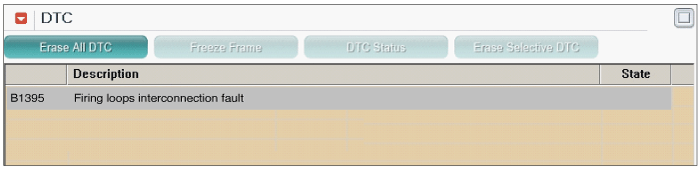
|
| 5. |
Is DTC present problem ?
|

|
▶ CCheck
for short between ignition circuits of DAB,PAB,BPT,CAB,SAB. If
the condition of harness and component is OK, this fault is
caused by SRSCM internal error so replace a known-good SRSCM
and then go to "Verification of Vehicle Repair" procedure. .
|
|

|
▶
Displaying nothing(no DTC) or DTC with label "H"(historical)
shows that Fault is intermittent caused by poor contact in the
part’s and/or SRSCM connector or was repaired and SRSCM memory
was not cleared.
Thoroughly check
connectors for looseness, poor connection, bending, corrosion,
contamination, deterioration, or damage.
▶ Repair or replace as necessary and then go to
"Verification of Vehicle Repair" procedure.
|
|
| Verification of Vehicle
Repair |
After a repair, it is
essential to verify that the fault has been corrected.
| 1. |
Connect scan tool and select "Diagnostic
Trouble Codes(DTC)" mode. |
| 2. |
Using a scan tool, clear the DTC.
|
| 3. |
Operate the vehicle within DTC Enable
conditions in General information. |
| 4. |
Are any DTC present ?
|
|
▶ Go to the
applicable troubleshooting procedure.
|
|
|
▶ System is
performing to specification at this time.
|
|