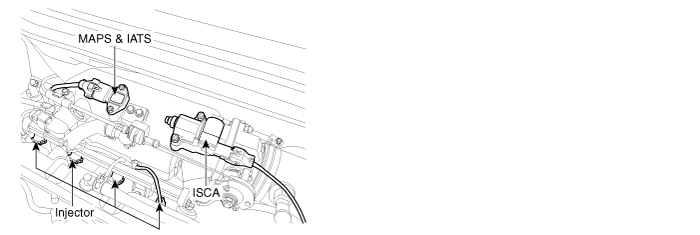
When the TP sensor’s
signal indicates closed throttle position and the engine is idling, the
PCM adjusts the idle speed control actuator so that the engine runs at the
correct idling speed, regardless of coolant temperature, load and etc.
When the additional load applied in the engine, the air flow through the
idle speed control actuator is increased momentarily to raise the idling
speed.
The PCM monitors engine
speed deviation from the target idle engine speed when the vehicle is
stopped and the throttle valve opening is stable. The PCM sets DTC P0506
if the difference to the target idle engine speed is lower than the
predetermined threshold.
Item
|
Detecting Condition
|
Possible Cause
|
DTC
Strategy
|
| •
|
Monitor deviation between target idle
speed and actual engine
speed | |
| •
|
Restriction in intake or exhaust
system |
| •
|
Carbonustment of the accelerator
cable |
| •
|
Contact resistance in
connectors |
|
Enable
Conditions
|
| •
|
Coolant temperature
>74°C(165.2°F) |
| •
|
Closed throttle :
10sec.(continuously) |
| •
|
20 sec. after engine
start. |
| •
|
10V< Battery voltage
<16V |
| •
|
Engine load < 1000
mg/rev | |
Threshold
Value
|
| •
|
Engine speed-Target idle speed <
-100rpm (Engine speed too
low) | |
Diagnostic
Time
|
|
Mil On
Condition
|
|
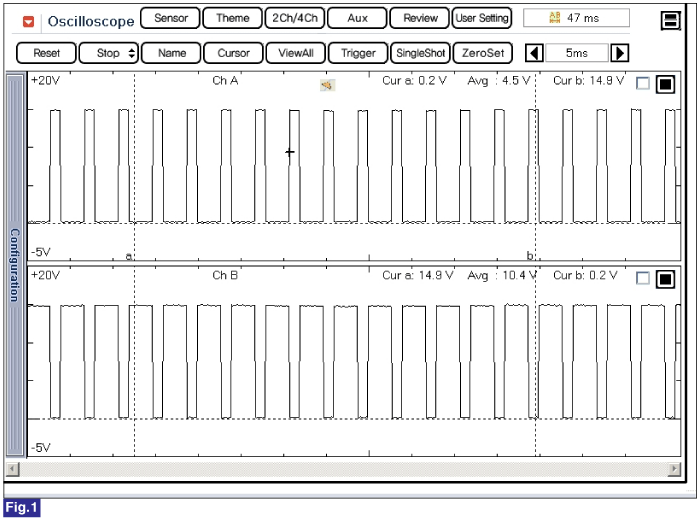
Fig 1) The above
waveforms are the voltage signals generated when the ISCA operates. This
ISCA is a duty type and the time opened determines the duty amount. The
left side is the waveform of the ISCA Opening coil during
idle.
The right side is the
waveform of the ISCA Closing coil during idle.
|
If any MAFS or ISCA codes are present, do ALL
REPAIRS associated with them before proceeding with this
troubleshooting tree. |
| 1. |
Connect GDS and select "Diagnostic Trouble
Codes(DTCs)" mode |
| 2. |
Click "DTC Status" on the menu bar to see
DTC's information. |
| 3. |
Confirm that "DTC Readiness Flag" indicates
"Complete". If not, drive the vehicle within conditions noted in the
freeze frame data or enable conditions.
|
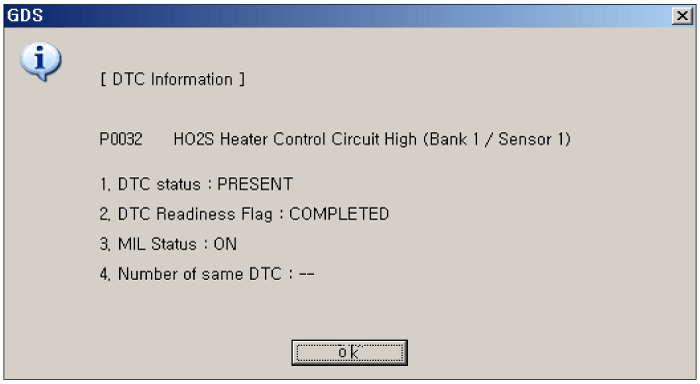
| 4. |
Read "DTC Status" parameter.
|
| 5. |
Is parameter displayed "History(Not Present)
fault"?
|
- History (Not Present) fault : DTC
occurred but has been cleared.
- Present fault : DTC is occurring at
present time. |
|

|
▶ Fault is
intermittent caused by poor contact in the sensor's and/or
PCM's connector or was repaired and PCM memory was not
cleared. Thoroughly check connectors for looseness, poor
connection, bending, corrosion, contamination, deterioration,
or damage. Repair or replace as necessary and then go to
"Verification of Vehicle Repair" procedure.
|
|

|
▶ Go to
next step as
below.
|
|
| ■ Check for restricted
intake or exhaust system |
| 1. |
Visually/physically inspect the following
items:
- Air cleaner filter element for excessive
dirt or for any foreign objects
- Throttle body inlet for damage or for any
foreign objects
- Restricted exhaust
system |
| 2. |
Was a problem found in any of the above
areas?
|
|
▶ Repair as
necessary and go to "Verification of Vehicle Repair" procedure
|
|
|
▶ Go to
next step as
below
|
|
| Terminal and Connector
Inspection |
| 1. |
Many malfunctions in the electrical system are
caused by poor harness(es) and terminals. Faults can also be caused
by interference from other electrical systems, and mechanical or
chemical damage. |
| 2. |
Thoroughly check connectors for looseness,
poor connection, bending, corrosion, contamination, deterioration,
or damage. |
| 3. |
Has a problem been found?
|
|
▶ Repair as
necessary and go to "Verification of Vehicle Repair"
procedure
|
|
|
▶ Go to
next step as
below
|
|
| 2. |
Remove ISCA from Throttle body and Check for
throttle bore, throttle plate and the ISCA passages for chocking and
for any foreign objects. Repair or clean as
necessary. |
| 3. |
Ignition "ON" & Engine
"OFF". |
| 4. |
Connect GDS and select "IDLE SPEED ACTUATOR"
parameter on the "ACTUATION TEST"
mode. |
| 5. |
Activates ISCA by pressing "STAT"
key. |
| 6. |
Check the ISCA for clicking sound and visually
verifying valve closes and opens.
|
Repeat numerous times to ensure valve
reliability. | |
| 7. |
Is ISCA Valve moving freely and not carbon
fouled?
|
|
▶ Check for
poor connection between PCM and component: backed out
terminal, improper mating, broken locks or poor terminal to
wire connection. Repair as necessary and go to "Verification
of Vehicle Repair" procedure.
|
|
|
▶ Check
ISCA valve for contamination, deterioration, or damage.
Substitute with a known-good ISCA valve and check for proper
operation. If the problem is corrected, replace ISCA valve and
then go to "Verification of Vehicle Repair"
procedure.
|
|
| Verification of Vehicle
Repair |
After a repair, it is
essential to verify that the fault has been corrected.
| 1. |
Connect GDS and select "Diagnostic Trouble
Codes(DTCs)" mode. |
| 2. |
Press F4(DTAL) and confirm that "DTC Readiness
Flag" indicates "Complete". If not, drive the vehicle within
conditions noted in the freeze frame data or enable conditions
. |
| 3. |
Read "DTC Status" parameter
. |
| 4. |
Is parameter displayed "History(Not Present)
fault"?
|
|
▶ System
performing to specification at this time. Clear the
DTC
|
|
|
▶ Go to the
applicable troubleshooting
procedure.
|
|
