The cruise control
system keeps the vehicle running at a fixed speed until a signal canceling
this fixed speed is received. When the main switch "AUTO CRUISE" is turned
on with vehicle in the running mode, the battery voltage is applied to the
PCM. When a signal from the control switch is input to the PCM while the
vehicle is in state, the cruise control actuator is activated to operate
the system the PCM controls the ETS motor to make a car go at a steady
speed you want. Also, while the system is operating, "AUTO CRUISE"
indicator lamp in the meter assembly lights up. In case of the cruise
control system failure, the symptoms such as acceleration failure and
vehicle speed setting failure will occur.
If the RESUME swich
signal is switching too frequently or stuck for too long, PCM sets
P0567.
Item
|
Detecting
Condition
|
Possible Cause
|
DTC
Strategy
|
| •
|
Monitors the switch is switching too
frequently or stuck for too
long. | |
|
Enable
Conditions
|
| •
|
Cruise control system type is
learned | |
Threshold
value
|
| •
|
Input switch signal is switching too
frequently or stuck | |
Diagnosis
Time
|
| •
|
Switching: more than 1 second failure
for 300 seconds test |
| •
|
Stuck: more than 75 seconds failure for
300 seconds test | |
MIL On
Condition
|
|
Item
|
Resistance(Ω)
|
ON/OFF
switch
|
3.9 kΩ ±
5%
|
SET
switch
|
220 Ω ±
5%
|
RESUME
switch
|
910 Ω ±
5%
|
CANCEL
switch
|
0 Ω ±
5%
|
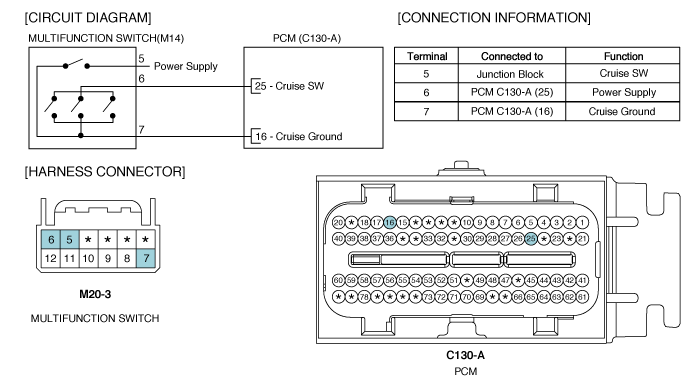
| 1. |
Check DTC Status
| (1) |
Connect scantool to Data Link
Connector(DLC). |
| (3) |
Select "Diagnostic Trouble Codes(DTCs)"
mode, and then Press F4(DTAL) to check DTC's information from
the DTCs menu. |
| (4) |
Read "DTC Status"
parameter.
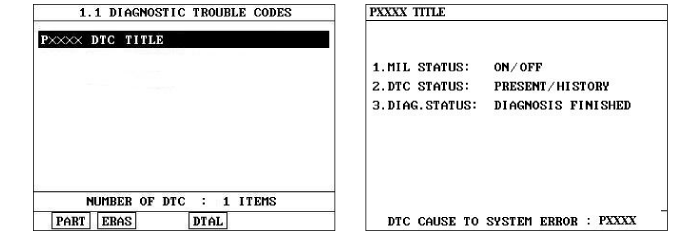
|
| (5) |
Is parameter displayed "Present
fault"?
|

|
▶ Go
to "Terminal and Connector inspection"
procedure.
|
|

|
▶
Fault is intermittent caused by poor contact in the
sensor’s and/or PCM’s connector or was repaired and PCM
memory was not cleared. Thoroughly check connectors for
looseness, poor connection, ending, corrosion,
contamination, deterioration, or damage. Repair or
replace as necessary and go to "Verification of Vehicle
Repair"
procedure.
|
| |
| Terminal and Connector
Inspection |
| 1. |
Many malfunctions in the electrical system are
caused by poor harness and terminals. Faults can also be caused by
interference from other electrical systems, and mechanical or
chemical damage. |
| 2. |
Thoroughly check connectors for looseness,
poor connection, bending, corrosion, contamination, deterioration,
or damage. |
| 3. |
Has a problem been found?
|
|
▶ Repair as
necessary and go to "Verification of Vehicle Repair"
procedure.
|
|
|
▶ Go to "
Component Inspection"
procedure.
|
|
| 1. |
Check auto cruise switch
| (1) |
IG "OFF" and disconnect auto cruise
switch connector. |
| (2) |
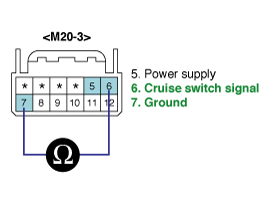
Measure resistance between terminals 6
and 7 of auto cruise switch connector with "RESUME" switch
depressed.(Component side)
Specification :
Item
|
Resistance(Ω)
|
RESUME switch
|
910 Ω ± 5% between terminals 7 and
6
|
|
| (3) |
Is the measured resistance within
specification?
|
|
▶
Substitute with a known - good PCM and check for proper
operation. If the problem is corrected, replace PCM and
go to "Verification of Vehicle Repair"
procedure.
|
|
|
▶
Substitute with a known - good auto cruise switch and
check for proper operation. If the problem is corrected,
replace auto cruise switch and go to "Verification of
Vehicle Repair"
procedure.
|
|
There is a memory reset function
on scantool that can erase optional parts automatically
detected and memorized by PCM. After testing PCM on the
vehicle, use this function to reuse the PCM on the
others | | |
| Verification of Vehicle
Repair |
| 1. |
Connect scan tool and select "Diagnostic
Trouble Codes(DTCs)" mode |
| 2. |
Press F4(DTAL) and confirm that "DTC Readiness
Flag" indicates "Complete". If not, drive the vehicle within
conditions noted in the freeze frame data or enable
conditions |
| 3. |
Read "DTC Status"
parameter |
| 4. |
Is parameter displayed "History(Not Present)
fault"?
|
|
▶ System
performing to specification at this time. Clear the
DTC
|
|
|
▶ Go to the
applicable troubleshooting
procedure.
|
|
