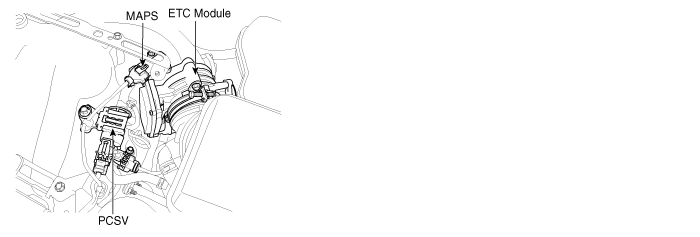
The Electronic Throttle
Control(ETC) system is made of the components throttle body, Throttle
Position Sensor(TPS)1&2 and Accelerator Position Sensor(APS) 1&2.
The throttle body contains the actuator, the throttle plate and the
throttle position sensor (potentiometer), which are integrated in one
housing. The actuator consists of a DC motor with a two-stage gear. The
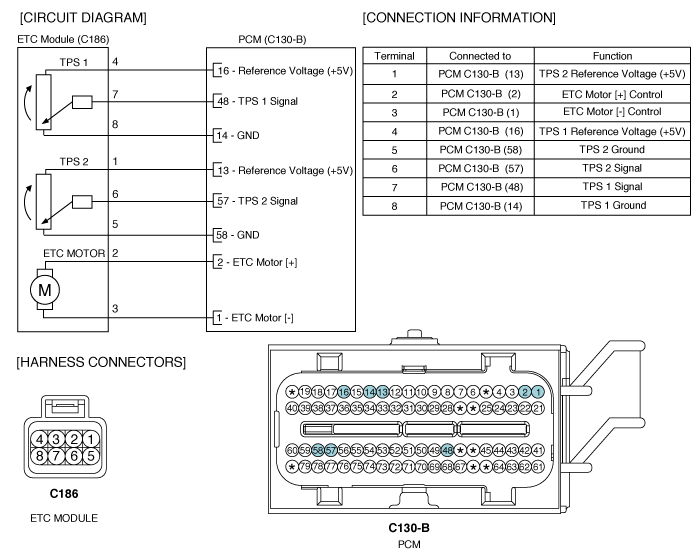
opening angle of the throttle valve is detected by the throttle position
sensor which is mounted on the throttle body. And it provides feedback to
the PCM to control the throttle motor in order to control the throttle
valve opening angle properly in response to the driving
condition.
If power management mode
is recognized under detecting condition, PCM sets P1295. And
MIL(Malfunction Indication Lamp) turns on.
Item
|
Detecting
Condition
|
Possible Cause
|
DTC
Strategy
|
| •
|
This code detects if the system is in
Power Management Mode | |
| •
|
Faulty ETC Items(TPS or ETC motor
etc) |
| •
|
TPS Malfunction +
MAFSMalfunction |
| •
|
MAP Malfunction + TPS
Malfunction |
|
Enable
Conditions
|
|
Threshold
value
|
| •
|
Power Management Mode is
active | |
Diagnosis
Time
|
|
MIL On
Condition
|
|
| 1. |
Connect scantool to DLC(Data Link
Connector) |
| 2. |
IG "ON" & Monitor that any different
DTC(Diagnostic Trouble Code) is existed.
(There will be at least one more DTC which
causes this DTC P1295 to retrieve ) |
| 3. |
Repair the DTCs cause DTC P1295 first
according to the designated trouble shooting guide.
(After repairing the DTCs cause DTC P1295,
don’t forget to do "ETC Initialization" as
follows. |
| 4. |
Is the same DTC occurred ?
|

|
▶
Substitute with a known-good PCM and check for proper
operation. If the problem is corrected,replace PCM and then go
to "Verification of Vehicle Repair" procedure.
|
There is a memory reset function
on scantool that can erase optional parts
automaticallydetected and memorized by PCM.
Before or after testing PCM on the
vehicle, use this function to reuse the PCM on the
others | |
|

|
▶ Go to
"Verification of Vehicle Repair"
procedure.
|
|
| Verification of Vehicle
Repair |
After a repair, it is
essential to verify that the fault has been corrected.
| 1. |
Connect scan tool and select "Diagnostic
Trouble Codes(DTCs)" mode |
| 2. |
Press F4(DTAL) and confirm that "DTC Readiness
Flag" indicates "Complete". If not, drive the vehicle within
conditions noted in the freeze frame data or enable
conditions |
| 3. |
Read "DTC Status"
parameter |
| 4. |
Is parameter displayed "History(Not Present)
fault"?
|
|
▶ System
performing to specification at this time. Clear the
DTC
|
|
|
▶ Go to the
applicable troubleshooting
procedure.
|
|
