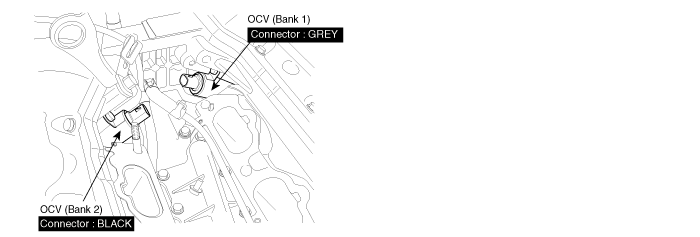
The CVVT (Continuously
Variable Valve Timing) system is installed to the chain sprocket of the
intake camshaft. This system controls the intake camshaft to provide the
optimal valve timing for every driving condition. The ECM controls the Oil
Control Valve(OCV), based on the signals output from mass air flow,
throttle position and engine coolant temperature. The CVVT controller
regulates the intake camshaft angle using oil pressure through the OCV. As
result, the relative position between the camshaft and the crankshaft
becomes optimal, and the engine torque improves, fuel economy improves,
exhaust emissions decrease under overall driving conditions.
PCM detects CAM phasing
average rate while cam signal is normally generating.
PCM determines that a
fault exists and a DTC is stored while vehicle is tip - in and out driving
for 5 minutes.
Item
|
Detecting
Condition
|
Possible cause
|
DTC
Strategy
|
| •
|
Determines if the phaser is moving at an
expected rate | |
| •
|
Excessive phasing system
leakage |
| •
|
Binding Oil Pressure
(ex. Blockage in OCV
filter) |
|
Enable
Conditions
|
| •
|
CAM signal is normally
generating |
| •
|
Perform tip-in and out more than 10 time
for 5 min. while
driving | |
Threshold
value
|
| •
|
Cam phasing is abnormally fast or slow
| |
Diagnosis
Time
|
| •
|
Continuous (Within
5min.) | |
MIL On
Condition
|
|
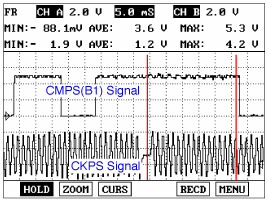
This example shows a
typical Crankshaft Position Sensor (CKPS) and Camshaft Position Sensor
(CMPS) waveform at idle.
If the 17th signal of
the CKPS after missing tooth is aligned with the high signal of the CMPS
at idle, PCM recognizes that Synchronization betweenCKPS and CMPS is
completed.
| 1. |
Check DTC Status
| (1) |
Connect scantool to Data Link
Connector(DLC). |
| (3) |
Select "Diagnostic Trouble Codes(DTCs)"
mode, and then Press F4(DTAL) to check DTC’s information from
the DTCs menu |
| (4) |
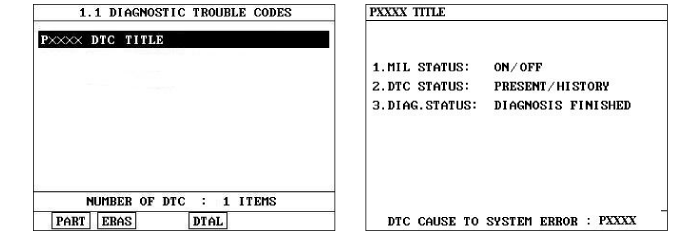
Read "DTC Status"
parameter.
|
| (5) |
Is parameter displayed "Present
fault"?
|

|
▶ Go
to "System Inspection" procedure.
|
|

|
▶
Fault is intermittent caused by PCM memory was not
cleared after repair. Erase DTC and drive the vehicle to
satisfy the enable codition then, go to " System
Inspection"
procedure
|
| |
| 1. |
Visual Inspection
| (1) |
Check oil level is
O.K. |
| (2) |
Check Oil and OCV is
contaminated. |
| (3) |
Check that any oil leakage is occurred
around OCV. |
| (4) |
Has a problem been found ?
|
|
▶
Repair or replace as necessary and then, go to "
Verification of Vehicle Repair"
procedure.
|
|
|
▶ Go
to "Component Inspection"
procedure.
|
| |
| 1. |
Check OCV resistance
| (1) |
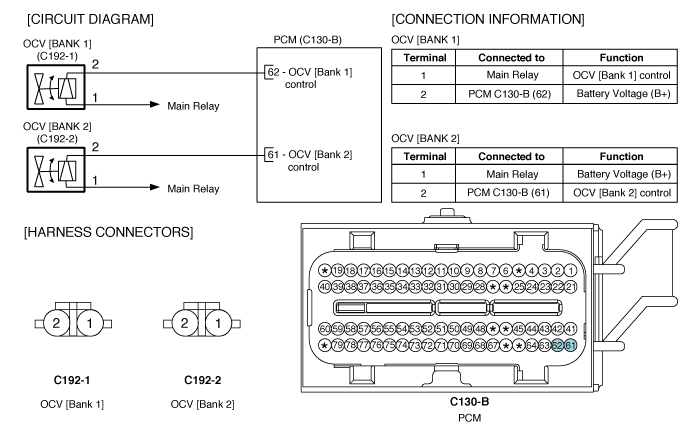
IG "OFF" and disconnect OCV
connector. |
| (2) |
Measure resistance between terminal 1
and 2 of OCV. (Component Side)
Specification :
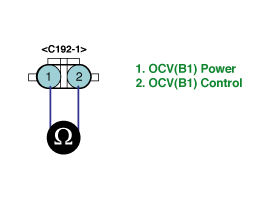
|
| (3) |
Is the measured resistance within
specification ?
|
|
▶ Go
to "Check CAM PHASER with actuation test" as
follows.
|
|
|
▶
Substitute with a known - good OCV and check for proper
operation.
If the problem is
corrected, replace OCV and go to "Verification of
Vehicle Repair"
procedure.
|
| |
| 2. |
Check CAM PHASER with actuation
test
| (1) |
Connect scantool and IG
"ON" |
| (2) |
Select "CAM PHASER INTAKE BANK 1" on the
Actuation Test |
| (3) |
Select "OIL CONTROL VALVE" on the
Actuation Test |
| (4) |
Activates "CAM PHASER INTAKE BANK 1" by
pressing "STRT(F1)" key |
| (5) |
Activates "OIL CONTROL VALVE" by
pressing "STRT(F1)" key |
| (6) |
Repeat this procedure 4 or 5 times to
ensure CAM PHASER and intake valve control solenoid
reliability
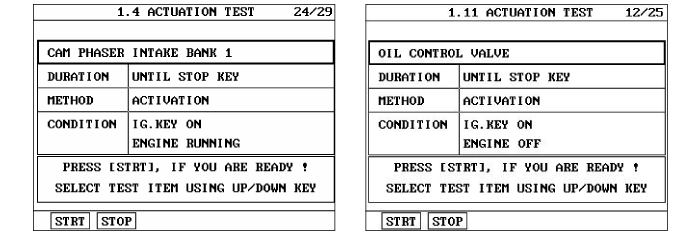
|
| (7) |
Has a problem been found ?
|
|
▶
Substitute with a known - good CVVT or OCV and check for
proper operation.
If the
problem is corrected, replace CVVT or OCV and go to
"Verification of Vehicle Repair"
procedure.
|
|
|
▶
Fault is intermittent. Drive the vehicle to meet the
enable condition for the DTC. and Go to "Verification of
Vehicle Repair"
procedure.
|
| |
| Verification of Vehicle
Repair |
After a repair, it is
essential to verify that the fault has been corrected.
| 1. |
Connect scan tool and select "Diagnostic
Trouble Codes(DTCs)" mode |
| 2. |
Press F4(DTAL) and confirm that "DTC Readiness
Flag" indicates "Complete". If not, drive the vehicle within
conditions noted in the freeze frame data or enable
conditions |
| 3. |
Read "DTC Status"
parameter |
| 4. |
Is parameter displayed "History(Not Present)
fault"?
|
|
▶ System
performing to specification at this time. Clear the
DTC
|
|
|
▶ Go to the
applicable troubleshooting
procedure.
|
|