Home›Fuel System›Engine Control System›Fuel Tank Pressure Sensor (FTPS)
Engine Control System › Fuel Tank Pressure Sensor (FTPS): Repair procedures
Inspection
1.
Connect the GDS on the Data Link Connector
(DLC).
2.
Measure the output voltage of the
FTPS.
Specification:
Refer to
"Specification"
Removal
1.
Turn the ignition switch OFF and disconnect
the battery negative (-) cable.
2.
Remove the rear seat (Refer to "Seat" in BD
group).
3.
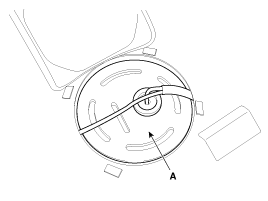
Remove the fuel pump service cover
(A).
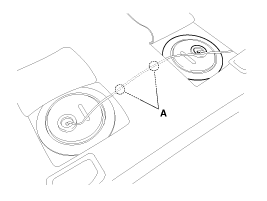
The wiring in between the fuel pump and
the sub fuel sender is fastened to the vehicle. So please
separate it before removing the fuel pump service cover in
accordance with the procedures below.
1.
Remove the sub fuel sender cover
and disconnect the sub fuel sender connector (Refer to
"Sub Fuel Sender" in this
group).
2.
Release the wiring clips (A) under
the
carpet.
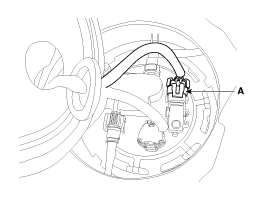
4.
Disconnect the fuel tank pressure sensor
connector (A), and then remove the fuel tank pressure
sensor.
Installation
•
Install the component with the specified
torques.
•
Note that internal damage may occur when
the component is dropped. If the component has been dropped,
inspect before
installing.
•
Insert the sensor in the installation
hole and be careful not to damage when
installation.