| Adjustment |
Calibration
Procedure
If the display read
"C", calibrate the compass.
| 1. |
Driving the vehicle in a circle at less than
8km/h 3 times or until the compass heading
appears. |
| 2. |
Driving in a circle in right-handed
direction and opposite direction are possible, and if the
calibration is completed, the compass heading will
appear. |
| 3. |
Keep driving in a circle until a commpass
heading appears. |
To
Adjust The Zone Setting :
| 1. |
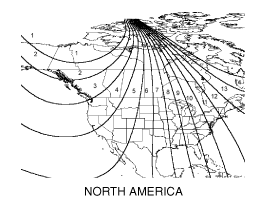
Determine the desired zone number based upon
your current location on the zone
maps. |
| 2. |
Press and hold the Feature Control button
for more than 6 but less than 9 seconds, the current zone number
will appear on the display (B). |
| 3. |
Pressing and holding the feature control
button (A) again will cause the numbers to increment (Note: they
will repeat …13, 14, 15, 1, 2,..). Releasing the button when the
desired zone number appears on the display will set the new
zone. |
| 4. |
Within about 5 seconds the compass will
start displaying a compass heading
again. |
To
Re-calibrate The Compass :
There are some
conditions that can cause changes to the vehicle magnets. Items such as
installing a ski rack or a antenna or even some body repair work on the
vehicle can cause changes to the vehicle's magnetic field. In these
situations, the compass will need to be re-calibrated to quickly correct
for these changes.
| 1. |
Press and hold the feature control button
(A) for more than 9 seconds. When the compass memory is cleared, a
"C" will appear in the display (B). |
| 2. |
To calibrate the compass, drive the vehicle
in 2 complete circles at less than 8 KPH (5
MPH). |
Zone
Map
| Homelink |
Description
The HomeLink Wireless
control system provides a convenient way to replace up to three hand-held
radio-frequency (RF) transmitters with a single built-in device. This
innovative feature will learn the radio frequency codes of most current
transmitters to operate devices such as gate operators, garage door
openers, entry door locks, security systems, even home
lighting.
Specification
| Item |
Description |
Remark |
| Rated Voltage |
DC 12V |
Testing Voltage : 12.8V |
| Operating Voltage |
9 ~ 18V |
Should be operation at limit
rage |
| Operating Temperature |
-30 ~ 85°C | |
| Storage Temperature |
-40 ~ 105°C | |
| Operating Humidity |
95% |
|
| Operating Current |
23 ~ 100mA |
|
| Low power Mode |
4 ~ 16mA |
|
| Reduce power Mode |
10 ~ 25mA |
|
| Insulation Resistant |
100MΩ (500VM) |
The case is exclude in EARTH |
| Dark current |
0.3mA MAX |
Learn & Transmit
Specification
| Signal |
Specification |
Remark | |
| Learn RF Signal |
Learning Frequency |
288-390 MHz |
|
| Learning Range |
0-1m |
Between H/L & Drive seat | |
| Transmit RF Signal |
Transmission Frequency |
288-390 MHz |
|
| Transmission Range |
13m MIN |
||
| Output Power |
75.6dBμV/m MAX |
Do as the FCC | |
※ In case of
OT(Original Transmitter) range < 80% of Transmission SPEC. It should be
apply to transmission range for 80% of OT.
| 1. |
Follow the OT or OR(Original Receiver) about
reception & transmission
frequency. |
| 2. |
Transmission Range means the distance from
which the receiving device RF signal from
HomeLink) |
| 3. |
Reception Range means the distance within
which the HomeLink can be trained with RF signal from
OT. |