| Function |
Bluetooth
Phone Operation
| • |
Bluetooth
Volume |
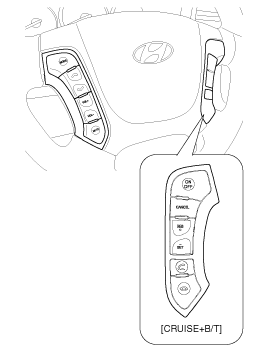
General
Feature
| • |
This system supports Bluetooth, a wireless
system that allows you to make or receive calls without taking your
hands from the steering wheel and without using cables to connect
the phone and system. |
| • |
The phone must be paired to the system
before using the hands-free feature.
Only one linked cellular phone can be used
with the system at a time.
|


Voice
Recognition Activation
| • |
The voice recognition engine contained in
the Bluetooth System can be activatedin the following
conditions:
- Button Activation
The voice recognition system will beactive
when the
 button is pressed and after the sound of a Beep. - Active Listening
The voice recognition system will beactive
for a period of time when the Voice Recognition system has askedfor
a customer response. |
| • |
The system can recognize single digits from
zero to nine while number greaterthan ten will not be
recognized. |
| • |
If the command is not recognized, the system
will announce "Pardon" or Noinput voice signal from microphone.
(Noresponse) |
| • |
The system shall cancel voice recogntionmode
in following cases : When pressing the button and saying cancel following the beep. When not
making a call and pressing the  button. When voice recognition has failed 3
consecutive times. |
| • |
At any time if you say "help", the system
will announce what commands
areavailable. |
Menu
tree
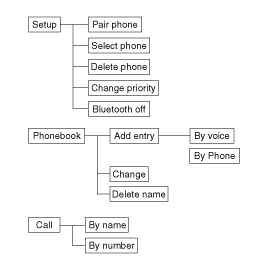
Phone
Setup
| Pairing phone |
To use the hands-free
system, you need to register your phone in the system. Up to 5 phones can
be registered in the system.
| 1. |
Press the button. |
| 2. |
Say "Set
Up". |
| 3. |
Say "Pair
Phone". |
| 4. |
Say "Yes". |
| 5. |
Say the name of the
contact. |
| 6. |
Say "Yes". |
| 7. |
The Pairing procedure of the cellularphone
varies according to each cellularphone.
|
| To connect phone |
The registered phones
can be selected. When the system connects to Bluetooth,the phone
previously used is automatically selected. Select a different phone if
necessary. Only the selected phone can be used with the hands-free
system.
| 1. |
Press the button. |
| 2. |
Say "Set
Up". |
| 3. |
Say "Select
Phone". |
| 4. |
Say the name of the contact or the number of
the contact. |
| 5. |
Say "Yes".
|
| Deleting phone |
The registered phones
can be deleted.
| 1. |
Press the button. |
| 2. |
Say "Set
Up". |
| 3. |
Say "Delete
Phone". |
| 4. |
Say the name of the contact, the number of
the contact or "Delete all phone". |
| 5. |
Say "Yes". |
Receiving
a phone call
When receiving a phone
call, a ring toneis audible and the system changes into telephone
mode.
When receiving a phone
call, the phone number and the message "Incoming" will be
displayed.
| • |
Do either one of the following:
Press the send switch to take the call.
Press the end switch to refuse the
call. |
| • |
To adjust the ring volume, push "+" or "-"
on the steering volume controls.
Volume adjustment cannot be madeusing the
audio system. |
| • |
To transfer a call to the
phone:
The received call can be transferred from
the hands-free system to the cellularphone that is connected to
Bluetooth.
For details, please refer to you user's
manual for the cellular phone or go to the Key matrix in this manual
(next page). |
Talking
on the phone
When talking on the
phone, the display will differ depending on whether or not the vehicle is
in motion.
Number and "active
call" is displayed.
When the call is
finished, press the end switch.
In the following situations, your voice may
not reach the other party:
|
Key
matrix
| No. |
KEY |
Class | ||||||||
| Paired H/P Empty |
Disconnected |
Connected |
Incoming
Call |
Outgoing
Call |
Active Call |
Active Call | ||||
| Normal mode |
BT SETUP menu | |||||||||
| 1 |
 |
SHORT |
Not Paired |
Not
Connecting |
- |
- |
|
- |
2nd call 1st Call:waiting 2nd Call:active |
2nd Call 2nd Call:waiting 1st Call:active |
| LONG |
- |
- |
- |
- |
- |
- |
Transfer call:secret
call | |||
| 2 |
 |
SHORT |
VR MODE
Cancel |
VR MODE
Cancel |
VR MODE
Cancel |
VR MODE
Cancel |
Reject Call |
End Call |
End Call |
End Call |
| LONG [10sec] |
- |
- |
Speaker Adaptation (Only
English) |
Speaker Adaptation (Only
English) |
- |
- |
- |
- | ||
| 3 |
 |
SHORT |
Active |
Active |
Active |
Active |
- |
- |
- |
- |
| LONG [10sec] |
Change language |
Change language |
Change language |
Change language |
- |
- |
- |
- | ||