| Inspection |
| 1. |
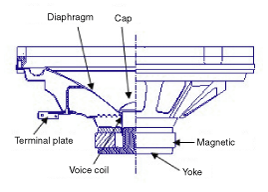
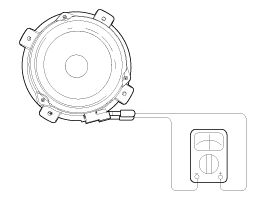
Troubleshooting for Speaker
|


| Replacement |
Front
Speaker
| 1. |
Remove the front door trim.
(Refer to the BD group - "Front
door") |
| 2. |
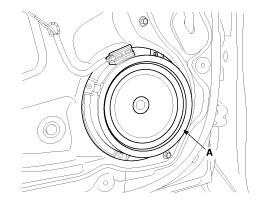
Remove the front speaker (A) after removing
4 rivets.
|
| 3. |
Installation is the reverse of
removal. |
Rear
Speaker
| 1. |
Remove the rear door trim.
(Refer to the BD group - "Rear
door") |
| 2. |
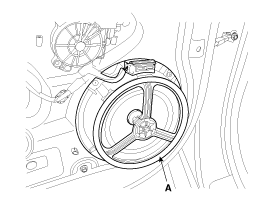
Remove the rear speaker (A) after removing 4
rivets.
|
| 3. |
Installation is the reverse of
removal. |
Crash
Pad Speaker
| 1. |
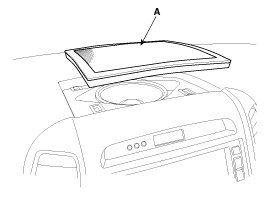
Remove the crash pad center speaker grill
(A).
|
| 2. |
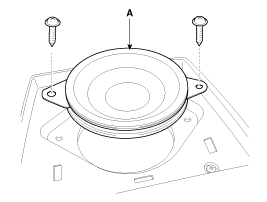
Remove the crash pad center speaker (A)
after loosening the 2 mounting screws.
|
| 3. |
Installation is the reverse of
removal. |
Tailgate
Speaker
| 1. |
Remove the tailgate trim.
(Refer to the BD group -
"Tailgate") |
| 2. |
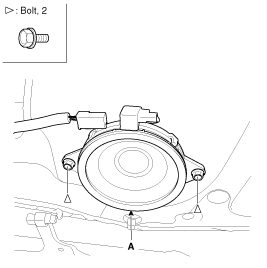
Remove the tailgate speaker (A) after
loosening 2 bolts.
|
External
Amplifier
| 1. |
Remove the front passenger seat after
removing the 4 bolts and disconnecting the connector
(Refer to the BD group - "Front
seat") |
| 2. |
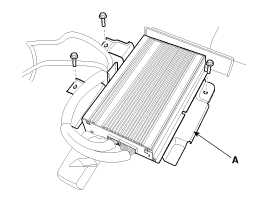
Remove the external amplifier (A) under the
front passenger seat after removing the 3 bolts.
|
| 3. |
Installation is the reverse of
removal. |
Tweeter
Speaker
| 1. |
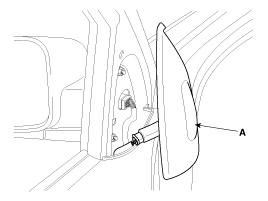
Remove the front door delta cover
(A).
(Refer to the BD group - "Front
door")
|
| 2. |
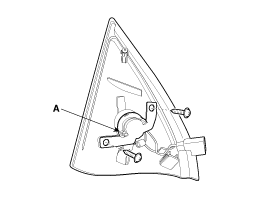
Remove the tweeter speaker (A) after
loosening 2 screws and disconnecting the connector.
|
| 3. |
Installation is the reverse of
removal. |
Woofer
Speaker
| 1. |
Remove the left luggage side
trim.
(Refer to the BD group - "Rear
seat") |
| 2. |
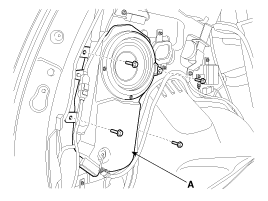
Remove the woofer speaker (A) after removing
4 bolts and disconnecting the connector.
|
| 3. |
Installation is the reverse of
removal. |