Control Panel
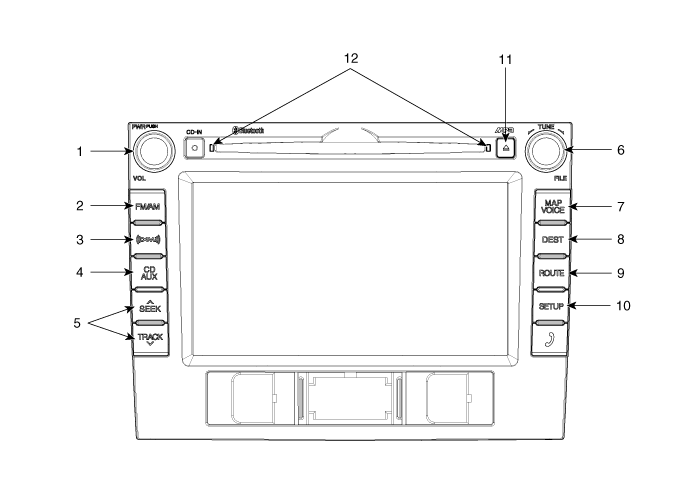
| 1. |
Power / Volume control Knob
| A. |
Push knob (over 0.8 second) : Turns the
power off. |
| B. |
Push knob (under 0.8 second) : Each time
the knob is pressed, the Audio is turned on and
off. |
| C. |
Turn knob : The range of volume
adjustment is between 0 ~
35. | |
| 2. |
FM/AM button
Each press will change the bands in the
following order: FM1 → FM2 → AM →
FM1 |
| 3. |
XM button
Each press will change the bands in the
following order: XM1 → XM2 → XM3 →
XM1 |
| 4. |
CD/AUX button
Each press will change the bands in the
following order: DISC(CD, MP3) → (USB or iPod) →(AUX) →DISC(CD,
MP3) |
| 5. |
SEEK/TRACK Up/Down button
| A. |
Short key press (less than 0.8
second) |
| -
|
FM/AM Mode : Automatically searches for
the previous or next broadcast frequencyand starts
playing. |
| -
|
SAT Mode : Receives the previous or next
channel. |
| -
|
CD Mode : Plays the previous or next
track. |
| -
|
MP3, USB Mode : Plays the previous or
next file. |
| -
|
iPod Mode : Plays the previous or next
song. |
| B. |
Long key press (over 0.8
second) |
| -
|
FM/AM Mode : Quickly moves through the
frequencies while the button is pressed. Once released,
automatically searches for broadcasts which can be
received. |
| -
|
SAT Mode : Quickly moves to the previous
or next channel. |
| -
|
CD Mode : REW/FF the current playing
track. |
| -
|
MP3, USB Mode : REW/FF the current
playing file. |
| -
|
iPod Mode : REW/FF the current playing
song. | |
| 6. |
TUNE Knob
| A. |
FM/AM Mode : Turn the Knob to search for
the desired frequency. Press theKnob to receive the selected
frequency. |
| B. |
SAT Mode : Turn the Knob to search for
the desired channel. Press the Knobto receive the selected
channel. |
| C. |
CD Mode : Turn the knob to search for
the desired track. Press the knob toplay the selected
track. |
| D. |
MP3, USB Mode : Turn the knob to search
for the desired file. Press the knobto play the selected
file. |
| E. |
iPod Mode : Turn the knob to search for
the desiredsong. Press the knob to play the selected
song. | |
| 7. |
MAP VOICE button
Displays the map screen for the current
position. |
| 8. |
DEST button
Displays the Destination menu
screen. |
| 9. |
ROUTE button
Displays the Route menu
screen. |
| 10. |
SET UP button
Displays the Setup menu
screen. |
| 11. |
RESET button
Resets the system - if software
locks-up.
|
If holding the power off knob for 0.8
second does not shut down the system,carefully use a
straightened paper clip at the access hole shown next to the
right DISC indicator LED to reset the software. The system
power will shut-off and
restart. | |
| 12. |
DISC insert indicator LED
Displays that a DISC has been
inserted. |
| Limitations Of The Navigation
system |
GPS Signal Reception State
As the GPS satellite
frequency is received/transmitted in straight lines, reception may not
work if external devices are placed on or near the GPS antenna or when
traveling through the following locations.
| • |
Basement parking
structures |
| • |
Roads within forested
areas |
| • |
Areas near high rise
buildings |
Vehicle Position Display
| 1. |
If multipass errors occur due to reflections
from buildings or related causes, the current position mark on the
navigation may differ from the actual position of the
vehicle. |
| 2. |
The position of the vehicle on the navigation
may be different from the actual position. If the vehicle is under
the occurrence, driving for a short period of time will allow
vehicle to go through map matching or GPS information (several
minutes may be necessary in certain cases).
| A. |
When driving on a Y-shaped road with a
narrow angle, the current position may be displayed in the
opposite direction. |
| B. |
If the vehicle is loaded onto a car
transport vehicle, the current position mark may be stalled on
the last position prior to
loading. |
| C. |
When driving on a spiral-shaped
road. |
| D. |
When driving in mountain regions with
sharp turns or sudden brakes. |
| E. |
When entering a road after having been
in an underground parking structure, building parking
structure, or turnable with many
rotations. |
| F. |
When the tires have recently been
replaced (Especially upon use of spare or studless
tires) |
| G. |
If the battery terminal is
removed. |
| H. |
When driving in city streets, the
current position may be displayed on the opposite side or on
an off-road position. |
| I. |
When changing the zoom level from the
maximum zoom in level to a different zoom level, the current
position mark may be displayed on a different
road. |
| J. |
When driving in heavy traffic with
frequent stop and go in traffic or
intersections. |
| K. |
When driving under slippery conditions,
such as heavy sand, snow,
etc. |
| L. |
When driving with the tire chain in
place. |
| M. |
When using a tire with an incorrect size
specification. |
| N. |
When the tire pressure for the 4 tires
are different. |
| O. |
When the replacement tire is a worn or
used tire (Especially studless tires having passed a 2nd
seasons, etc.) |
| P. |
When driving near high-rise
buildings |
| Q. |
If a roof carrier has been
installed |
| R. |
When driving under high speeds or having
calculated a long-distance
route. | |
Route Guidance
Suitable route guidance
may not occur caused by search conditions or the driving
position.
| • |
Guidance to go straight may be given while
driving on a straight road. |
| • |
Guidance may not be given even when having
turned at an intersection. |
| • |
There are certain intersections in which
guidance may not occur. |
| • |
A route guidance signaling entrance into a no
enter zone may occur (No enter zone, road under construction,
etc.) |
| • |
Guidance may be given to a position removed
from the actual destination if roads to reach the actual destination
do not exist or are too narrow. |
| • |
Faulty voice guidance may be given if the
vehicle breaks from the designated route (ex : if a turn is made at
an intersection while the navigation provided guidance to go
straight). |
| • |
Map Data may be missing or incorrect causing
route guidance to not be given. |
Route Re-calculation
The following phenomena
may occur after conducting route recalculation.
| • |
Guidance may be given to a position differing
from the current position when turning at an
intersection. |
| • |
Route recalculation may take a longer period
of time when driving under high
speeds. |
| • |
A route guidance signaling for a U-Turn in a
No U-Turn location may occur. |
| • |
A route guidance signaling entrance into a no
enter zone may occur (No enter zone, road under construction,
etc). |
| • |
Guidance may be given to a position removed
from the actual destination do not exist or are too
narrow. |
| • |
Faulty voice guidance may be given if the
vehicle breaks from the designated route (ex : if a turn is made at
an intersection while the navigation provided guidance to go
straight) |
