| Replacement |
| 1. |
Disconnect the negative (-) battery
terminal. |
| 2. |
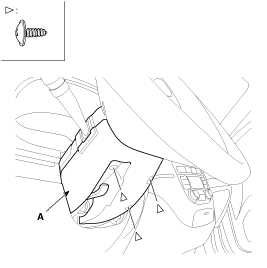
Remove the steering column upper and lower
shrouds (A) after removing 3 screws.
|
| 3. |
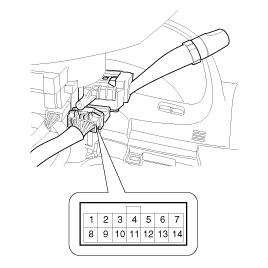
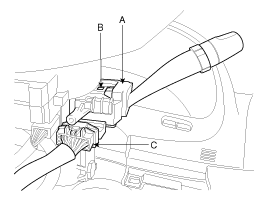
Remove the wiper switch (A) by pushing the
lock pin (B) after disconnecting the connector (C).
|
| 4. |
Installation is the reverse of
removal. |
| Inspection |
| 1. |
Multifunction switch operates head lamps and
wiper by communicating with BCM through LIN
communication. |
| 2. |
Check BCM input/output value of each position
of multifunction switch when you inspect the module whether faulty
or not. |
| 3. |
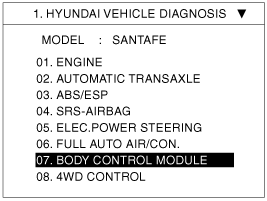
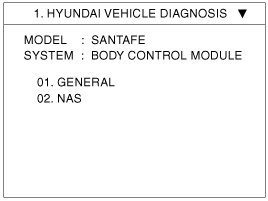
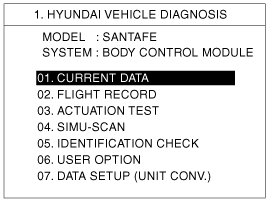
Select model and BCM menu.
|
| 4. |
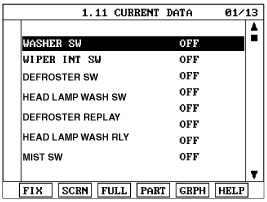
Select "Current data" and wiper.
|
| 5. |
Check input/output value of washer & wiper
switch.
|
Inspection
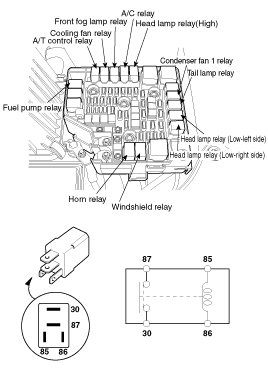
Check for continuity
between the terminals.
| 1. |
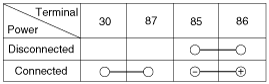
There should be continuity between the No.30
and No.87 terminals when power and ground are connected to the No.85
and No.86 terminals. |
| 2. |
There should be no continuity between the
No.30 and No.87 terminals when power is disconnected.
|
| 3. |
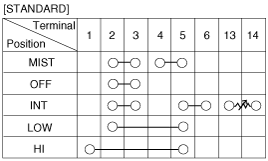
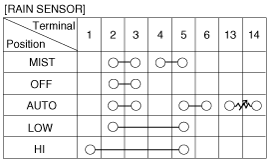
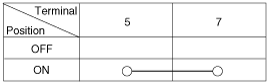
Check for continuity between the terminals
while operating the wiper and washer switch. If it is not normal
condition, replace wiper and wiper switch.
Wiper Switch
Washer Switch
|