| INSPECTION |
To determine
if the EC mirror will dim, check it per the below procedure.
| 1. |
Turn the ignition key to the "ON"
position. |
| 2. |
Cover the front looking
sensor. |
| 3. |
Shine a flashlight into the rearward looking
sensor. |
| 4. |
The mirror should dim as soon as the rearward
looking sensor detects the high light level.
|

| 5. |
Put the vehicle into reverse, the mirror
should not dim. |
| 6. |
Aim a flashlight at the front looking sensor
and another flashlight at the rearward looking sensor. The mirror
should not darken. |
| HOMELINK MIRROR(IF INSTALLED) |
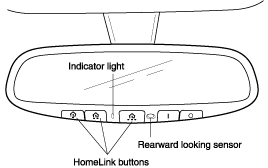
Your new
vehicle comes equipped with a Gentex Night Vision Safety mirror. During
nighttime driving, this safety feature will automatically detectand
eliminate dangerous rearview mirror glare.
Your new
mirror also comes with an integrated HomeLink Universal Transceiver, which
allows you to program the mirror to activate your garage door(s), estate
gate, home lighting, etc. The mirror actually learns the codesfrom your
various existing transmitters.
AUTOMATIC-DIMMING FUNCTION
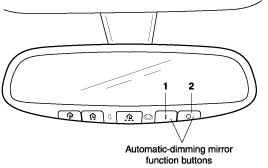
To protect
your vision during nighttime driving, your mirror will automatically dim
upon detecting glare from the vehicles traveling behindyou.
Press the (2)
button to turn the automatic-dimming function off. The mirror indicator
light will turn off.
Press the (1)
button to turn the automatic-dimming function on. The mirror indicator
light will illuminate.
The mirror defaults to the "on" position each
time the vehicle is started. |
HOMELINK PROGRAMMING
|
PROGRAMMING
Your vehicles
may require the ignition switch to be turned to the "ACC" position for
programming and/or operation of HomeLink. It is also recommended that a
new battery be replaced in the hand-held transmitter of the device being
programmed to HomeLink for quicker training and accuratetransmission of
the radio-frequency.
Follow these
steps to train your HomeLink mirror:
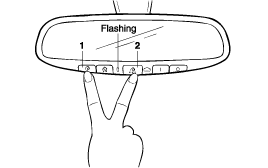
| 1. |
When programming the buttons for the first
time, press and hold the two outside HomeLink buttons (1), (2)
releasing when the indicator light begins to flash (approximately 20
seconds). This procedure erases the factory-set default codes. Do
not perform this step when programming additional
transmitters.
|
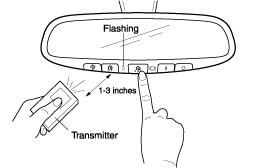
| 2. |
Hold the transmitter of the device you want to
train 1 to 3 inches away from the bottom of the mirror.
Simultaneously press the hand-held transmitter button and the
HomeLink button you wish to train. The indicator light willflash
slowly at first, then rapidly, indicating successful
programming. |
| 3. |
If the garage door opener or other device you
wish to train is rolling-code equipped, proceed to the "Rolling Code
Programming" section below. |
| 4. |
Repeat step 2 to program the remaining
HomeLink buttons. |
ADDITIONAL PROGRAMMING FOR ROLLING CODE
DEVICES
For any
rolling-code-equipped device; follow the steps below after completing the
"Programming" section. A second person may make the followingsteps
easier.
| 1. |
Locate the "learn" or "smart" button on the
device's motor head unit. The exact location and color of the button
varies by product brand, but is usually referenced in the device's
owner's manual. Contact HomeLinkat 1.800.355.3515 or
www.homelink.com for help. |
| 2. |
Press and release the "learn" or "smart"
button on the device's motor head
unit. |
You now have 30 seconds to initiate step
3. |
| 3. |
Return to the vehicle and firmly press and
release the programmed HomeLink button. Press and release the same
HomeLink button a second time to complete the training process.
(Some devices may require you to press andrelease a third time to
complete the training.) |
| 4. |
Now your HomeLink mirror and the
rolling-code-equipped device should be synchronized. The remaining
HomeLink buttons may now be programmed if thishas not been done
previously. |
OPERATING HOMELINK
Now your
HomeLink mirror and the rolling-code-equipped device should be
synchronized. The remaining HomeLink buttons may now be programmedif this
has not been done previously.
ERASING PROGRAMMED BUTTONS
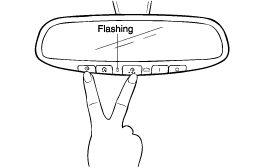
To erase the
three HomeLink buttons, press and hold the two outside buttons until the
indicator light begins to flash (after 20 seconds). Releaseboth
buttons.
Individual
buttons cannot be erased, but can be reprogrammed.
REPROGRAMMING SINGLE HOME LINK BUTTON
To program a
device to HomeLink using a HomeLink button previously trained, follow
these steps:
| 1. |
Press and hold the desired HomeLink button. Do
not release until step 4 has been
completed. |
| 2. |
When the indicator light begins to flash
slowly (after 20 seconds), hold the handheld transmitter 1 to 3
inches away from the bottom of the
mirror. |
| 3. |
Press and hold the transmitter button (or, if
necessary, press and "cycle," as described in the '"Gate Operator
& Canadian Programming" portionof this
text). |
| 4. |
The HomeLink indicator light will flash slowly
at first, then rapidly, indicating successful programming. Release
both buttons. |
GATE OPERATOR PROGRAMMING & CANADIAN
PROGRAMMING
During
programming, your hand-held transmitter may automatically stop
transmitting.
Continue to
press and hold the HomeLink button while you press and repress ("cycle")
your handheld transmitter every two seconds until the frequency signal has
been learned. The indicator light will flash slowly atfirst and then
rapidly upon successful training.
If programming a garage door opener or gate,
it is advised to unplug the device during the "cycling" process to
preventpossible motor burnout. |
ACCESSORIES
For more
information on HomeLink and HomeLink-compatible products, or to purchase
HomeLink accessories, call 1.800.355.3515 or visit
www.homeink.com.