| REPLACEMENT |
| 1. |
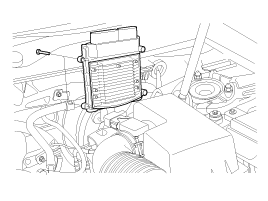
Disconnect the ECM wiring
connector. |
| 2. |
Unscrew four bolts mounting on back of air
cleaner assembly.
|
| 3. |
Remove the
ECM. |
| 4. |
Install a new ECM.
|
| 5. |
Write the VIN (Vehicle Identification
Number) in a new ECM according to "VIN PROGRAMMING PROCEDURE" (Refer
to FL-43). |
| 6. |
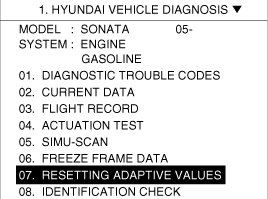
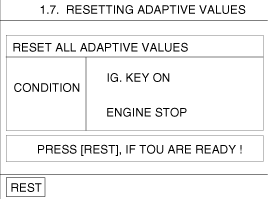
Perform the below procedeures to program an
new TPS adaptation into a new ECM.
|


| 7. |
Check a fault code(DTC) on Hi-Scan(Pro) if
the TPS adaptation was successful. |
| VIN PROGRAMMING PROCEDURE |
VIN (Vehicle
Identification Number) is a number that has the vehicle's information
(Maker, Vehicle Type, Vehicle Line/Series, Body Type, Engine Type,
Transmission Type, Model Year, Plant Location and so forth. For more
information, please refer to the group "GI" in this SERVICE MANUAL). When
replacing an ECM, the VIN must be programmed in the ECM. If there is no
VIN in ECM memory, the fault code (DTC P0630) is set.
The programmed VIN cannot be changed. When
writing the VIN, confirm the VIN
carefully |
| 1. |
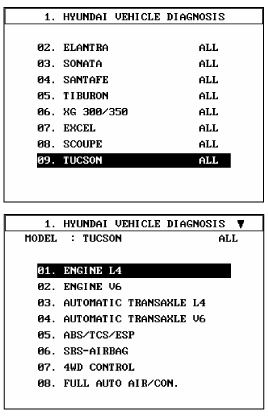
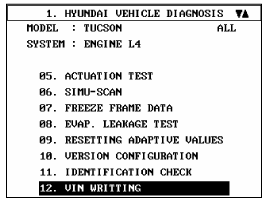
Select "Vehicle" and "Engine" (For example,
TUCSON 2.0L L4).
|
| 2. |
Select "VIN WRITING".
|
| 3. |
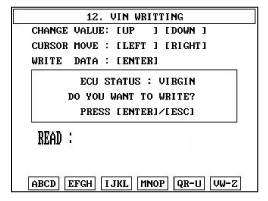
Check the ECM status.
Is the ECM status "VIRGIN"?
▶ Go to next step 4.
▶ END |


| 4. |
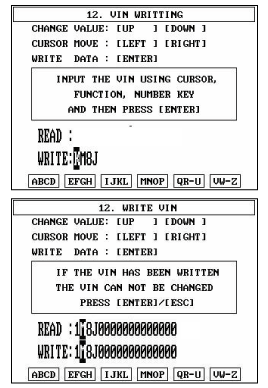
Write the VIN with cursor, function and
number keys.
|

| 5. |
After verifying the written VIN, press the
"ENTER" key. |
| 6. |
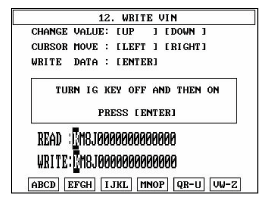
Turn the ignition switch OFF, and then turn
ON.
|
| 7. |
Verify the programmed VIN in the ECM
memory. |
| VIN PROGRAMMING PROCEDURE |
VIN (Vehicle
Identification Number) is a number that has the vehicle's information
(Maker, Vehicle Type, Vehicle Line/Series, Body Type, Engine Type,
Transmission Type, Model Year, Plant Location and so forth. For more
information, please refer to the group "GI" in this SERVICE MANUAL). When
replacing an ECM, the VIN must be programmed in the ECM. If there is no
VIN in ECM memory, the fault code (DTC P0630) is set.
The programmed VIN cannot be changed. When
writing the VIN, confirm the VIN
carefully |
| 1. |
Select "Vehicle" and "Engine" (For example,
TUCSON 2.0L L4).
|
| 2. |
Select "VIN WRITING".
|
| 3. |
Check the ECM status.
Is the ECM status "VIRGIN"?
▶ Go to next step 4.
▶ END |
| 4. |
Write the VIN with cursor, function and
number keys.
|
| 5. |
After verifying the written VIN, press the
"ENTER" key. |
| 6. |
Turn the ignition switch OFF, and then turn
ON.
|
| 7. |
Verify the programmed VIN in the ECM
memory. |