| COMPONENT LOCATION |
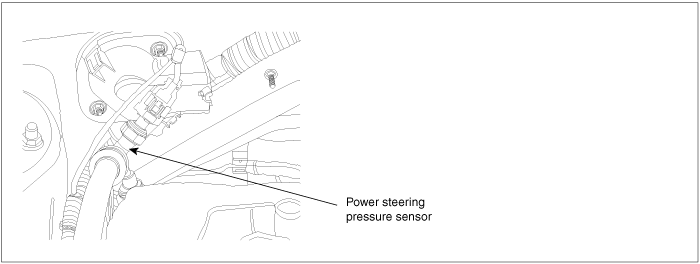
| GENERAL DESCRIPTION |
The power steering
system increases steering performance and improves steering feel and
power-saving effectiveness. The power steering pressure switch senses the
power steering load and converts it into a voltage signal to the ECM. The
ECM then controls the idle speed control motor by using the voltage signal
from the power steering pressure switch.
| DTC DESCRIPTION |
ECM sets DTC P0553 if
the ECM detects signal higher than the possible range of a properly
operating sensor
| DTC DETECTING CONDITION |
| Item |
Detecting
Condition |
Possible
Cause | ||||||||
| DTC Strategy |
|
| ||||||||
| Enable Conditions |
| |||||||||
| Threshold Value |
| |||||||||
| Diagnostic Time |
| |||||||||
| MIL On Condition |
|
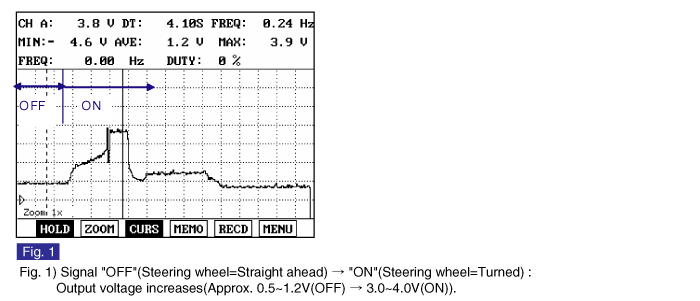
| SIGNAL WAVEFORM AND DATA |
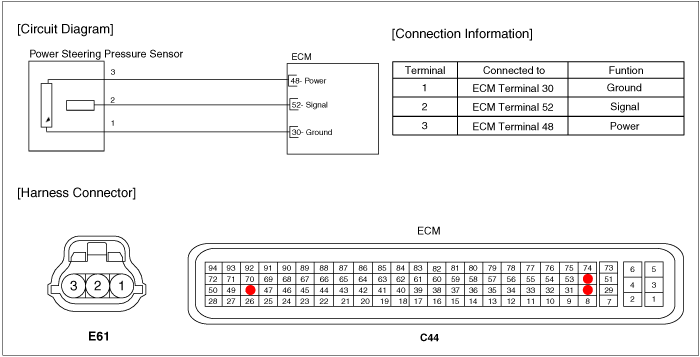
| SCHEMATIC DIAGRAM |
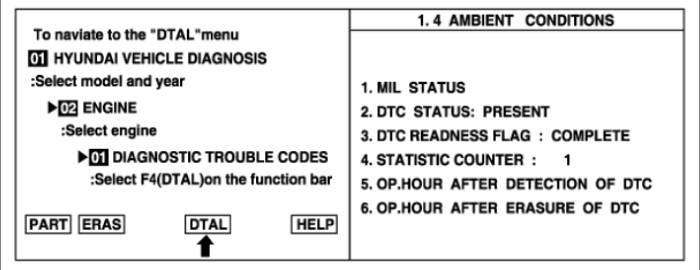
| MONITOR DTC STATUS |
| 1. |
Connect scan tool and select "Diagnostic
Trouble Codes(DTCs)" mode |
| 2. |
Press F4(DTAL) to select DTC information
from the DTCs menu |
| 3. |
Confirm that "DTC Readiness Flag" indicates
"Complete". If not, drive the vehicle within conditions noted in the
freeze frame data or enable
conditions |
| 4. |
Read "DTC Status" parameter
|
| 5. |
Is parameter displayed "History(Not Present)
fault"?
▶ Fault is intermittent caused by poor
contact in the sensor's and/or ECM's connector or was repaired and
ECM memory was not cleared. Thoroughly check connectors for loose or
poor connections, bending, corrosion, contamination, deterioration,
or damage. Repair or replace as necessary and then go to
"Verification of Vehicle Repair" procedure
▶ Go to next step as
below |



| SIGNAL CIRCUIT INSPECTION |
| 1. |
With ignition "OFF",disconnect sensor
connector |
| 2. |
Ignition "ON" & Engine
"OFF" |
| 3. |
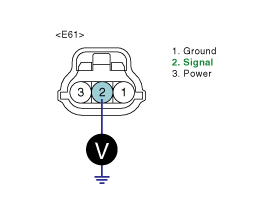
Measure the voltage between terminal 2 of
the sensor harness connector and chassis ground
|
| 4. |
Is voltage within the
specification?
▶ Go to next step as below
▶ Repair as necessary and go to
"Verification of Vehicle Repair"
procedure. |
| GROUND CIRCUIT INSPECTION |
| 1. |
Ignition
"OFF" |
| 2. |
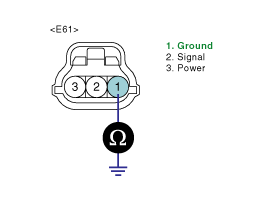
Measure resistance between terminal 1 of the
sensor harness connector and chassis ground
|
| 3. |
Is resistance within the
specification?
▶ Go to next step as below
▶ Repair as necessary and go to
"Verification of Vehicle Repair"
procedure. |
| TERMINAL AND CONNECTOR INSPECTION |
| 1. |
Many malfunctions in the electrical system
are caused by poor harness(es) and terminals. Faults can also be
caused by interference from other electrical systems, and mechanical
or chemical damage. |
| 2. |
Thoroughly check connectors for looseness,
poor connection, bending, corrosion, contamination, deterioration,
or damage. |
| 3. |
Has a problem been found?
▶ Repair as necessary and go to
"Verification of Vehicle Repair" procedure
▶ Go to next step as
below |
| COMPONENT INSPECTION |
| 1. |
Reconnect the sensor and ECM
connectors |
| 2. |
Warm up the engine to normal operating
temperature |
| 3. |
Set up an oscilloscope as follows
:
Channel A (+): terminal 2 of the pressure
sensor(back probe), (-): ground
|
| 4. |
Is waveform within the
specification?
▶ Check for poor connection between ECM and
component: backed out terminal, improper mating, broken locks or
poor terminal to wire connection. Repair as necessary and go to
"Verification of Vehicle Repair" procedure
▶ Substitute with a known-good sensor and
check for proper operation. If the problem is corrected, replace
sensor and then go to "Verification of Vehicle Repair"
procedure. |
| VERIFICATION OF VEHICLE REPAIR |
After a repair, it is
essential to verify that the fault has been corrected.
| 1. |
Connect scan tool and select "Diagnostic
Trouble Codes(DTCs)" mode |
| 2. |
Press F4(DTAL) and confirm that "DTC
Readiness Flag" indicates "Complete". If not, drive the vehicle
within conditions noted in the freeze frame data or enable
conditions |
| 3. |
Read "DTC Status"
parameter |
| 4. |
Is parameter displayed "History(Not Present)
fault"?
▶ System performing to specification at this
time. Clear the DTC
▶ Go to the applicable troubleshooting
procedure |