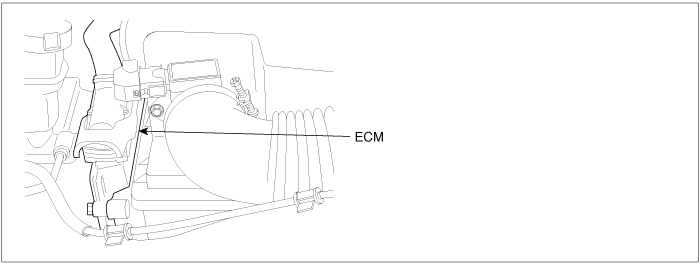
A malfunction is
detected by using a checksum technique for verifying data. The digital
data is composed of zeros and ones. A checksum is the total of all ones in
a string of data. By comparing the checksum value with a stored value, a
malfunction can be detected.
The ECM monitors RAM
areas and communication connections between microcontroller and output
drivers and sets DTC P0605 if failure is detected.
Item
|
Detecting
Condition
|
Possible
Cause
|
DTC Strategy
|
Case1
|
| •
|
ECM internal process(Level 2)
monitoring | |
| •
|
Poor connection or damaged
harness |
|
Case2
|
| •
|
Check RAM Area / Communication
connections | |
Case3
|
| •
|
ECM internal process(Level 3)
monitoring | |
Enable Conditions
|
|
Threshold Value
|
Case1
|
| •
|
Actual value is higher / lower than
allowable range |
| •
|
Too high engine speed(1760rpm) in case
of ETC limp home |
| •
|
Difference between actual torque and
torque set point is higher than
threshold | |
Case2
|
| •
|
RAM/Checksum test
failure. | |
Case3
|
| •
|
RAM/ROM error on microcontroller
checksum error |
| •
|
Communication between main controller
and monitoring unit error |
| •
|
Calculation of process monitoring
error | |
Diagnostic Time
|
Case1
|
|
Case2
|
|
Case3
|
|
Limp-Home
|
Case1
|
| •
|
Forced limited RPM mode : The ECM
limits engine speed to
1500rpm |
| •
|
Electrical check of the ETC system is
prohibited | |
Case2
|
Case3
|
| •
|
Forced engine shut down mode : The ECM
shuts down the engine | |
MIL On Condition
|
|
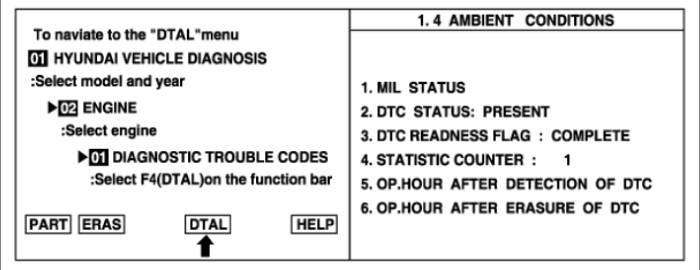
| 1. |
Connect scan tool and select "Diagnostic
Trouble Codes(DTCs)" mode |
| 2. |
Press F4(DTAL) to select DTC information
from the DTCs menu |
| 3. |
Confirm that "DTC Readiness Flag" indicates
"Complete". If not, drive the vehicle within conditions noted in the
freeze frame data or enable
conditions |
| 4. |
Read "DTC Status" parameter
|
| 5. |
Is parameter displayed "History(Not Present)
fault"?
| - |
History (Not Present) fault :
DTC occurred but has been
cleared |
| - |
Present fault : DTC is occurring
at present
time | |

▶ Fault is intermittent caused by poor
contact in the sensor's and/or the ECM's connector, which was
repaired but ECM memory was not cleared. Thoroughly check connectors
for looseness, poor connection, bending, corrosion, contamination,
deterioration, or damage. Repair or replace as necessary and go to
"Verification of Vehicle Repair" procedure

▶ Go to next step as
below |
BACK
UP VOLTAGE INSPECTION
| 2. |
Disconnect ECM
connector |
| 4. |
Measure voltage between terminal 6 of the
ECM harness connector and chassis ground
Specification : Remain stable at
battery voltage
| |
| 5. |
Are circuits remaining stable at battery
voltage?
▶ Using a scan tool, check ECM software
version and upgrade as necessary. If version is the newest one,
check ECM for contamination, deterioration, or damage. Substitute
with a known-good ECM and check for proper operation. If the problem
is corrected, replace ECM and then go to "Verification of Vehicle
Repair" procedure.
|
It is necessary to perform the TPS
adaptation procedure with Scan tool when the throttle body
assembly or ECM is replaced. |
▶ TPS adaptation procedure
1. Erase previous TPS adaptation value using
Scan tool.
2. Ignition "OFF" and then "ON" without
cranking. Wait for 10 seconds under enable conditions
| A. |
Enable conditions : Battery >10V
& Intake Air Temp. >5.3°C(41.5°F) & 5.3°C(41.5°F)
<Engine Coolant Temp.
<99.8°C(211.6°F) |
3. After TPS adaptation, the system
normality should be confirmed by reading out "FMY" on the Scan
Tool
▶ If voltage fluctuates, check circuit for
loose, bent or corroded terminals, Repair as necessary and go to
"Verification of Vehicle Repair"
procedure |
| VERIFICATION OF VEHICLE
REPAIR |
After a repair, it is
essential to verify that the fault has been corrected.
| 1. |
Connect scan tool and select "Diagnostic
Trouble Codes(DTCs)" mode |
| 2. |
Press F4(DTAL) and confirm that "DTC
Readiness Flag" indicates "Complete". If not, drive the vehicle
within conditions noted in the freeze frame data or enable
conditions |
| 3. |
Read "DTC Status"
parameter |
| 4. |
Is parameter displayed "History(Not Present)
fault"?
▶ System performing to specification at this
time. Clear the DTC
▶ Go to the applicable troubleshooting
procedure. |
