| COMPONENT LOCATION |
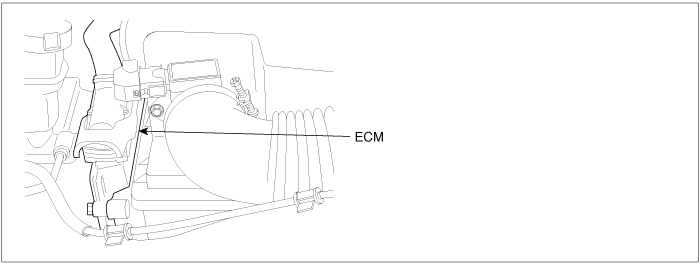
| GENERAL DESCRIPTION |
Regulations require
that all 2005 and subsequent model year vehicles shall have the Vehicle
Identification Number(VIN) available in a standardized format through the
standardized data link connector in accordance with SAE J1979
specifications. Using a scan tool, PERFORM "VIN WRITING" procedure after
replacing or reflashing a ECM.
| DTC DESCRIPTION |
The ECM monitors ROM
areas and sets DTC P0630 if there is no Vehicle Identification Number(VIN)
information.
| DTC DETECTING CONDITION |
| Item |
Detecting
Condition |
Possible
Cause | |||||
| DTC Strategy |
|
| |||||
| Enable Conditions |
| ||||||
| Threshold Value |
| ||||||
| Diagnostic Time |
| ||||||
| MIL On Condition |
| ||||||
| MONITOR DTC STATUS |
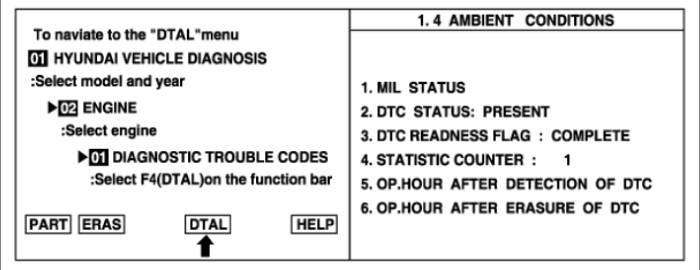
| 1. |
Connect scan tool and select "Diagnostic
Trouble Codes(DTCs)" mode |
| 2. |
Press F4(DTAL) to select DTC information
from the DTCs menu |
| 3. |
Confirm that "DTC Readiness Flag" indicates
"Complete". If not, drive the vehicle within conditions noted in the
freeze frame data or enable
conditions |
| 4. |
Read "DTC Status" parameter
|
| 5. |
Is parameter displayed "History(Not Present)
fault"?
▶ Fault is intermittent, caused by poor
contact in the sensor's and/or ECM's connector or was repaired and
ECM memory was not cleared. Thoroughly check connectors for
looseness, poor connection, bending, corrosion, contamination,
deterioration, or damage. Repair or replace as necessary and go to
"Verification of Vehicle Repair" procedure
▶ Go to next step as
below |



| SYSTEM INSPECTION |
| 1. |
Was the ECM just replaced or
reflashed?
▶ Using a scan tool, perform "VIN WRITING"
procedure. Refer to the latest Reference manual for scan tool and go
to "Verification of Vehicle Repair" procedure
▶ Using a scan tool, read VIN
information.
If there is no proper VIN information,
perform "VIN WRITING" procedure.
If VIN information exists, substitute with a
known-good ECM and check for proper operation. If the problem is
corrected, replace ECM.
And go to "Verification of Vehicle Repair"
procedure. |
| VERIFICATION OF VEHICLE REPAIR |
After a repair, it is
essential to verify that the fault has been corrected.
| 1. |
Connect scan tool and select "Diagnostic
Trouble Codes(DTCs)" mode |
| 2. |
Press F4(DTAL) and confirm that "DTC
Readiness Flag" indicates "Complete". If not, drive the vehicle
within conditions noted in the freeze frame data or enable
conditions |
| 3. |
Read "DTC Status"
parameter |
| 4. |
Is parameter displayed "History(Not Present)
fault"?
▶ System performing to specification at this
time. Clear the DTC
▶ Go to the applicable troubleshooting
procedure. |