The value of the input
shaft speed should be equal to the value of the output shaft speed, when
multiplied by the 4th gear ratio, while the transaxle is engaged in the
4th gear. For example, if the output speed is 1,000 rpm and the 4th gear
ratio is 0.712, then the input speed is 0,712 rpm.
This code is set if
the value of input shaft speed is not equal to the value of the output
shaft, when multiplied by the 4th gear ratio, while the transaxle is
engaged in 4th gear. This malfunction is mainly caused by mechanical
troubles such as control valve sticking or solenoid valve malfuctioning
rather than an electrical issue.
Item
|
Detecting Condition &
Fail Safe
|
Possible
cause
|
DTC Strategy
|
| •
|
4th gear incorrect
ratio | |
| •
|
Faulty Input speed
sensor |
| •
|
Faulty output speed
sensor |
| •
|
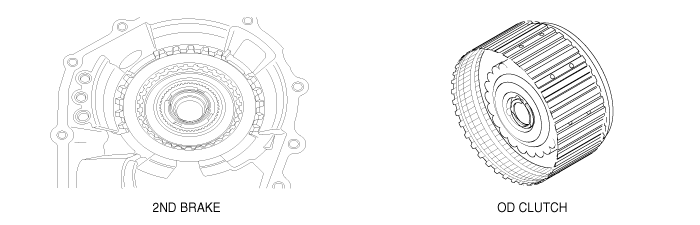
Faulty UD clutch or 2nd
brake | |
Enable
Conditions
|
| •
|
A/T oil temp sensor voltage
<4.5V |
| •
|
Voltage of Battery
>10V |
| •
|
TRANSAXLE RANGE SWITCH is
normal | |
Threshold
value
|
| •
|
ㅣInput speed/4th gear ratio - output
speed|≥200rpm /4th. gear
ratio | |
Diagnostic
Time
|
|
Fail Safe
|
| •
|
Locked into 3rd gear.
(If diagnosis code P0734 is output
four times, the transaxle is locked into 3rd
gear) | |
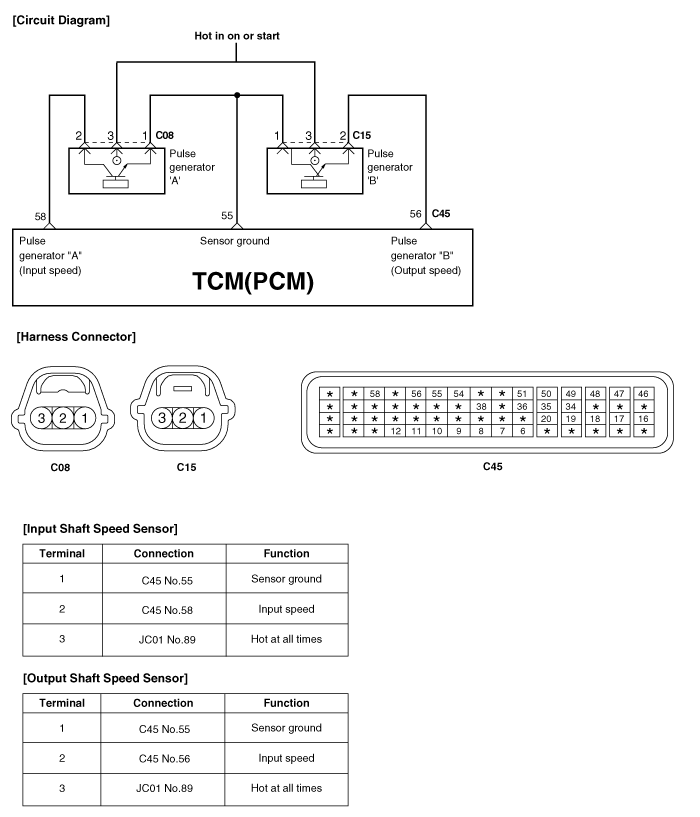
※ It is difficult to
"STALL TEST" in 4th gear, therefore Go to "W/Harness Inspection"
procedure.
OPERATING ELEMENT OF EACH SHIFTING
RANGE
|
UD/C
|
OD/C
|
REV/C
|
2ND/B
|
LR/B
|
OWC
|
P
|
|
|
|
|
●
|
|
R
|
|
|
●
|
|
●
|
|
N
|
|
|
|
|
●
|
|
D1
|
●
|
|
|
|
●
|
○
|
D2
|
●
|
|
|
●
|
|
|
D3
|
●
|
●
|
|
|
|
|
D4
|
|
●
|
|
●
|
|
|
※ Low & Reverse
Brake is released when the vehicle speed is over 7Km/h(5
MPH).
| SIGNAL CIRCUIT
INSPECTION |
| 3. |
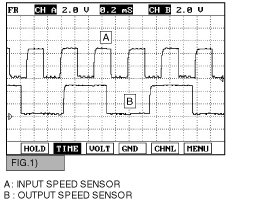
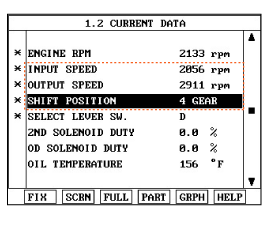
Monitor the "INPUT & OUTPUT SPEED
SENSOR" parameter on the scantool. |
| 4. |
Accelerate the Engine speed until about 2000
rpm in the 4th gear while driving the vehicle on a level
road.
Specification : INPUT SPEED - (OUTPUT
SPEED × GEAR RATIO) ≤ 200 RPM
|
|
| 5. |
Are "INPUT & OUTPUT SPEED SENSOR" within
specifications?

▶ Go to "Component Inspection"
procedure.

▶ Check for electrical noise of circuit in
INPUT & OUTPUT SPEED SENSOR or replace INPUT & OUTPUT SPEED
SENSOR. Repair as necessary and go to "Verification Vehicle Repair"
procedure. |
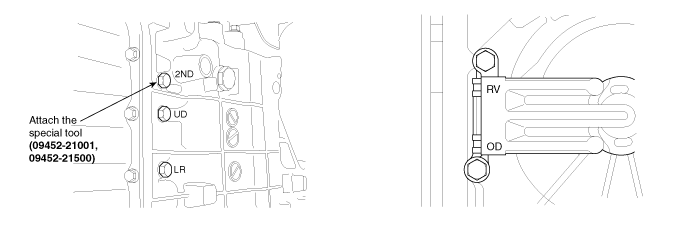
| 1. |
Connect Oil pressure gauge to "OD" and "2nd"
port. |
| 3. |
Drive the car with gear position
"4". |
| 4. |
Compare it with reference data as
below.
Specification : shown
below
|
Measurement
condition
|
Standard hydraulic pressure kPa
(psi)
|
Selector lever position
|
Shift position
|
Engine speed (rpm)
|
Under drive clutch pressure
|
Reverse clutch pressure
|
Overdrive clutch pressure
|
Low&reverse brake pressure
|
Second brake pressure
|
Damper clutch Apply pressure (DA)
|
Damper clutch Release pressure
(DR)
|
P
|
-
|
2,500
|
-
|
-
|
-
|
260-340
(38-50)
|
-
|
-
|
-
|
R
|
Reverse
|
2,500
|
-
|
1,270-1,770
(185-256)
|
-
|
1,270-1,770
(185-256)
|
-
|
-
|
-
|
N
|
-
|
2,500
|
-
|
-
|
-
|
260-340
(38-50)
|
-
|
-
|
-
|
D
|
1st gear
|
2,500
|
430-510
(62-74)
|
-
|
-
|
1,010-1,050
(146-152)
|
-
|
-
|
-
|
2nd gear
|
2,500
|
430-510
(62-74)
|
-
|
-
|
-
|
430-510
(62-74)
|
-
|
-
|
3rd gear
|
2,500
|
430-510
(62-74)
|
-
|
430-510
(62-74)
|
-
|
-
|
More than 730 (100)
|
0-10
(0-1)
|
4th gear
|
2,500
|
-
|
-
|
430-510
(62-74)
|
-
|
780-880
(110-130)
|
More than 730 (100)
|
0-10
(0-1)
|
※ The values are subject to change according
to vehicle model or condition
※ Depress the acceleration pedal "GENTLY"
under no load when measuring the hydraulic
pressure. |
| 5. |
Is oil pressure value within
specification?
▶ Repair AUTO TRANSAXLE(Clutch or Brake) as
necessary and go to "Verification Vehicle Repair"
procedure.
▶ Replace AUTO TRANSAXLE (BODY CONTROL VALVE
faulty) as necessary and go to "Verification Vehicle Repair "
procedure. |
| VERIFICATION OF VEHICLE
REPAIR |
After a repair, it is
essential to verify that the fault has been corrected.
| 1. |
Connect scan tool and select "Diagnostic
Trouble Codes(DTCs)" mode. |
| 2. |
Using a scantool, Clear
DTC. |
| 3. |
Operate the vehicle within DTC Enable
conditions in General information. |
| 4. |
Are any DTCs present ?
▶ Go to the applicable troubleshooting
procedure.
▶ System performing to specification at this
time. |