| GENERAL DESCRIPTION |
The relevant data for
the immobilizer function are stored at permanent memory (EEPROM or Flash
etc.).
The immobilizer data are
stored by three independent entries.
The data from EEPROM are
evaluated by "2 of 3 decision". That means all three entries are read and
the content is compared before authentication process.
If the contents of all
entries are equal, the authentication will run without additional
measures.
If only the contents of
two entries are equal, the authentication will run and fault code "EEPROM
defective“ is stored at ECM.
If the contents of all
three entries are different from each other, no authentication will be
possible and the fault code "EEPROM defective“ will be stored. The limp
home function cannot be activated. The ECM shall be replaced if the EEPROM
related fault occurs again after new teaching of all keys.
| DTC DESCRIPTION |
This DTC is defined as
Virgin TP or Invalid TP with “Learnt” ECM status (Authentication
fail).
| DTC DETECTING CONDITION |
| Item |
Detecting
Condition |
Possible cause | ||||
| Enable
Condition |
|
| ||||
| Detecting
Criteria |
|
| MONITOR SCANTOOL DATA |
| 1. |
Ignition "ON" & Engine
"OFF". |
| 2. |
Connect Scan tool and clear the
DTCs. |
| 3. |
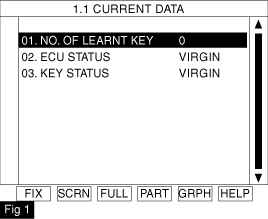
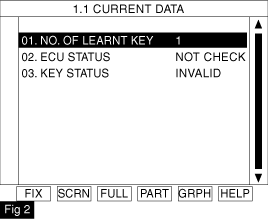
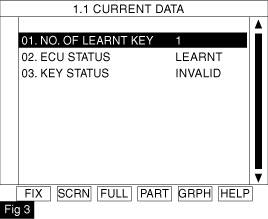
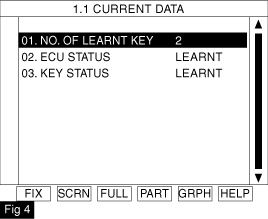
If the DTCs are retrieved again, monitor
"CURRENT DATA" to check No. of Learnt key, ECM and KEY
status.
Fig 1 : ECM has not matched with any Key
yet.
Fig 2 : ECM Internal Failure.
Fig 3 : IG On with unmatched key.
Fig 4 : 2(two) Keys have been matched with
ECM. |
| 4. |
Are both Key and ECM status
learnt?
Fault is intermittent caused by poor contact
in the SMARTRA's and/or ECM's connector or was repaired and ECM
memory was not cleared. Thoroughly check connectors for looseness,
poor connection, bending, corrosion, contamination, deterioration,
or damage.
Repair or replace as necessary and then go to
"Verification of Vehicle Repair" procedure.
Go to "Component Inspection"
procedure. |


| COMPONENT INSPECTION |
| 1. |
Check Transponder
|

| VERIFICATION OF VEHICLE REPAIR |
After a repair, it is
essential to verify that the fault has been corrected.
| 1. |
Connect scan tool and monitor CURRENT DATA to
check No. of Learnt key, ECM and KEY
status. |
| 2. |
Select Diagnostic Trouble Codes(DTCs)" mode
and Clear the DTCs. |
| 3. |
Are any DTCs present?
Go to the applicable troubleshooting
procedure.
System is performing to specification at this
time. |