The PCM controls the
locking or unlocking of the Torque Converter Clutch (or Damper Clutch) by
appling hydraulic pressure. The main purpose of the TCC control is to save
fuel by decreasing the hydraulic load inside the torque converter. The PCM
outputs duty pulses to control the torque converter clutch control
solenoid valve and hydraulic pressure is applied to the torque converter
according to the torque converter clutch duty ratio value. When the duty
ratio is high, high pressure is applied and the torque converter clutch is
locked. The normal operating range of the torque converter clutch control
duty ratio value is from 30%(unlocked) to 85%(locked).
The PCM increases the
duty ratio to engage the torque converter clutch, monitoring the slip rpms
(difference beteween engine speed and turbine speed). To decrease the slip
of the torque converter clutch, the PCM applies more hydraulic pressure by
increasing the duty ratio. When the slip rpm does not drop down below the
specification with 100% duty ratio, the PCM determines that the torque
converter clutch is stuck OFF and sets this code.
Item
|
Detecting Condition & Fail
Safe
|
Possible cause
|
DTC Strategy
|
|
※
TORQUE CONVERTER(DAMPER) CLUTCH : TCC
| •
|
Faulty TCC or oil pressure
system |
| •
|
Faulty TCC solenoid
valve |
| •
|
Faulty body control
valve |
|
Enable Conditions
|
| •
|
TCC Duty cycle≠0 or TCC Abnormal slip
counters ≥ 4 | |
Threshold value
|
| •
|
TCC slip counter ≥4
counts | |
Diagnostic Time
|
|
Fail Safe
|
| •
|
Stop the torque converter clutch
control | |
| 1. |
Connect scantool to data link
connector(DLC). |
| 3. |
Sellect "D RANGE" and drive
vehicle. |
| 4. |
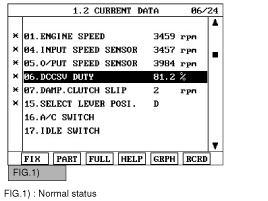
Monitor the "TORQUE CONVERTER(DAMPER) CLUTCH"
parameter on the scantool.
Specification : TCC SLIP<160RPM(In
condition that TCC SOL. DUTY > 80% )
|
|
| 5. |
Are "TCC SOLENOID DUTY and TCC SLIP" within
specifications?

▶ Fault is intermittent caused by poor contact
in the sensor's and/or PCM's connector or was repaired and PCM
memory was not cleared. Throughly check connectors for looseness,
poor connection, bending, corrosion, contamination, deterioration or
damage. Repair or replace as necessary and go to "Verification
vehicle repair" procedure.

▶ Go to "Component inspection"
procedure. |
| 1. |
CHECK TORQUE CONVERTER CLUTCH SOLENOID
VALVE
| (1) |
Connect scantool to data link
connector(DLC). |
| (2) |
Ignition "ON" & Engine
"OFF". |
| (3) |
Select A/T solenoid valve actuator test
and operate actuator test. |
| (4) |
Can you hear operating tone for using
TCC SOLENOID VALVE actuator testing function?
▶ Go to "CHECK OIL PRESSURE" as
below.
▶ Replace "TCC SOLENOID VALVE" as
necessary and go to "Verification vehicle repair"
procedure. | |
| 2. |
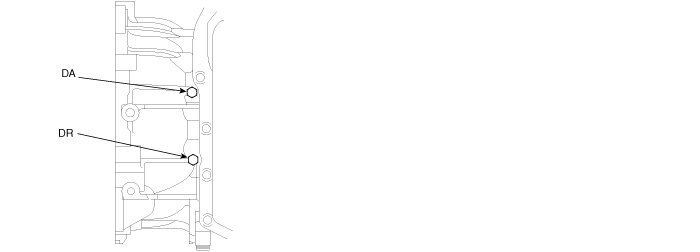
CHECK OIL PRESSURE
| (1) |
Connect oil pressure gauge to "DA" and
"DR" ports. |
| (2) |
Ignition "ON" & Engine
"OFF". |
| (3) |
After connecting Scantool and monitor
the "TCC SOLENIOD VALVE DUTY" parameter on the scantool data
list. |
| (4) |
Select the "D" range and accelerate
engine speed to 2500 rpm. |
| (5) |
Measure oil pressure.
Manual valve position
|
VFS
current(mA)
|
RPM
|
Operation (Duty rate %)
|
Damper Apply Pressure※(MPa)
|
Damper Release Pressure
(MPa)
|
LR
|
2ND
|
UD
|
OD
|
DCC
|
RED*
|
D
|
200
|
2500
|
100
|
100
|
0
|
0
|
0
|
0
|
0.25~0.45
|
0.50~0.70
|
↑
|
↑
|
↑
|
↑
|
50
|
↑
|
0.20~0.45
|
0
|
↑
|
↑
|
↑
|
↑
|
100
|
↑
|
0.96~1.04
|
0
|
900
|
100
|
100
|
0
|
0
|
0
|
0
|
0.12~0.22
|
0.25~0.45
|
↑
|
↑
|
↑
|
↑
|
100
|
↑
|
MIN. 0.29
|
0
|
※ Each case of increasing and decreasing
of DCC solenoid duty rate to be
satisfied. |
| (6) |
Is oil pressure value within
specification?
▶ Repair TORQUE CONVERTER CLUTCH(REPLACE
Torque Converter ) as necessary and go to "Verification
vehicle repair " procedure.
▶ Replace A/T assembly (or valve body
assembly) as necessary and go to "Verification vehicle repair"
procedure. | |
| VERIFICATION OF VEHICLE
REPAIR |
After a repair, it is
essential to verify that the fault has been corrected.
| 1. |
Connect scan tool and select "Diagnostic
Trouble Codes(DTCs)" mode. |
| 2. |
Using a scantool, Clear
DTC. |
| 3. |
Operate the vehicle within DTC Enable
conditions in General information. |
| 4. |
Are any DTCs present ?
▶ Go to the applicable troubleshooting
procedure.
▶ System performing to specification at this
time. |