| Component Location |
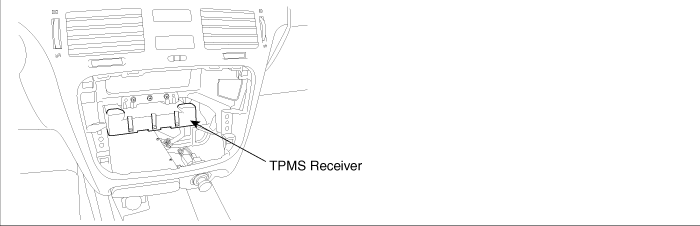
| General Description |
TPM Receiver is
integrated with the TPM module installed at the bottom of the steering
column. The operating battery of TPM module is supplied from the vehicle
battery. Data such as Tire pressure, Tire Temperature, TPM sensor battery
status and TPM sensor valve ID from TPM sensors are transmitted to TPM
receiver in the form of RF signal. TPM module accomplishes Tire Monitoring
and Warning Logic with received data.
| DTC Description |
This DTC indicates
that system is not functioning due to High interference levels from
external sources.
| DTC Detecting Condition |
| Item |
Detecting
Condition |
Possible
cause | ||||
| DTC strategy |
|
| ||||
| Enable conditions |
| |||||
| Threshold value |
| |||||
| Diagnosis time |
|
| Monitor Scantool Data |
| 1. |
Park the vehicle on a level
surface. |
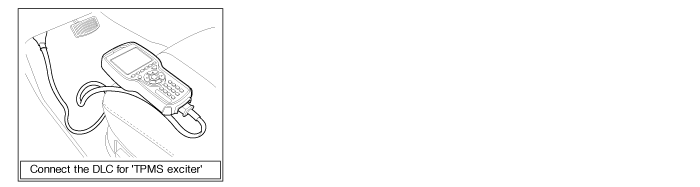
| 2. |
Connect 'TPMS exciter' or scantool to Data
Link Connector(DLC).
|
| 3. |
Select "TPMS DIAGNOSIS"
mode. |
| 4. |
Select the "FULL" mode of "CURRENT DATA"
function. |
| 5. |
Monitor the parameter of RF RSSI background
on the 'TPMS exciter' or scantool after 9 minutes.
|
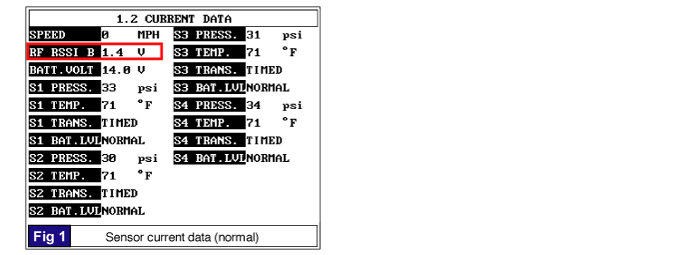
| 6. |
Is parameter within
specifications?
▶ Fault is intermittent. It has been
repaired and TPM receiver module memory is not cleared
yet.
▶ Go to "Verification of vehicle Repair"
procedure.
▶ Substitute with a known-good TPM receiver
module and check for proper operation.
▶ If the problem is corrected, replace TPM
receiver module and then go to "Verification of Vehicle Repair"
procedure. |


| Verification of Vehicle Repair |
After a repair, it is
essential to verify that the fault has been corrected.
| 1. |
Connect TPMS exciter or scantool and select
"Diagnostic Trouble Codes(DTCs)"
mode |
| 2. |
Using a TPMS exciter or scantool, Clear
DTC. |
| 3. |
Operate the vehicle within DTC Enable
conditions in General information. |
| 4. |
Are any DTCs present ?
▶ Go to the applicable troubleshooting
procedure.
▶ System performing to specification at this
time. |