The detecting system
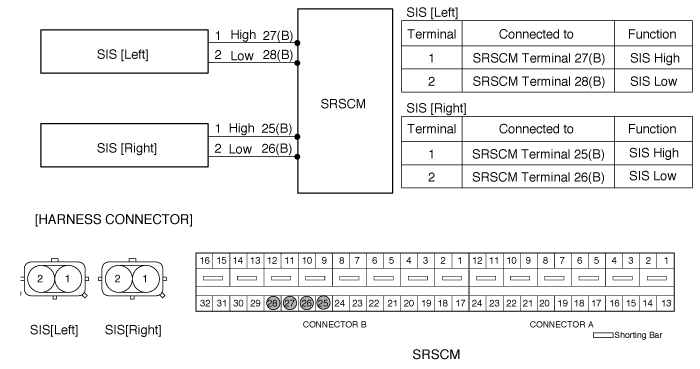
for side crash consists of the SRSCM and two Side Impact Sensors (SIS).The
SRSCM sets above DTC(s) if it detects that any SIS is defective or there
is communication error between any front SIS and the SRSCM.
DTC
|
Condition
|
Probable
cause
|
B1400
|
| •
|
Open between SIS and
SRSCM |
| •
|
Side Impact Sensor (SIS)
Malfunction |
|
| •
|
Side Impact Sensor (SIS)
squib |
|
| Terminal & Connector
Inspection |
| 1. |
Visually inspect all connectors related to
the affected circuit for damage and secure
connection. |
| 2. |
Inspect terminals for damage and
corrosion.
|
Avoid damaging connectors during the
inspection
process. | |
| 3. |
Are any problems found?

▶ Go to next step.

▶ After repairing the trouble part, check
whether DTC occurs or not. |
| 1. |
PREPARATION
| (1) |
Turn the ignition switch to
LOCK. |
| (2) |
Disconnect the negative (-) terminal
from the battery and wait for at least 3
minutes. |
| (3) |
Remove the DAB module and
disconnect the DAB connector. |
| (4) |
Disconnect the connectors of the PAB,
SAB, CAB, BPT, FIS and SIS. |
| (5) |
Disconnect the SRSCM
connector. | |
| 2. |
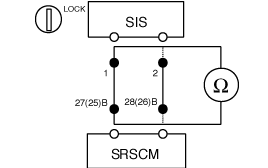
CHECK SIS CIRCUIT
| (1) |
Measure resistance between the
terminal 1 of SIS harness connector and the terminal 27(25) of
SRSCM harness connector(B). |
| (2) |
Measure resistance between the
terminal 2 of SIS harness connector and the terminal 28(26) of
SRSCM harness connector(B).
specification(resistance) :
below 1 Ω
|
Is the measured resistance within
specification?
▶Check Side Impact
Sensor.
▶ Repair or replace the wiring harness
between the SIS and the
SRSCM. | |
| 3. |
CHECK THE SIDE IMPACT SENSOR
| (1) |
Replace the Side Impact Sensor(SIS)
with a new one.
● Refer to "Side Impact Sensor(SIS)"
section in this SERVICE
MANUAL. |
| (2) |
Install the DAB module and connect the
DAB connector. |
| (3) |
Connect the connectors of the PAB,
SAB, CAB, BPT, FIS and SIS. |
| (4) |
Connect the SRSCM
connector. |
| (5) |
Connect the negative (-) terminal to
the battery. |
| (6) |
Connect a Hi-Scan(Pro) to the data
link connector. |
| (7) |
Turn the ignition switch to ON and
check the vehicle again.
Does Hi-Scan (Pro) indicate any DTC
related to Side Impact Sensor(SIS)?
▶ Go to next step.
▶ Replace
SIS. | |
| 4. |
CLEAR THE DTC AND CHECK THE VEHICLE
AGAIN
| (1) |
Install the DAB module and connect the
DAB connector. |
| (2) |
Connect the connectors of the PAB,
SAB, CAB, BPT, FIS and SIS. |
| (3) |
Connect the SRSCM
connector. |
| (4) |
Connect the negative (-) terminal to
the battery. |
| (5) |
Connect a Hi-Scan(Pro) to the data
link connector. |
| (6) |
Turn the ignition switch to ON
. |
| (7) |
Clear the DTC stored in the SRSCM
memory with the Hi-Scan(Pro). |
| (8) |
Turn the ignition switch to LOCK and
wait for at least 30
seconds. |
| (9) |
Turn the ignition switch to ON and
wait for at least 30 seconds. |
| (10) |
Check the vehicle again with the
Hi-Scan(Pro).
Does the above DTC(s) go
off?
▶ Problem is intermittent or was
repaired and SRSCM memory was not cleared.
▶Replace the SRSCM with a new one, and
then check the vehicle again. At this time, if the vehicle
normally operates with a new SRSCM, the fault may be the
SRSCM(Replace
SRSCM). | |
