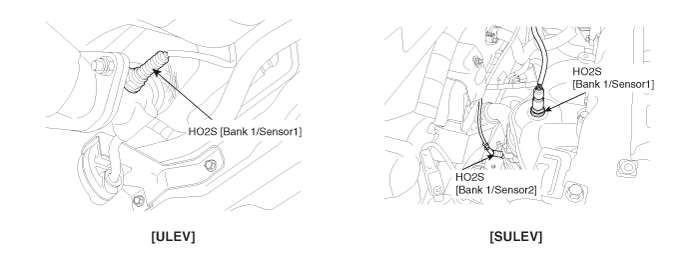
The linear O2 sensor is
mounted on the front side of the Catalytic Converter (warm-up catalytic
converter) or in the front exhaust pipe. It detects a wide range of
air/fuel ratios in the exhaust gas from the rich to lean regions. This
linear O2 sensor produces a current that corresponds to a specific
air/fuel ratio. The PCM monitors this signal and determines whether the
air/fuel mixture is rich or lean. The PCM constantly monitors the linear
O2 sensor and increases or decreases the fuel injection duration using
this signal. This is called closed-loop fuel control
operation.
The PCM monitors front
HO2S signal level during part load or full load operation to check if the
fornt HO2S is mechanically attached to the exhaust gas pipe while the
vehicle is running. The PCM sets DTC P2414 if front HO2S signal is within
the predetermined threshold. If the same error code is set in the next
driving cycle, the PCM illuminates the MIL.
Item
|
Detecting
Condition
|
Possible cause
|
DTC
Strategy
|
| •
|
Sensor not mounted -Plausability check
in Part load or Full load | |
| •
|
Poor connection or damaged
harness |
|
Enable
Conditions
|
| •
|
Engine state : Part load or full
load |
| •
|
Wide range sensor pump current
valid |
| •
|
10V < Battery voltage <
16V | |
Threshold
value
|
|
Diagnosis
Time
|
|
MIL On
Condition
|
|
| Diagnostic Circuit
Diagram |
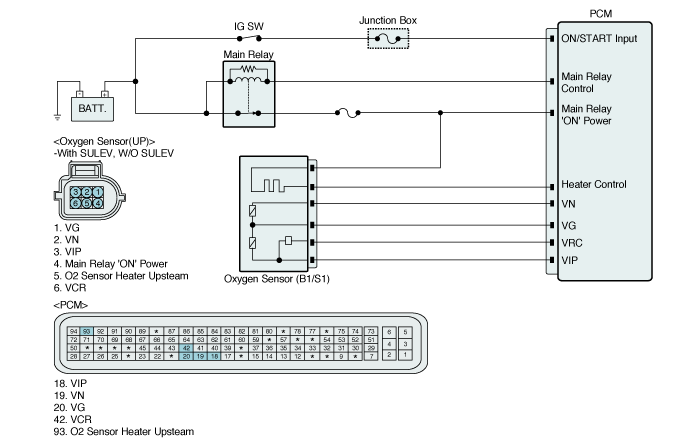
|
If any codes relating to Rear HO2S or
TWC(ThreeWay Catalyst Converter) are stored, do ALL REPAIRS
associated with those codes before proceeding with this
troubleshooting tree. |
| 1. |
Connect GDS and select "DTC Analysis"
mode |
| 2. |
Click "DTC Status" on the menu bar to see
DTC's information. |
| 3. |
Confirm that "DTC Readiness Flag" indicates
"COMPLETED". If not, drive the vehicle within conditions noted in
the freeze frame data or enable
conditions. |
| 4. |
Read "DTC Status" parameter.
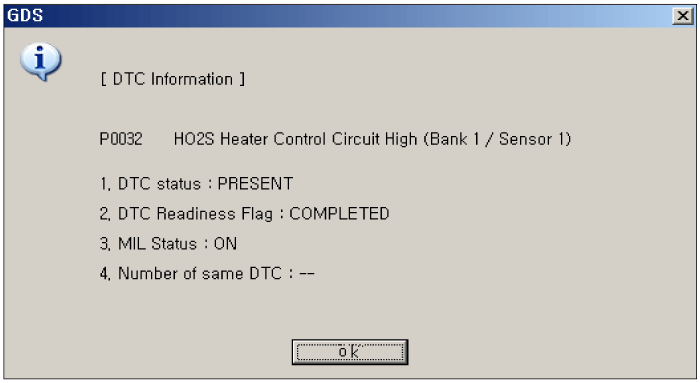
|
| 5. |
Is parameter displayed "History(Not Present)
fault"?
|
- History (Not Present) fault : DTC
occurred but has been cleared.
- Present fault : DTC is occurring at
present time. |
|

|
▶ Fault is
intermittent caused by poor contact in the sensor's and/or
PCM's connector or was repaired and PCM memory was not
cleared. Thoroughly check connectors for looseness, poor
connection, bending, corrosion, contamination, deterioration,
or damage. Repair or replace as necessary and then go to
"Verification of Vehicle Repair" procedure.
|
|

|
▶ Go to
next step as
below
|
|
| Terminal and Connector
inspection |
| 1. |
Many malfunctions in the electrical system are
caused by poor harness(es) and terminals. Faults can also be caused
by interference from other electrical systems, and mechanical or
chemical damage. |
| 2. |
Thoroughly check connectors for looseness,
poor connection, bending, corrosion, contamination, deterioration,
or damage. |
| 3. |
Has a problem been found?
|
|
▶ Repair as
necessary and go to "Verification of Vehicle Repair" procedure
|
|
|
▶ Go to
next step as
below.
|
|
| 1. |
Visually/physically inspect the HO2S for the
following conditions:
- Ensure that the HO2S is securely
installed.(Pigtail and wiring harness not making contact with the
exhaust pipe)
- Check for corrosion on terminals and
terminal tension (at the HO2S and at the PCM)
- Front HO2S for silicon contamination. This
contamination will be indicated by a white powdery coating on the
portion of the sensor exposed to the exhaust stream and this will
result in a but false(high) voltage signal
- Fuel, engine coolant or oil
contamination
- Use of improper sealant
|
| 2. |
Was a problem found in any of the above
areas? |
|
|
▶ Repair or
replace as necessary and go to "Verification of Vehicle Repair"
procedure
|
|
|
▶ Substitute with
a known-good component and check for proper operation. If the
problem is corrected, replace component and then go to "Verification
of Vehicle Repair" procedure.
|
| Verification of Vehicle
Repair |
After a repair, it is
essential to verify that the fault has been corrected.
| 1. |
Connect GDS and select "DTC Analysis"
mode. |
| 2. |
Click "DTC Status" and confirm that "DTC
Readiness Flag" indicates "Complete". If not, drive the vehicle
within conditions noted in the freeze frame data or enable
conditions. |
| 3. |
Read "DTC Status"
parameter. |
| 4. |
Is parameter displayed "History(Not Present)
fault"?
|
|
▶ System
performing to specification at this time. Clear the
DTC.
|
|
|
▶ Go to the
applicable troubleshooting
procedure.
|
|
