| Description |
Introduction to XM radio
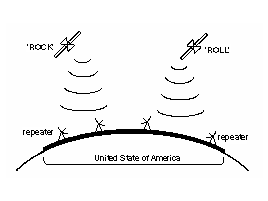
XM-Radio is a Satellite
Based Radio Broadcast System that operates around 2.3 GHz from two 15,000
watts satellites; one named "ROCK," at 115 Degrees West, the other named
"ROLL" at 85.0 Degrees West. Or another way of saying, the satellites are
positioned over the East and West Coasts of US. The service covers only
US.
Due to the limitations
of satellite transmission, the signal is not able to penetrate buildings,
so it cannot effectively cover dense urban areas. The terrestrial repeater
network extends SDARS coverage and allows providers to reach the greatest
number of subscribers and provide quality coverage. The repeaters receive
the XM signal directly from the satellites and then re-transmit it to XM
radios anywhere.
XM provides digitalized
radio programs in terms of channels. Each channel is a program that the
user can tune to. A category is a group of channels. Examples of
categories are classical, news and sports.
XM is a paid service.
That means users have to make a subscription to XM before they can enjoy
the programs. However, XM does give some free-to-air channels. The users
can listen to one of them without making any subscription.
| Function |
Main Display
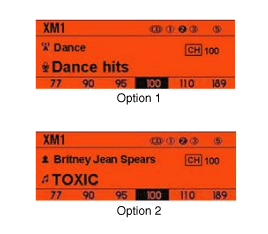
Main display in XM mode
| XM1 |
XM band |
| CH
100 |
Channel
Number |
| Dance |
Category
name |
| Dance
hits |
Channel
name |
| Britney Jean
Spears |
Artist
name |
| TOXIC |
Song
title |
| 77,90,95,100,110,189 |
Preset channel
number |
| 100 |
Current preset
channel number |
| *The
disc icons reflect the actual disc status in the CD changer (for CDC
Models). | |
| * User
can select the base display of channel info. (Option 1 or Option
2) | |
| *
Information display mode is extended mode. (Display allowable
characters.) | |
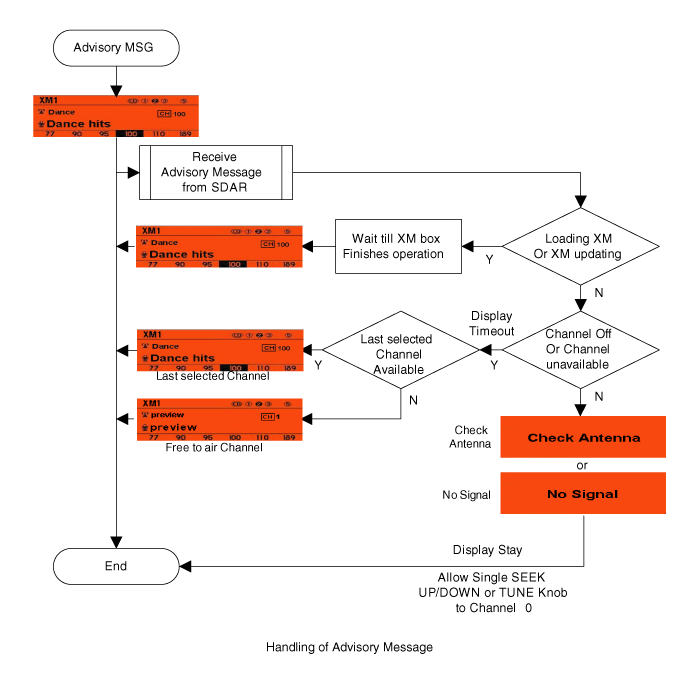
Handling Of Advisory Messages
Advisory messages are
messages to indicate the various abnormal conditions during XM operations.
These are defined in the “XM Radios Minimum Feature & Functionality”
and duplicated here. The ways to handle each message are stated in the
table below.
| Condition |
Display |
Handling | |||
| Antenna not
connected |
Check
Antenna
|
Display
stays. No beep. Allow seek up/down to channel 0 for viewing Radio ID. | |||
| Updating
encryption code |
XM
Updating
|
Display
stays. No beep. Go back to channel after updating is done. | |||
| Loss of
signal |
No
Signal
|
Display
stays. No beep. Allow seek up/down to channel 0 for viewing Radio ID. | |||
Acquiring
channel audio or information
|
Loading
|
Display
stays. No beep. Go back to channel after loading is done. | |||
| Channel not
in service |
Off
Air
|
Display
timeout. No beep. Go to last selected channel if one exists. If not, go to free-to-air channel, e.g. CH1 | |||
| Channel
(SID) no longer available |
CH
Unavailable
|
Display
timeout. No beep. Go to last selected channel if one exists. If not, go to free-to-air channel, e.g. CH1 | |||
| Corresponding Artist Name/Feature, or Song/Program Title
are null (empty) |
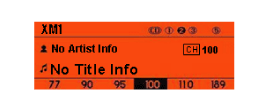
No Artist
Info / No Title Info
|
Timeout
follows that defined in Extra Channel Info section. No beep. Stay in current channel. | |||
| Category
name not available |
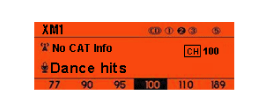
No CAT
Info
|
Timeout
follows that defined in Extra Channel Info section. No beep. Stay in current channel. | |||
| No channel
available for the chosen category |
Not
Found
|
Display
timeout. No beep. Go to last selected channel if one exists. If not, go to free-to-air channel, e.g. CH1 |