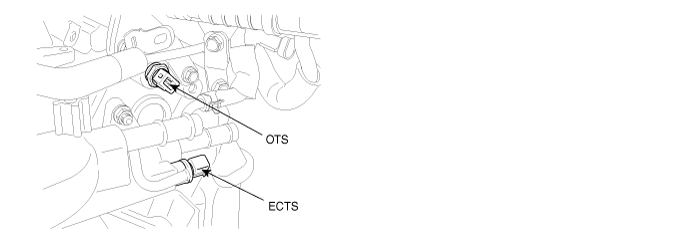
The fluid of the CVVT is
the engine oil and its density changes according to the engine oil
temperature. At this time the Oil Temperature Sensor (OTS) helps
compensation against the temperature differences. The Oil Temperature
Sensor measures the engine oil temperature before the engine oil comes
into the Oil-flow Control Valve (OCV). According to the measured
temperature, the Engine Control Module (PCM) compensates the oil-flow
control valve operation time.
Checking output signals
from oil temperture sensor every 15 sec. under detecting condition, if an
signal is low for more than 12.5 sec., PCM sets P0197. MIL(Malfunction
Indication Lamp) turns on when the malfunction lasts till consecutive 2
driving cycle.
Item
|
Detecting
Condition
|
Possible Cause
|
DTC Strategy
|
|
| •
|
Short to ground in
harness |
|
Enable Condition
|
Case
1
|
| •
|
Engine running state > 60
sec. |
| •
|
Coolant temperature < 110
°C(230°F) | |
Case
2
|
| •
|
Engine running state > 90
sec. | |
Threshold value
|
| •
|
Oil temperature sensor's signal <
0.1V | |
Diagnosis time
|
| •
|
Continuous
(More than 12.5 sec.failure for every 15
sec.test) | |
MIL ON condition
|
|
Temperature(°C/°F)
|
Resistance(kΩ)
|
-20°C/
-4°F
|
16.52kΩ
|
20°C/
68°F
|
2.45kΩ
|
80°C/
176°F
|
0.29kΩ
|
| 1. |
Check DTC Status
| (1) |
Connect scantool to Data Link
Connector(DLC). |
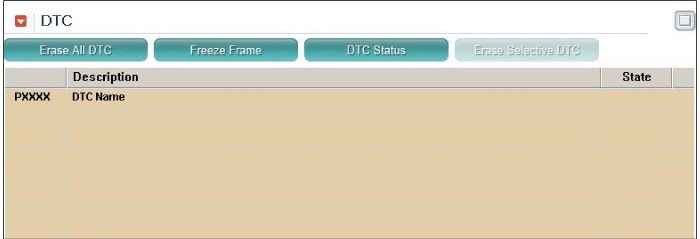
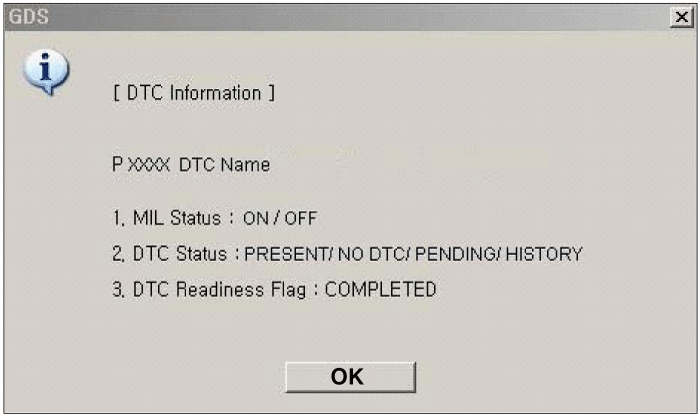
| (3) |
Select "DTC" button, and then Press "DTC
Status" to check DTC’s information from the DTCs
menu |
| (4) |
Read "DTC Status"
parameter.
|
| (5) |
Is parameter displayed "Present
fault"?
|

|
▶ Go
to "Terminal and Connector Inspection" procedure.
|
|

|
▶
Fault is intermittent caused by poor contact in the
sensor’s and/or PCM’s connector or was repaired and PCM
memory was not cleared. Thoroughly check connectors for
looseness, poor connection, ending, corrosion,
contamination, deterioration, or damage. Repair or
replace as necessary and go to "Verification of Vehicle
Repair"
procedure.
|
| |
| Terminal and Connector
Inspection |
| 1. |
Many malfunctions in the electrical system are
caused by poor harness and terminals. Faults can also be caused by
interference from other electrical systems, and mechanical or
chemical damage. |
| 2. |
Thoroughly check connectors for looseness,
poor connection, bending, corrosion, contamination, deterioration,
or damage. |
| 3. |
Has a problem been found?
|
|
▶ Repair or
replace if necessary and go to "Verification of Vehicle
Repair" procedure.
|
|
|
▶ Go to
"Signal Circuit Inspection"
procedure.
|
|
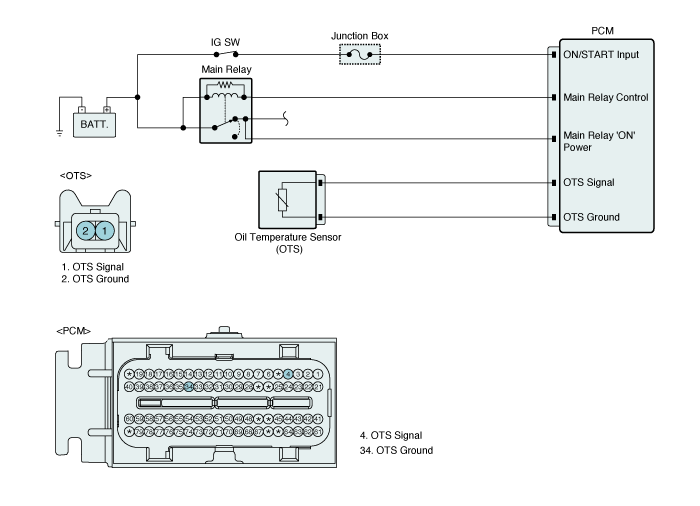
| Signal Circuit
Inspection |
| 2. |
Disconnect OTS
connector |
| 4. |
Measure voltage between harness signal
terminal of OTS and chassis ground.
Specification
: Approx. 5V
| |
| 5. |
Is the measured voltage within specification
?
|
|
▶ Go to "
Component Inspection" procedure.
|
|
|
▶ Repair
short to ground in harness, and go to "Verification of Vehicle
Repair" procedure.
|
|
| 2. |
Monitor Oil Temperature parameter on the
scantool |
| 4. |
Disconnect OTS
connector. |
| 5. |
Measure resistance between signal and ground
terminals of OTS connector after checking out the oil temperature
with scantool
Specification :
Temperature(°C/°F)
|
Resistance(kΩ)
|
-20°C/
-4°F
|
16.52kΩ
|
20°C/
68°F
|
2.45kΩ
|
80°C/
176°F
|
0.29kΩ
|
|
| 6. |
Is the measured resistance within
specification ?
|
|
▶
Substitute with a known - good PCM and check for proper
operation.
If the problem is
corrected, replace PCM and go to "Verification of Vehicle
Repair" procedure.
|
|
|
▶
Substitute with a known - good OTS and check for proper
operation.
If the problem is
corrected, replace OTS and go to "Verification of Vehicle
Repair"
procedure.
|
|
| Verification of Vehicle
Repair |
After a repair, it is
essential to verify that the fault has been corrected.
| 1. |
Connect scantool and select "DTC"
button. |
| 2. |
Press "DTC Status" button and confirm that
"DTC Readiness Flag" indicates "Completed". If not, drive the
vehicle within conditions noted in the freeze frame data or enable
conditions |
| 3. |
Read "DTC Status"
parameter |
| 4. |
Is parameter displayed "History(Not Present)
fault"?
|
|
▶ System
performing to specification at this time. Clear the
DTC
|
|
|
▶ Go to the
applicable troubleshooting
procedure.
|
|