MONITOR-MEDIA SYSTEM
DESCRIPTION
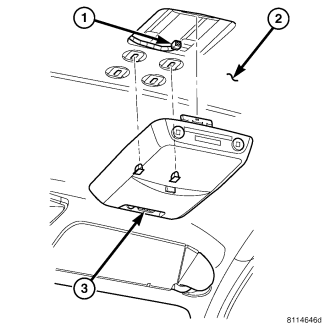
The video entertainment system, consist of:
- Battery powered remote control
- DVD player located at the end of the center floor console
- Two headsets
- Video monitor (3) located on the headliner (2)
In addition to video DVDs, the system will play audio DVDs, audio CDs, MP3 audio disc, and video CDs. There are plug-in jacks on the DVD player to show video directly from a video camera, connect video games for display on the screen, and play music directly from a MP3 player.
OPERATION
A seven inch (diagonal measurement) liquid crystal display (LCD) screen supports both 3 X 4 and 6 X 9 video formats. The hinged screen latches in the closed position and swings down for viewing.
REMOVAL
WARNING: Disable the airbag system before attempting any steering wheel, steering column, seat belt tensioner, side airbag, or instrument panel component diagnosis or service. Disconnect and isolate the battery negative (ground) cable, then wait two minutes for the airbag system capacitor to discharge before performing further diagnosis or service. This is the only sure way to disable the airbag system. Failure to take the proper precautions could result in accidental airbag deployment and possible personal injury.
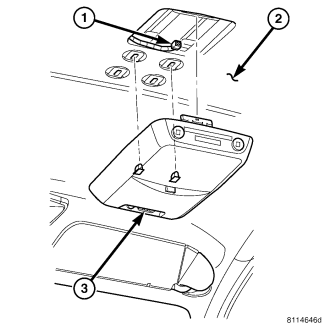
1. Disconnect and isolate the battery negative cable.
2. Remove the two mounting fasteners.
3. Using a trim stick, press the retaining clip at the rear of the monitor (3). Move the monitor from side to side to release from headliner (2).
4. Disconnect electrical harness connector (1) and remove monitor.
INSTALLATION
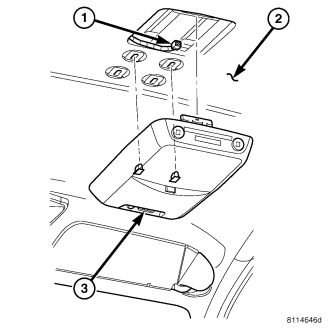
1. Connect electrical harness connector (1) to monitor (3).
2. Position monitor and press into place.
3. Install and tighten mounting fasteners.
4. Connect battery negative cable.