SEAL-PINION
REMOVAL
1. Remove wheels.
2. Push back brake pads and release hand brake.
3. Remove propeller shaft.
4. Rotate pinion with inch pound torque and record torque to rotate.
5. Mark installation position of collared nut with respect to drive pinion.
6. Bend pinion nut lock back with a punch and hammer.
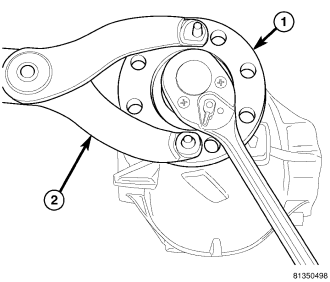
7. Hold pinion flange (1) with flange Wrench C-3281(2) and remove pinion nut.
8. Mark a line across the pinion shaft and flange for installation reference.
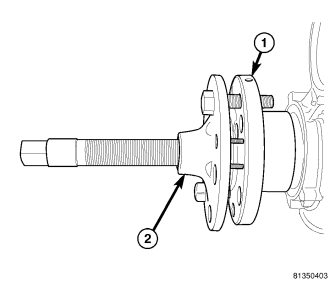
9. Remove pinion flange (1) with Puller C-452 (2).
10. Remove pinion seal with a seal pick.
INSTALLATION
1. Install pinion seal with seal Installer C-3972A and Handle C-4171.
2. Position pinion flange on pinion shaft with reference mark aligned.
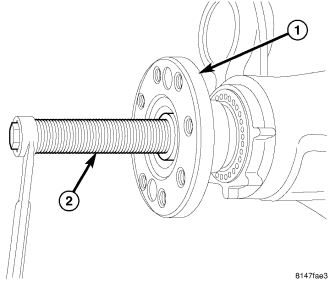
3. Install pinion flange (1) on pinion with flange Installer 9616 (2). Tap flange on pinion, then thread installer center bolt on pinion shaft and draw flange onto the pinion.
4. Install new pinion collared nut and carefully tighten nut in stages holding flange (1) with flange Wrench C-3281(2). Check torque to rotate after each stage, until previously value of torque to rotate is exceeded by 0.5 N·m. (4.4 in. lbs.).
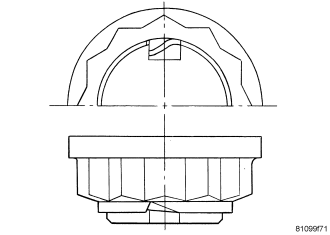
5. Cut the pinion nut collar.
6. Bend nut collar so it touches the wall of the slot in the pinion shaft.
7. Connect propeller shaft to pinion flange.
8. Install wheel and tires.
9. Operate brake pedal several times until brake pads contact brake discs (brake pressure built up).