AXLE BEARINGS
REMOVAL
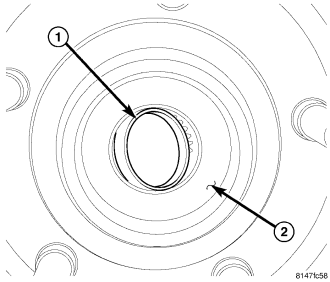
1. With vehicle in neutral, position on hoist.
2. Remove calipers and rotors.
3. Tap axle end plug (1) loose from the wheel flange (2) with a hammer and punch. Pull plug (1) out of wheel flange (2).
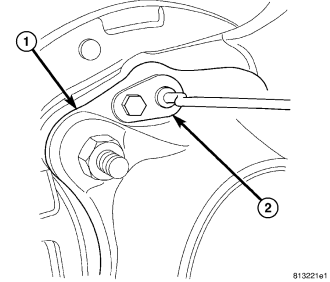
4. Remove speed sensors (2) from axle tube (1) flange.
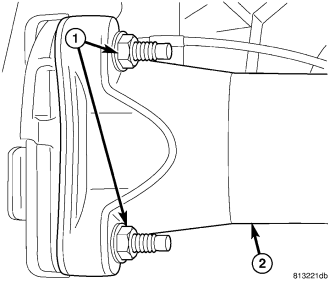
5. Remove axle flange nuts (1) from axle (2).
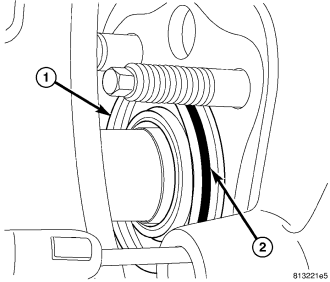
6. Pull axle shaft and backing plate out of axle tube until axle bearing (1) is exposed.
7. Remove O-ring (2) from the axle bearing.
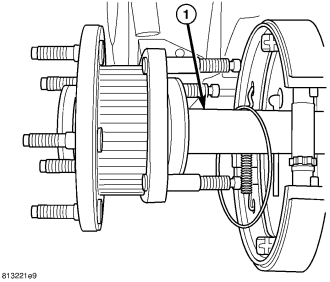
8. Slide axle shaft (1) from axle tube and backing plate.
9. Tap axle shaft out of the wheel flange and axle bearing through the plug hole with a hammer and brass drift.
INSTALLATION
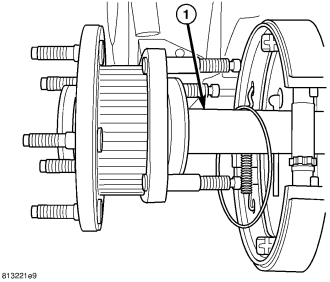
NOTE: If a bearing flange stud is loose or has backed out tighten stud to 27 N·m (20 ft. lbs.).
1. Install axle flange bolts into axle flange.
2. Tap axle shaft through axle bearing into wheel flange.
3. Install axle shaft (1) into axle tube and backing plate with new O-ring on axle.
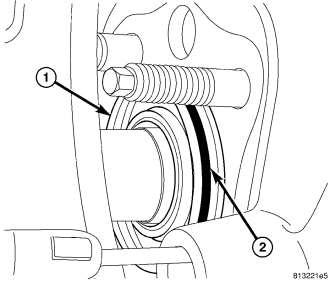
4. Slip O-ring (2) through backing plate, then push axle through backing plate until bearing (1) is exposed.
5. Install O-ring (2) axle bearing.
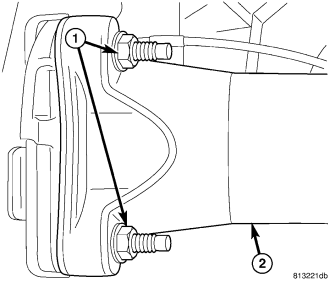
6. Push axle into axle tube.
7. Install axle (2) flange nuts (1) and tighten to 119 N·m (88 ft. lbs.).
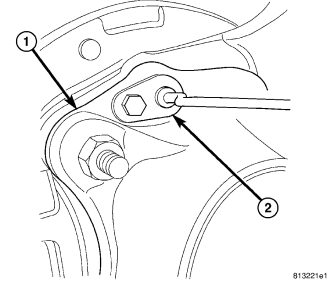
8. Install speed sensors (2) in axle tube (1) flange.
9. Coat new axle flange plug with Mopar® Stud N' Bearing Mount Adhesive or equivalent and install plug with freeze plug installer.
10. Install calipers and rotors.