CLUSTER BEZEL
REMOVAL
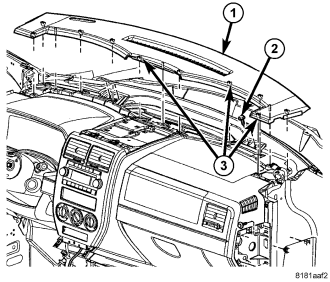
1. Remove the top cover (1), (Refer to 23 - BODY/INSTRUMENT PANEL/INSTRUMENT PANEL TOP COVER - REMOVAL).
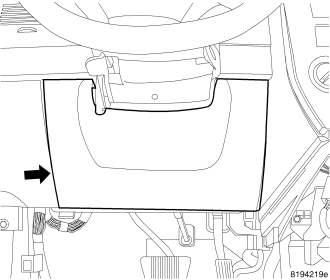
2. Remove the steering column opening cover, (Refer to 23 - BODY/INSTRUMENT PANEL/STEERING COLUMN OPENING COVER - REMOVAL).
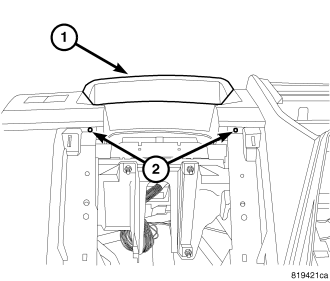
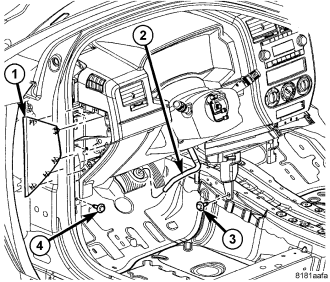
3. Remove the two lower bezel screws (2) at the steering column opening.
4. Using a trim stick C-4755 or equivalent, separate and remove the end cap (1).
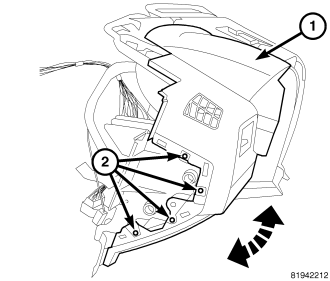
5. Remove the four screws (2) behind the end cap and rotate the front of the bezel (1) up.
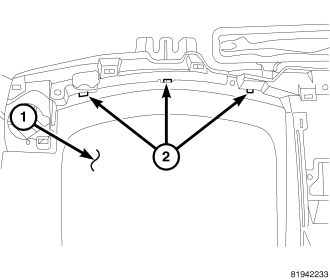
6. Separate the three rear tabs (2) and remove the bezel (1).
INSTALLATION
1. Insert the three rear tabs (2) into the I/P structure.
2. Position the front of the bezel (1) down into place and install the four side screws (2).
3. Position the end cap (1) onto the I/P and seat the retaining clips fully.
4. Install the two lower bezel screws (2).
5. Position the steering column opening cover onto the I/P and seat the retaining clips fully.
6. Position the top cover (1) onto the I/P and seat the retaining clips (3) fully, (Refer to 23 - BODY/INSTRUMENT PANEL/INSTRUMENT PANEL TOP COVER - INSTALLATION).