INSTALLATION
ALL-WHEEL-DRIVE
CAUTION: Failure to install speed sensor cables properly may result in contact with moving parts or an over extension of cables causing an open circuit. Be sure that cables are installed, routed, and clipped properly.
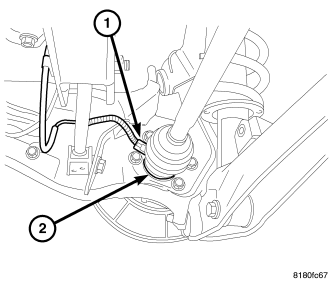
NOTE: When installing the sensor head to the spring-loaded retainer on the hub and bearing, make sure the head is held snug in the retainer. If there is any play, the clip is deformed and the hub and bearing must be replaced. The retainer is not serviced separately.
1. Clip the wheel speed sensor head (1) (flat side to bearing rear face) into the spring-loaded retainer on the rear of the hub and bearing (2).
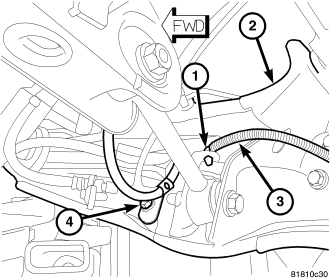
2. Position the wheel speed sensor (3) on the trailing link (2) and install the screw (4) securing it in place. Tighten the mounting screw to 18 N·m (13 ft. lbs.).
3. Position the wheel speed sensor (3) and install the routing clip (1) fastening the sensor to the trailing link (2).
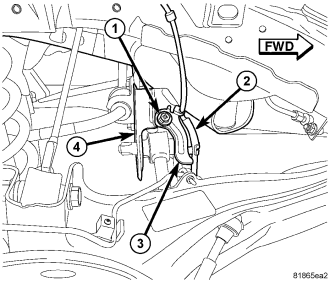
4. Position the wheel speed sensor cable routing clamp (3) on the rear suspension crossmember (4) and install the mounting screw (1). Tighten the mounting screw to 18 N·m (13 ft. lbs.).
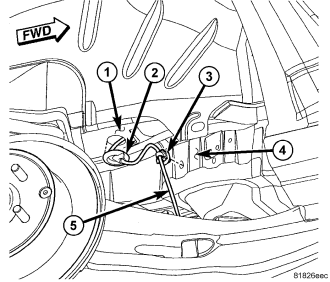
5. Install the speed sensor cable routing clip (3) on the outside frame rail (4).
NOTE: When inserting the wheel speed sensor cable through the hole in the body, route the cable toward the shock tower to make it easier to grasp the cable to connect it to the body wiring harness connector in a later step.
6. Insert the wheel speed sensor cable (5) through the hole in the body (1) and install the grommet (2) in the hole.
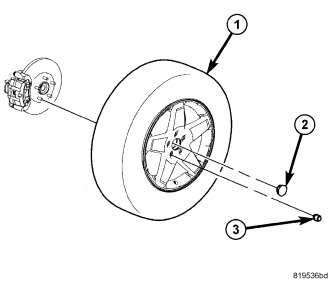
7. Install the tire and wheel assembly (1) (Refer to 22 - TIRES/WHEELS - INSTALLATION). Install and tighten the wheel mounting nuts (3) to 135 N·m (100 ft. lbs.).
8. Lower the vehicle.
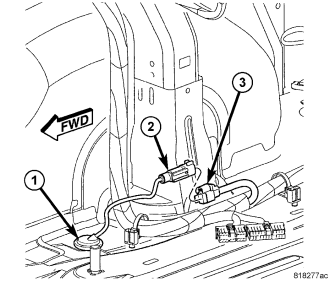
9. Through the opening in the bottom of the quarter trim panel, connect the wheel speed sensor cable connector (2) to the body wiring harness connector (3).
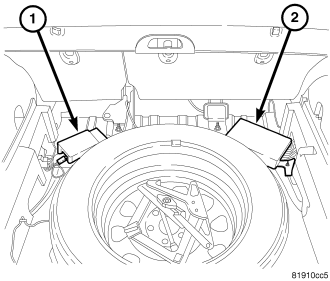
10. If equipped, install the satellite receiver (1) or amplifier (2) to rear floor pan.
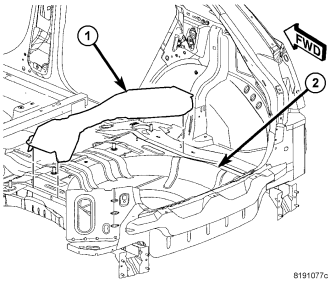
11. Install the rear floor pan silencer (1).
12. Install the cargo floor cover.
13. Perform the Diagnostic Verification Test and clear any faults. (Refer to 5 - BRAKES - STANDARD PROCEDURE)
FRONT-WHEEL-DRIVE
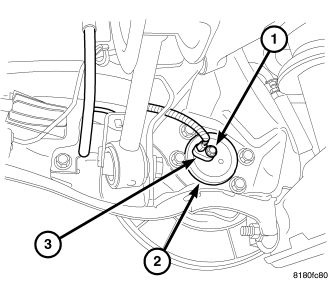
1. Install the wheel speed sensor head (3) into the rear of the hub and bearing (2).
2. Install the wheel speed sensor head mounting screw (1). Tighten the screw to 10 N·m (89 in. lbs.).
3. Position the wheel speed sensor (3) on the trailing link (2) and install the screw (4) securing it in place. Tighten the mounting screw to 18 N·m (13 ft. lbs.).
4. Position the wheel speed sensor (3) and install the routing clip (1) fastening the sensor to the trailing link (2).
5. Position the wheel speed sensor cable routing clamp (3) on the rear suspension crossmember (4) and install the mounting screw (1). Tighten the mounting screw to 18 N·m (13 ft. lbs.).
6. Install the speed sensor cable routing clip (3) on the outside frame rail (4).
NOTE: When inserting the wheel speed sensor cable through the hole in the body, route the cable toward the shock tower to make it easier to grasp the cable to connect it to the body wiring harness connector in a later step.
7. Insert the wheel speed sensor cable (5) through the hole in the body (1) and install the grommet (2) in the hole.
8. Install the tire and wheel assembly (1) (Refer to 22 - TIRES/WHEELS - INSTALLATION). Install and tighten the wheel mounting nuts (3) to 135 N·m (100 ft. lbs.).
9. Lower the vehicle.
10. Through the opening in the bottom of the quarter trim panel, connect the wheel speed sensor cable connector (2) at the body wiring harness connector (3).
11. If equipped, install the satellite receiver (1) or amplifier (2) to rear floor pan.
12. Install the rear floor pan silencer (1).
13. Install the cargo floor cover.
14. Perform the Diagnostic Verification Test and clear any faults. (Refer to 5 - BRAKES - STANDARD PROCEDURE)