CLUSTER BEZEL
REMOVAL
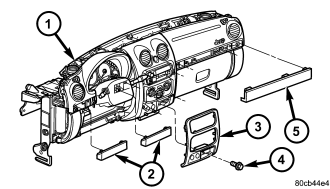
1. Before proceeding with the following repair procedure, review all warnings and cautions. (Refer to 23 - BODY/INSTRUMENT PANEL - WARNING)
2. Remove the driver side trim bezels (2). (Refer to 23 - BODY/INSTRUMENT PANEL/INSTRUMENT PANEL DRIVER SIDE BEZEL - REMOVAL)
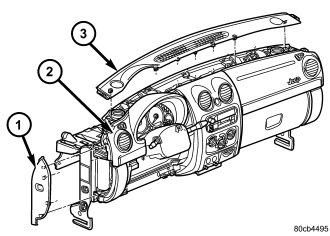
3. Remove the instrument panel top cover (3). (Refer to 23 - BODY/INSTRUMENT PANEL/INSTRUMENT PANEL TOP COVER - REMOVAL)
4. Remove the seven screws and remove the cluster bezel.
INSTALLATION
1. Before proceeding with the following repair procedure, review all warnings and cautions. (Refer to 23 - BODY/INSTRUMENT PANEL - WARNING)
2. Install the cluster bezel and the seven screws.
3. Install the instrument panel top cover (3). (Refer to 23 - BODY/INSTRUMENT PANEL/INSTRUMENT PANEL TOP COVER - INSTALLATION)
4. Install the driver side trim bezels (2). (Refer to 23 - BODY/INSTRUMENT PANEL/INSTRUMENT PANEL DRIVER SIDE BEZEL - INSTALLATION)