CONNECTOR
REMOVAL
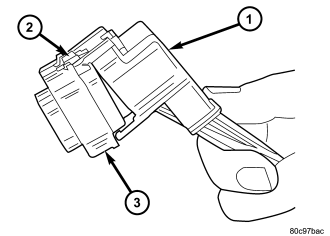
1. Disconnect battery.
2. Release Connector Lock (2).
3. Disconnect the connector (3) being repaired from its mating half/component.
4. Remove the dress cover (if applicable) (1).
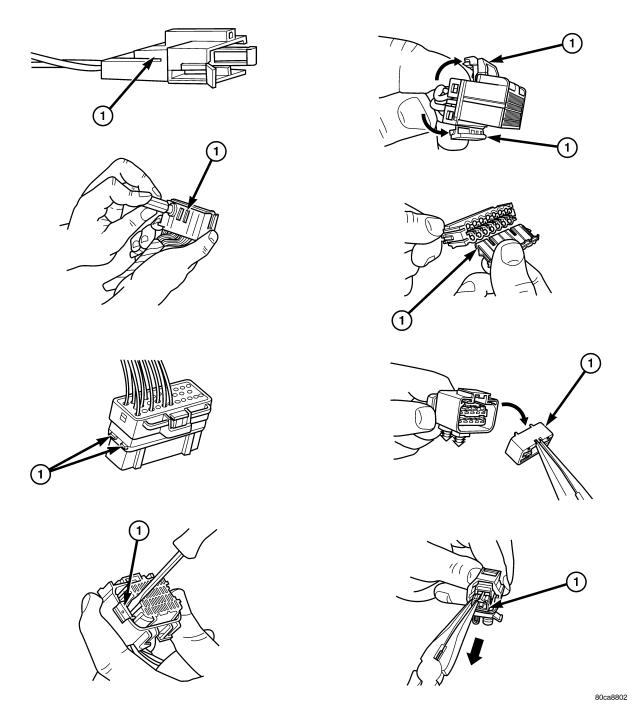
5. Release the Secondary Terminal Lock, if required (1).
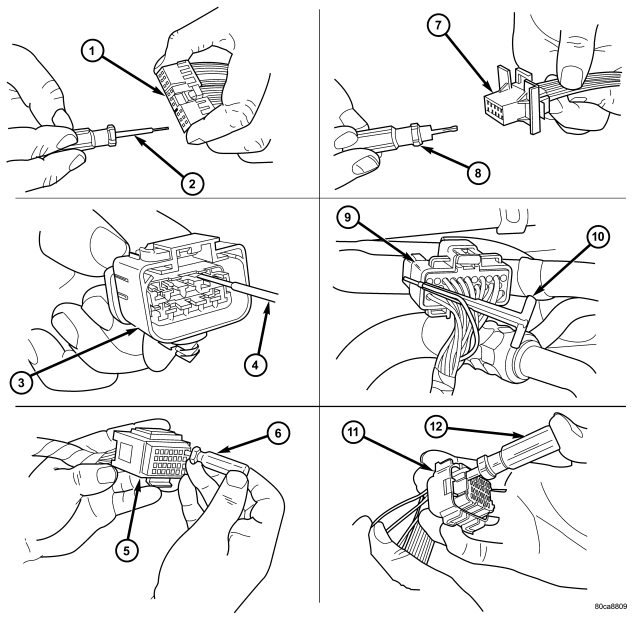
| 1 - TYPICAL CONNECTOR |
| 2 - PICK FROM SPECIAL TOOL KIT 6680 |
| 3 - APEX CONNECTOR |
| 4 - PICK FROM SPECIAL TOOL KIT 6680 |
| 5 - AUGAT CONNECTOR |
| 6 - SPECIAL TOOL 6932 |
| 7 - MOLEX CONNECTOR |
| 8 - SPECIAL TOOL 6742 |
| 9 - THOMAS AND BETTS CONNECTOR |
| 10 - SPECIAL TOOL 6934 |
| 11 - TYCO CONNECTOR |
| 12 - SPECIAL TOOL 8638 |
6. Position the connector locking finger away from the terminal using the proper special tool. Pull on the wire to remove the terminal from the connector .
INSTALLATION
1. Insert the removed terminal in the same cavity on the repair connector.
2. Repeat steps for each terminal in the connector, being sure that all wires are inserted into the proper cavities. For additional connector pin-out identification, refer to the wiring diagrams.
3. When the connector is re-assembled, the secondary terminal lock must be placed in the locked position to prevent terminal push out.
4. Replace dress cover (if applicable).
5. Connect connector to its mating half/component.
6. Connect battery and test all affected systems.