P2128-ACCELERATOR PEDAL POSITION SENSOR 2 CIRCUIT HIGH
P2128-ACCELERATOR PEDAL POSITION SENSOR 2 CIRCUIT HIGH
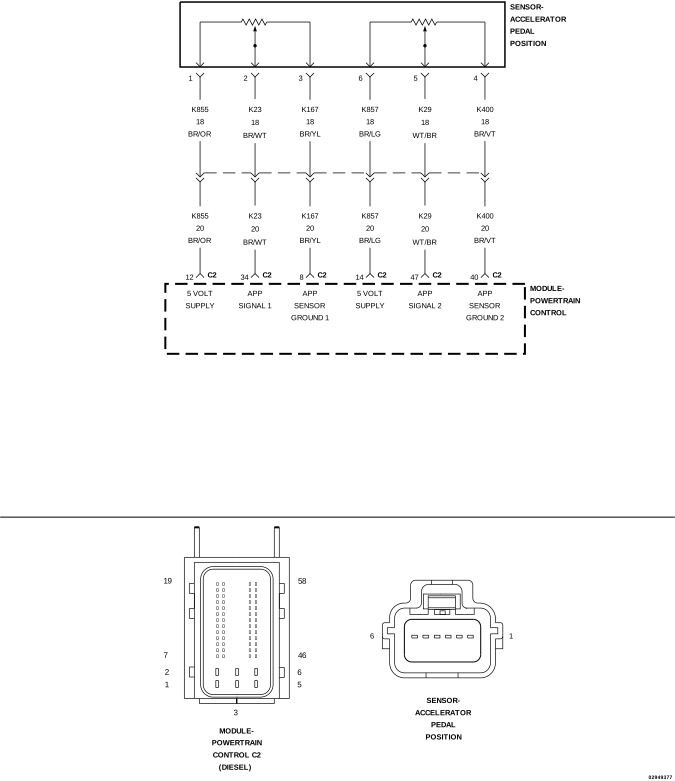
For a complete wiring diagram, refer to the Wiring Information.
Theory of Operation
The Accelerator Pedal Position (APP) Sensor contains two independent three wire sensors. Each sensor provides independent pedal position signals to the Powertrain Control Module (PCM). The raw voltage signal from APP Sensor 1 is twice the raw voltage signal from APP Sensor 2. Although the raw voltage signals differ, the scan tool converts and displays these voltages as matching percentages of pedal travel.
When Monitored:
With the ignition on.
Set Condition:
The APP Sensor 2 signal circuit is above 2.5 volts for 0.31 seconds.
Possible Causes
(K856) APP SENSOR 2 5-VOLT SUPPLY CIRCUIT SHORTED TO VOLTAGE
(K29) APP SENSOR 2 SIGNAL CIRCUIT SHORTED TO VOLTAGE
(K29) APP SENSOR 2 SIGNAL CIRCUIT SHORTED TO THE (K856) APP SENSOR 2 5-VOLT SUPPLY CIRCUIT OR (K855) APP SENSOR 1 5-VOLT SUPPLY CIRCUIT
3.
CHECK THE (K29) APP SENSOR 2 SIGNAL CIRCUIT FOR A SHORT TO THE 5-VOLT SUPPLY CIRCUITS
1.
Turn the ignition off.
2.
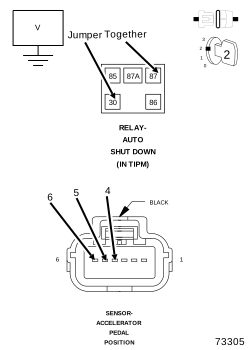
Remove the jumper wire and install the ASD Relay.
3.
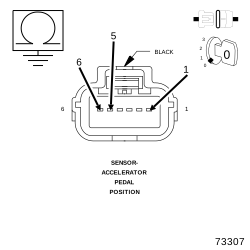
Measure the resistance between the (K29) APP Sensor 2 Signal circuit and the (K856) APP Sensor 2 5-Volt Supply circuit in the APP Sensor harness connector.
4.
Measure the resistance between the (K29) APP Sensor 2 Signal circuit and the (K855) APP Sensor 1 5-Volt Supply circuit in the APP Sensor harness connector.
Is the resistance above 10k Ohms for both of the circuits?
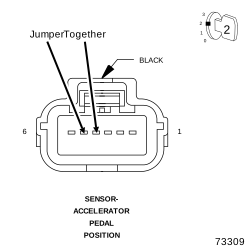
Connect a jumper wire between the (K400) APP Sensor 2 Sensor Ground circuit and the (K29) APP Sensor 2 Signal circuit at the APP Sensor harness connector.
8.
Turn the ignition on.
9.
With the scan tool, select View DTCs.
NOTE:
The scan tool should display an Accelerator Pedal Position Sensor 2 Low DTC as active with the jumper wire in place.
Does the scan tool display the DTC as described above?
Yes
Replace the Accelerator Pedal Position Sensor in accordance with the service information.
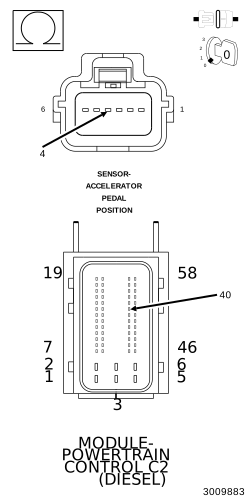
Using the wiring diagram/schematic as a guide, inspect the wiring and connectors between the Accelerator Pedal Position Sensor and the Powertrain Control Module (PCM).
2.
Look for any chafed, pierced, pinched, or partially broken wires.
3.
Look for broken, bent, pushed out or corroded terminals.
4.
Perform any Technical Service Bulletins that may apply.