P2784-INPUT SPEED SENSOR 1/2 CORRELATION
P2784-INPUT SPEED SENSOR 1/2 CORRELATION
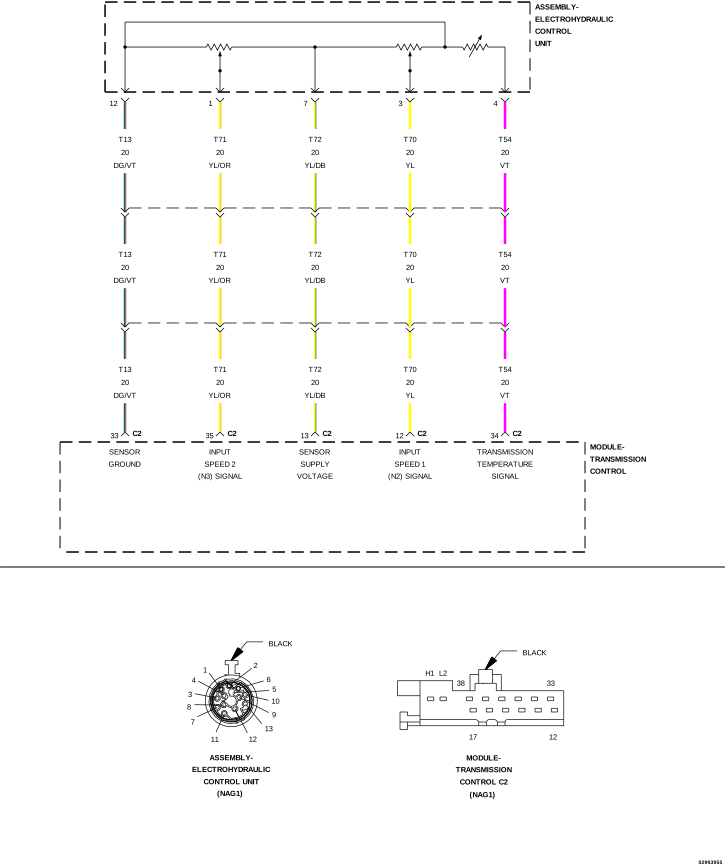 |
For a complete wiring diagram, refer to the Wiring Information.
Theory of Operation
The Input Speed Sensors 1 and 2 (N2 - N3) will report the same speed in 2nd, 3rd and 4th gears. If the Input Speed Sensor 1 and 2 signals are not the same in these gears, the DTC will set.
-
When Monitored:
Engine speed greater than 450 rpm, no engine speed DTCs, no TCM undervoltage system operation, no output speed sensor DTCs (CAN signal from the ABS system), all wheel speeds above 250 rpm (CAN signal from the ABS system), no rear wheel speed DTCs (signal from the ABS system), and no wheel slip detected (CAN signal from the ABS system), no shifting operation, Input Speed Sensor 2 (N3) greater than 800 rpm and Input Speed Sensor 1 (N2) greater than 0 rpm and the TCM not in reset.
-
Set Condition:
If the speed difference between the Input Speed Sensors 1 and 2 (N2 - N3) is greater than 150 rpm.
Possible Causes |
|---|
| INTERNAL TRANSMISSION |
| TRANSMISSION CONTROL MODULE (TCM) |
Always perform the NAG1 Pre-Diagnostic Troubleshooting procedure before proceeding. (Refer to 28 - DTC-Based Diagnostics/MODULE, Transmission Control (TCM) - Standard Procedure).
1. CHECK FOR SPEED SENSOR OR SENSOR SUPPLY VOLTAGE DTCS
| 1. | With the scan tool, check for other transmission DTCs. |
Are any Input Speed Sensor and/or Sensor Supply Voltage DTCs present?
Yes
- (Refer to 28 - DTC-Based Diagnostics/MODULE, Transmission Control (TCM) - Diagnosis and Testing) and perform the appropriate diagnostic procedure.
No
- Go To 2
2. CHECK TO SEE IF INPUT SENSOR MISMATCH IS CURRENT
| NOTE: | If the TCM detects and stores a DTC, the TCM also stores the vehicles operating conditions under which the DTC originally set and is located in scan tool under Environmental Data. Before erasing any stored DTCs, record any available data to assist in duplicating the conditions in which the DTC originally set. |
| 1. | With the scan tool, record the Environmental Data and erase Transmission DTCs. |
| 2. | Using the Environmental Data recorded earlier, test drive the vehicle while trying to duplicate the conditions in which the DTC originally set. |
Did the DTC P2784-INPUT SPEED SENSOR 1/2 CORRELATION reset?
Yes
- Go To 3
No
- Go To 4
| 1. | Turn the ignition off to the lock position. |
| 2. | Remove the Transmission Oil Pan and inspect for debris, a plugged Transmission Oil Filter, or any sign of an internal transmission problem. |
Is there any debris, plugged Transmission Oil Filter, or any sign of an internal transmission problem?
Yes
- Repair as necessary in accordance with the Service Information.
- Perform the NAG1 TRANSMISSION VERIFICATION TEST. (Refer to 28 - DTC-Based Diagnostics/MODULE, Transmission Control (TCM) - Standard Procedure).
No
- Using the schematics as a guide, check the Transmission Control Module (TCM) terminals for corrosion, damage, or terminal push out. Pay particular attention to all power and ground circuits. If no problems are found, replace the TCM in accordance with the Service Information.
- Perform the NAG1 TRANSMISSION VERIFICATION TEST. (Refer to 28 - DTC-Based Diagnostics/MODULE, Transmission Control (TCM) - Standard Procedure).
4. CHECK THE WIRING AND CONNECTORS
| 1. | The conditions necessary to set this DTC are not present at this time. |
| 2. | Using the schematics as a guide, inspect the wiring and connectors specific to this circuit. |
| 3. | Wiggle the wiring and connectors while checking for any possible open or shorted circuits. |
| 4. | Perform any Service Information Tune-ups or Technical Service Bulletins that may apply. |
Were there any problems found?
Yes
- Repair as necessary.
- Perform the NAG1 TRANSMISSION VERIFICATION TEST. (Refer to 28 - DTC-Based Diagnostics/MODULE, Transmission Control (TCM) - Standard Procedure).
No