The condition that caused this code to set is not present at this time. Check for an intermittent condition by inspecting the related wiring harness for chafed, pierced, pinched, and partially broken wires. Also inspect the related connectors for broken, bent, pushed out, spread, corroded, or contaminated terminals.
2.
CHECK EACH NON-FUNCTIONING COMPONENT FOR AN INTERNAL SHORT TO GROUND
NOTE:
Using the wiring diagram as a guide disconnect each non-functioning component one at a time while checking for the DTC to become stored. Repeat these steps for each component.
1.
Turn the ignition off.
2.
Disconnect the non-functioning component harness connector.
3.
Turn the ignition on.
4.
Activate the Panel Illumination.
5.
With the scan tool, read DTCs.
Did the DTC change from active to stored when the component was disconnected?
3.
CHECK THE (E12) PANEL LAMPS DRIVER CIRCUIT FOR A SHORT TO GROUND
1.
Turn the ignition off.
2.
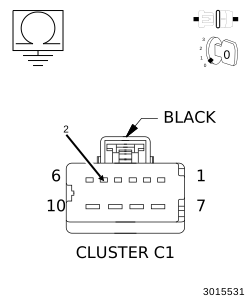
Disconnect the Cluster C1 harness connector.
3.
With all (E12) Panel Lamps Driver circuit components disconnected, measure the resistance to ground on the (E12) Panel Lamps Driver Circuit from the Cluster C1 harness connector.
Is the resistance less than 10K Ohms?
Yes
Repair the (E12) Panel Lamps Driver circuit for a short to ground.