B142F-SATELLITE RADIO ANTENNA NOT CONNECTED
B142F-SATELLITE RADIO ANTENNA NOT CONNECTED
Special Tools: Click to display a list of tools used in this procedure
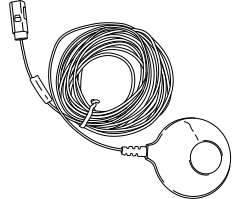
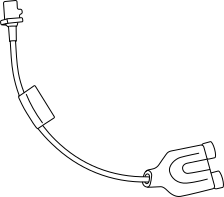
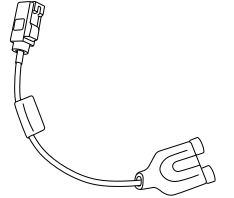
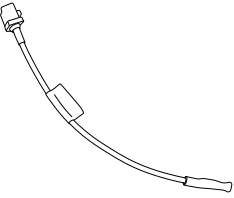
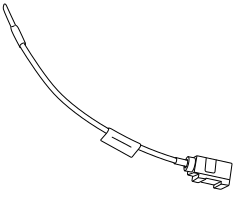
For a complete wiring diagram, refer to the Wiring Information.
-
When Monitored:
With the ignition on and the Radio in satellite mode.
-
Set Condition:
This DTC sets when the Radio does not detect a Satellite Antenna connection.
Possible Causes |
|---|
| BAD ANTENNA CONNECTION |
| OPEN SATELLITE RADIO ANTENNA CABLE |
| OPEN SATELLITE RADIO ANTENNA |
| SATELLITE RADIO RECEIVER |
1. CHECK THE ANTENNA CONNECTION
| 1. | Turn the ignition off. |
| 2. | Disconnect the Satellite Radio Antenna connector at the rear of the Radio. |
| 3. | Inspect the Satellite Radio Antenna connection. |
Was the antenna connection clean and secure?
Yes
- Go To 2
No
- Clean and secure the antenna connection as necessary.
- Perform the BODY VERIFICATION TEST. (Refer to 28 - DTC-Based Diagnostics/MODULE, Totally Integrated Power (TIPM) - Standard Procedure).
2. CHECK THE ANTENNA AND CABLE
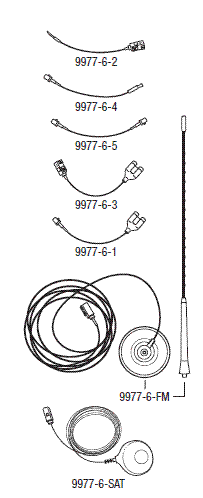
| 1. | Connect the Radio Diagnostic Tool 9977-6-SAT to the Satellite Antenna connection on the back of the Radio. |
| 2. | Make sure one of the front doors is still open. |
| 3. | Using the scan tool, erase the DTCs. |
| 4. | Turn the ignition on. |
| 5. | Turn the Radio on. |
| 6. | Using the scan tool, read the active Radio DTCs. |
Does the scan tool display: B142F Satellite Radio Antenna Not Connected as Active?
Yes
- Replace the Satellite Radio in accordance with the Service Information.
- Perform the BODY VERIFICATION TEST. (Refer to 28 - DTC-Based Diagnostics/MODULE, Totally Integrated Power (TIPM) - Standard Procedure).
No
- Go To 3
3. TEST THE SATELLITE ANTENNA CABLE
| 1. | Disconnect the Satellite Antenna cable at the Satellie Antenna. |
| 2. | Connect the appropriate Radio Diagnostic Tool 9977-6-1 or 9977-6-3 to the Satellite Antenna cable at the back of the Radio. |
| 3. | Connect the appropriate Radio Diagnostic Tool 9977-6-4 or 9977-6-2 to the Satellite Antenna cable at the Satellite Antenna. |
| 4. | Measure the Resistance across the terminals on the tool. |
Is the resistance above 52.5 Ohms?
No
-
Use the Radio Diagnostic Tool
9977-6
to locate the open circuit, repair or replace the Satellite Antenna cable as necessary. - Perform the BODY VERIFICATION TEST. (Refer to 28 - DTC-Based Diagnostics/MODULE, Totally Integrated Power (TIPM) - Standard Procedure).
Yes
- Replace the Satellite Antenna in accordance with the Service Information.
- Perform the BODY VERIFICATION TEST. (Refer to 28 - DTC-Based Diagnostics/MODULE, Totally Integrated Power (TIPM) - Standard Procedure).