Home › 28 - DTC-Based Diagnostics › AMPLIFIER (AMP), Base › B147D-CHANNEL 6 AUDIO SPEAKER OUTPUT CIRCUIT SHORTED TOGETHERB147D-CHANNEL 6 AUDIO SPEAKER OUTPUT CIRCUIT SHORTED TOGETHER
For a complete wiring diagram, refer to the Wiring Information .
Possible Causes
(X206) RIGHT REAR SPEAKER (+) CIRCUIT SHORTED TO THE (X296) RIGHT REAR SPEAKER (-) CIRCUIT
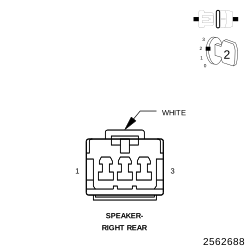
RIGHT REAR SPEAKER
AMPLIFIER
1.
CHECK FOR AN INTERMITTENT CONDITION
2.
Using the scan tool, record and erase the Amplifier DTCs.
3.
Cycle the ignition switch from on to off, wait five seconds and then back to on.
4.
Turn the Radio on and set the volume to 25.
5.
Adjust the speakers to the rear and center.
6.
Using the scan tool, read the active Amplifier DTCs.
Does the scan tool display active: B147D-CHANNEL 6 AUDIO SPEAKER OUTPUT CIRCUIT SHORTED TOGETHER? Yes
No
2.
CHECK THE OPERATION OF THE RIGHT REAR SPEAKER
1.
Using the scan tool, erase the DTCs.
2.
Turn the ignition off.
3.
Disconnect the Right Rear Speaker harness connector from the Right Rear Speaker.
5.
Turn the radio on and set the volume to 25.
6.
Using the scan tool, read the active Amplifier DTCs.
Does the scan tool display active: B147D-CHANNEL 6 AUDIO SPEAKER OUTPUT CIRCUIT SHORTED TOGETHER? No
Yes
3.
CHECK THE (X206) RIGHT REAR SPEAKER (+) CIRCUIT AND THE (X296) RIGHT REAR SPEAKER (-) CIRCUITS FOR A SHORT TOGETHER
1.
Turn the ignition off.
2.
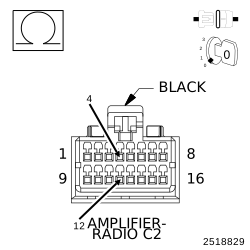
Disconnect the Amplifier C2 harness connector.
3.
Measure the resistance between the (X206) Right Rear Speaker (+) circuit, and the (X296) Right Rear Speaker (-) circuit.
Is the resistance below 10K Ohms? Yes
No