For a complete wiring diagram, refer to the Wiring Information.
NOTE:
Check for and remove any non-FCC compliant components before beginning this diagnostic procedure.
Theory of Operation
When installing a new Tire Pressure Monitoring (TPM) Module, the module is programed with universal IDs for the Tire Pressure Monitoring (TPM) Sensors. The TPM Module must be programmed with the correct TPM Sensor ID's.
NOTE:
FF is the default value. If this value is found, the TPM controller has not been programmed.
When Monitored:
During
vehicle TPM Sensor ID locate process.
Set Condition:
When installing
a new Tire Pressure Monitoring (TPM) Module.
Always be certain to select the proper vehicle line and model year when using this tool, as the tool will automatically use the correct protocol to attempt to read the Sensor. If the incorrect vehicle line and/or model year is selected, the Sensor will not respond to the tool.
NOTE:
If you receive no response from any of the tire pressure sensors, check to make sure that the TPM-RKE Analyzer is set correctly, and repeat the process on each of the non-responsive wheel(s)
1.
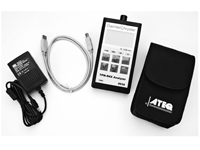
Use a TPM-RKE Analyzer
CH9936
to scan each TPM Sensor for an ID, store in the proper location in the TPM-RKE Analyzer.
2.
Use a TPM-RKE Analyzer to upload the correct IDs and proper locations in the scan tool.
3.
With the scan tool, select the TPM Module under "Miscellaneous Functions", follow the procedure for uploading TPM Sensor IDs.
4.
With the scan tool, erase TPM Module DTCs.
5.
Test drive the vehicle at a speed greater than 24 km/h (15 mph) for 20 minutes in order to receive TPM data and allow for the system to update.
6.
With the scan tool, check to see if the TPM sensor IDs match what is programmed into the TPM Module.
Install a new Tire Pressure Monitoring (TPM) Module in accordance with the Service Information. (Refer to 22 - Tires and Wheels/Tire Pressure Monitoring/MODULE, Tire Pressure Monitoring (TPM) - Removal).
Starting with the left front wheel, deflate the tire to 20 PSI, wait two minutes, and check the scan tool for changes to any compensated tire pressure values.
3.
Repeat the above step on each wheel of the vehicle.
4.
With the scan tool, erase TPM Module DTCs.
5.
Test drive the vehicle at a speed greater than 24 km/h (15 mph) for 20 minutes in order to receive TPM data and allow for the system to update.
6.
With the scan tool, check to see if the TPM sensor IDs are programmed into the TPM Module.
Install a new Tire Pressure Monitoring (TPM) Module in accordance with the Service Information. (Refer to 22 - Tires and Wheels/Tire Pressure Monitoring/MODULE, Tire Pressure Monitoring (TPM) - Removal).