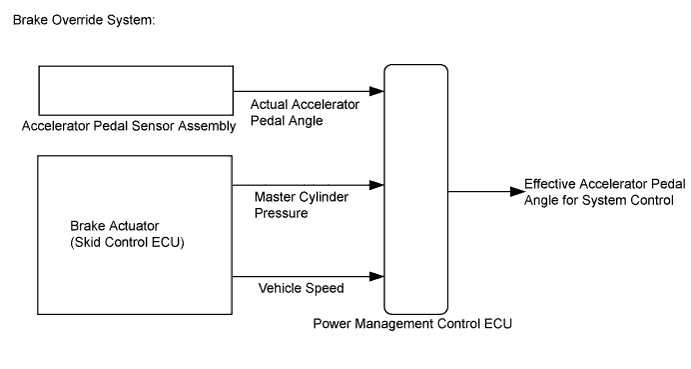
HYBRID CONTROL SYSTEM > Brake Override System |
| 1.CHECK DTC OUTPUT (ALL CODES) |
Connect the intelligent tester to the DLC3.
Turn the power switch on (IG).
Enter the following menus: System Select / Utility / All Codes.
Check DTCs.
| Result | Proceed to |
| No DTCs are output. | A |
| DTCs are output. | B |
Turn the power switch off.
|
| ||||
| A | |
 |
| 2.READ VALUE USING INTELLIGENT TESTER (MASTER CYLINDER CTRL TRQ) |
Connect the intelligent tester to the DLC3.
Turn the power switch on (IG).
Enter the following menus: Powertrain / Hybrid Control / Data List / Master Cylinder Ctrl Trq.
Read the value displayed on the intelligent tester.
| Tester Display | Measurement Item/Range | Normal Condition |
| Master Cylinder Ctrl Trq | Master cylinder control torque/ Min.: -4096 Nm, Max.: 4095 Nm | Brake pedal depressed: Changes with the brake pedal pressure Brake pedal released: 0 Nm |
| Result | Proceed to |
| Displayed value changes according to the brake pedal pressure. | A |
| Displayed speed value does not change according to the brake pedal pressure. | B |
Turn the power switch off.
|
| ||||
| A | |
|
| 3.READ VALUE USING INTELLIGENT TESTER (ACCEL PEDAL POS #1, ACCEL PEDAL POS #2) |
Connect the intelligent tester to the DLC3.
Turn the power switch on (IG).
Enter the following menus: Powertrain / Hybrid Control / Data List / Accel Pedal Pos #1, Accel Pedal Pos #2.
Read the value displayed on the intelligent tester.
| Tester Display | Measurement Item/Range | Normal Condition |
| Accel Pedal Pos #1 | Accelerator pedal position sensor No.1/ Min.: 0%, Max.: 100% | Accelerator pedal released → depressed → released: Changes with accelerator pedal pressure |
| Accel Pedal Pos #2 | Accelerator pedal position sensor No.2/ Min.: 0%, Max.: 100% |
| Result | Proceed to |
| Displayed speed values smoothly changes following accelerator pedal operation. | A |
| Displayed speed values does not smoothly change following accelerator pedal operation. | B |
Turn the power switch off.
|
| ||||
| A | |
|
| 4.READ VALUE USING INTELLIGENT TESTER (VEHICLE SPD) |
Connect the intelligent tester to the DLC3.
Turn the power switch on (IG).
Enter the following menus: Powertrain / Hybrid Control / Data List / Vehicle Spd.
Read the value displayed on the intelligent tester.
| Tester Display | Measurement Item/Range | Normal Condition |
| Vehicle Spd | Vehicle speed/ Min.: 0 km/h (0 mph), Max.: 255 km/h (158 mph) | Vehicle stopped: 0 km/h (0 mph) No large fluctuations when driving at a constant speed: Vehicle running at constant speed between 16.1 to 64.4 km/h (10 to 40 mph) |
| Result | Proceed to |
| Displayed speed value does not fluctuate. | A |
| Displayed speed value fluctuates. | B |
Turn the power switch off.
|
| ||||
| A | |
|
| 5.READ VALUE USING INTELLIGENT TESTER (FR, FL, RR, RL WHEEL SPEED) |
Connect the intelligent tester to the DLC3.
Turn the power switch on (READY).
Enter the following menus: Chassis / ABS/VSC/TRAC / Data List / All Data / FR Wheel Speed, FL Wheel Speed, RR Wheel Speed and RL Wheel Speed.
Read the value displayed on the intelligent tester.
| Tester Display | Measurement Item/Range | Normal Condition |
| FR Wheel Speed | Front speed sensor RH / Min.: 0 km/h (0 mph), Max.: 326 km/h (202 mph) | Vehicle stopped: 0 km/h (0 mph) No large fluctuations when driving at a constant speed: Vehicle running at constant speed between 16.1 to 64.4 km/h (10 to 40 mph) |
| FL Wheel Speed | Front speed sensor LH / Min.: 0 km/h (0 mph), Max.: 326 km/h (202 mph) | |
| RR Wheel Speed | Rear speed sensor RH / Min.: 0 km/h (0 mph), Max.: 326 km/h (202 mph) | |
| RL Wheel Speed | Rear speed sensor LH / Min.: 0 km/h (0 mph), Max.: 326 km/h (202 mph) |
| Result | Proceed to |
| Displayed speed value does not fluctuate. | A |
| Displayed speed value fluctuates. | B |
Turn the power switch off.
|
| ||||
| A | ||
 | ||
| ||
