CD cannot be Inserted / Played or CD is Ejected Right After Insertion
Circuit diagnosis
INSPECTION PROCEDURE
| 1. CHECK IF A PROPER CD IS INSERTED |

Make sure that the CD is an audio CD or a CD with an MP3 or WMA file, and that it is not deformed, flawed, stained, burred, or otherwise defective.
- OK:
- Normal CD.
- HINT:
- Translucent or uniquely-shaped CDs cannot be played.
- CDs with adhesive paper labels should not be played.
- Commercial audio CDs can be played.
- CD-DA files on CD-ROMs, CD-Rs, and CD-RWs can be played.
- MP3 and WMA files on CD-ROMs, CD-Rs, and CD-RWs can be played.
- For details on playable CDs, refer to the Owner's Manual.
- Translucent or uniquely-shaped CDs cannot be played.
|
|
||||

| OK | |
 |
| 2. CHECK THAT CD IS INSERTED PROPERLY |
Check whether or not the CD is inserted upside down.
- OK:
- CD is properly inserted.
|
|
||||
| OK | |
|
| 3. CHECK CD |
Clean the disc by wiping it with a soft cloth from the inside to the outside in a radial direction.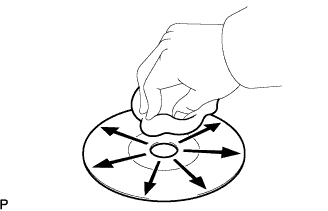

- OK:
- Malfunction disappears.
- NOTICE:
- Do not use a conventional record cleaner or anti-static preservative.
|
|
||||

| OK | ||
 |
||
| ||
| 4. REPLACE CD |
Replace the CD with a normal one and check that the malfunction disappears.
- OK:
- Malfunction disappears.
|
|
||||
| OK | ||
|
||
| ||