DISASSEMBLY
Removal / installation
| 1. REMOVE PROPELLER SHAFT ASSEMBLY |

Put matchmarks on both flanges.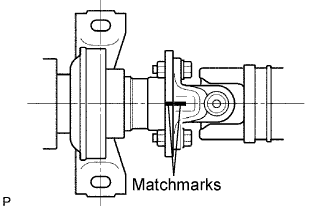

Remove the 4 nuts, bolts, washers and propeller shaft assembly.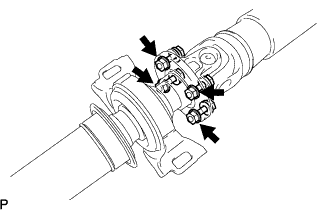
| 2. REMOVE NO. 1 CENTER SUPPORT BEARING ASSEMBLY |
Hold the intermediate shaft assembly in a vise between aluminium plates.
- NOTICE:
- Do not overtighten the vise.
Using a chisel and a hammer, release the staked part of the nut.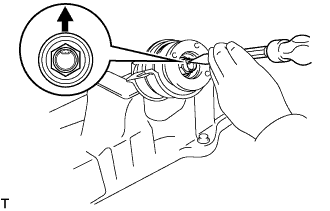
- NOTICE:
- Release the staked part of the nut completely, otherwise the threads of the intermediate shaft may be damaged.
Using SST to hold the universal joint flange, remove the nut and intermediate shaft washer.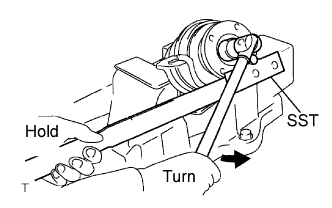
- SST
- 09330-00021
Put matchmarks on the intermediate shaft assembly and universal joint flange.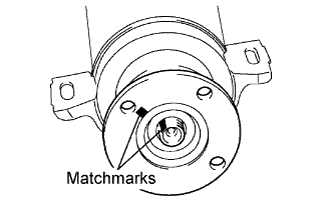
Using SST, remove the universal joint flange from the intermediate shaft assembly.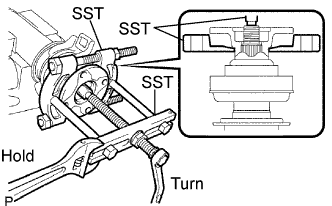
- SST
- 09950-00020
09950-00030
09330-00021
- NOTICE:
- Apply grease to the threads and tip of the SST center bolt before use.
Remove the No. 1 center support bearing assembly and 2 center support bearing washers from the intermediate shaft assembly.