01-DF
Diagnostic trouble codes
DESCRIPTION
| DTC No. |
DTC Detection Condition |
Trouble Area |
| 01-DF *1 |
The device with a display fails and the master is switched to the audio device. Also when a communication error between sub-master (audio) and master occurs, this code is stored. |
|
- HINT:
- *1: When 210 seconds have elapsed after disconnecting the power supply connector of the master component with the engine switch on (ACC or IG), this code is stored.
- NOTICE:
- Before starting troubleshooting, be sure to clear DTCs to erase codes stored due to the reasons described in the HINT above. Then, check for DTCs and troubleshoot according to the output DTCs.
- The radio receiver is the master unit.
- Be sure to clear and recheck DTCs after the inspection is completed to confirm that no DTCs are output.
- Before starting troubleshooting, be sure to clear DTCs to erase codes stored due to the reasons described in the HINT above. Then, check for DTCs and troubleshoot according to the output DTCs.
INSPECTION PROCEDURE
- NOTICE:
- Be sure to read DESCRIPTION before performing the following procedures.
| 1. CHECK RADIO RECEIVER POWER SOURCE CIRCUIT |

If the power source circuit is operating normally, proceed to the next step.
| NEXT | |
 |
| 2. INSPECT RADIO RECEIVER |
Disconnect the radio receiver connectors.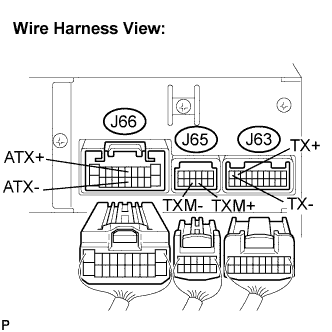

Measure the resistance according to the value(s) in the table below.
- Standard resistance:
Tester Connection
Condition
Specified Condition
ATX+ - ATX-
Always
60 to 80 Ω
TXM+ - TXM-
Always
60 to 80 Ω
TX+ - TX-
Always
60 to 80 Ω
|
|
||||

| OK | |
|
| 3. IDENTIFY THE COMPONENT WHICH HAS STORED THIS CODE |
Enter the diagnostic mode.
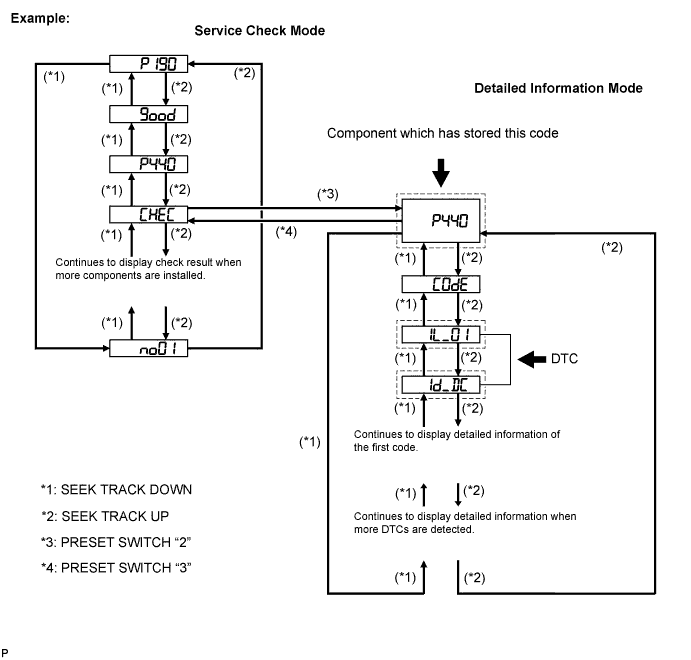
Press the preset switch "3" to change to "Detailed Information Mode".
Identify the component which has stored this code.
Component Table: Component
Physical address
Gateway ECU
1C6
Stereo component amplifier
440
Integration control & panel assembly
1D8
- HINT:
- "440 (stereo component amplifier)" is the component which has stored this code in the example shown in the illustration.
- "440 (stereo component amplifier)" is the component which has stored this code in the example shown in the illustration.
- For details of the DTC display, refer to the "DTC CHECK/CLEAR" (Click here).
- For details of the DTC display, refer to the "DTC CHECK/CLEAR" (Click here).
| NEXT | |
|
| 4. CHECK HARNESS AND CONNECTOR (RADIO RECEIVER - COMPONENT WHICH HAS STORED THIS CODE) |
- HINT:
- For details of the connectors, refer to the "TERMINALS OF ECU" (Click here).
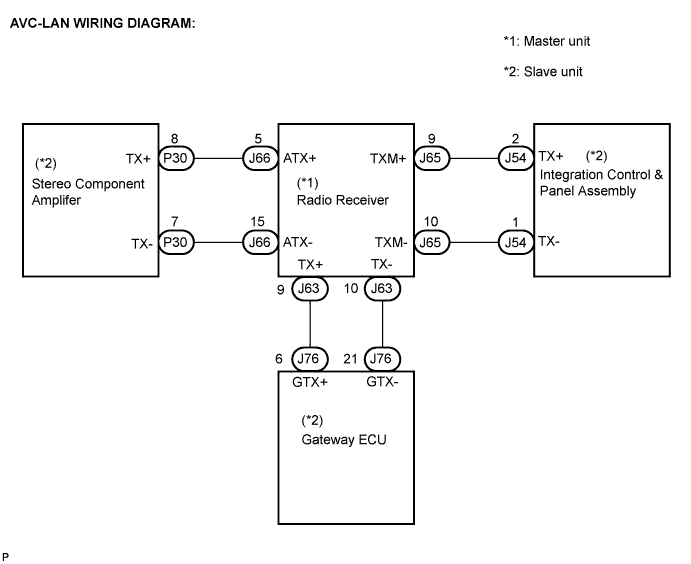
Referring to the AVC-LAN wiring diagram below, check the AVC-LAN circuit between the radio receiver and the component which has stored this code.
Disconnect all connectors between the radio receiver and the component which has stored this code.
Check for an open or short in the AVC-LAN circuit between the radio receiver and the component which has stored this code.
- OK:
- There is no open or short circuit.
|
|
||||
| OK | |
|
| 5. REPLACE RADIO RECEIVER |
Replace the radio receiver with a normal one and check if the same problem occurs again.
- OK:
- Same problem does not occur.
|
|
||||
| OK | ||
 |
||
| ||