| Last Modified: 11-27-2007 | 1.6 J | |
| Service Category: Audio/Visual/Telematics | Section: Navigation/Multi Info Display | |
| Model Year: 2008 | Model: LX570 | Doc ID: RM000000OB0018X |
| Title: NAVIGATION / MULTI INFO DISPLAY: NAVIGATION SYSTEM: INSPECTION PROCEDURE (2008 LX570) | ||
|
Panel Switches do not Function |
INSPECTION PROCEDURE
PROCEDURE
|
1. |
CHECK PANEL SWITCH |
(a) Check for foreign matter around the switch that might prevent operation.
OK:
No foreign matter is found.
|

|
2. |
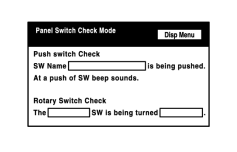
CHECK PANEL SWITCH (DISPLAY CHECK MODE) |
|
(a) Enter the "Display Check" mode and select "Panel Switch Check Mode"
|

(b) Operate the abnormal switch and check if the switch name and status are correctly displayed.
OK:
The switch name and status are correctly displayed as operated.
|

|

|