| Last Modified: 11-27-2007 | 1.6 J | |
| Service Category: Audio/Visual/Telematics | Section: Navigation/Multi Info Display | |
| Model Year: 2008 | Model: LX570 | Doc ID: RM000000OB301AX |
| Title: NAVIGATION / MULTI INFO DISPLAY: NAVIGATION SYSTEM: INSPECTION PROCEDURE (2008 LX570) | ||
|
Display does not Dim when Light Control Switch is Turned ON |
INSPECTION PROCEDURE
PROCEDURE
|
1. |
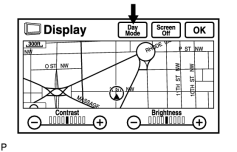
CHECK IMAGE QUALITY SETTING |
|
(a) Enter the display adjustment screen by pressing the "DISP" switch. |
(b) Turn the light control switch to the TAIL position.
(c) Check if "Day Mode" on the display is ON.
OK:
"Day Mode" is ON.
|

|
2. |
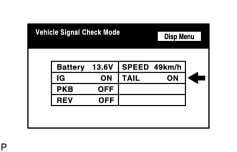
CHECK VEHICLE SIGNAL (DISPLAY VEHICLE SIGNAL) |
|
(a) Enter the "Display Check" mode and select "Vehicle Signal Check Mode"
|

(b) Cover the automatic light control sensor on the instrument panel with a cloth.
(c) Set the instrument panel light control to less than the maximum (to activate the dimmer function that works when the light control switch is in the TAIL position).
(d) Check that the display changes between DIM and BRIGHT according to the light control switch operation.
OK:
|
Light Control Switch Condition |
Display Condition |
|---|---|
|
TAIL or HEAD |
ON |
|
OFF |
OFF |
HINT:
The display is updated once per second. It is normal for the display to lag behind the actual switch operation.
|

|

|