| Last Modified: 11-27-2007 | 1.6 J | |
| Service Category: Audio/Visual/Telematics | Section: Navigation/Multi Info Display | |
| Model Year: 2008 | Model: LX570 | Doc ID: RM000000PO702LX |
| Title: NAVIGATION / MULTI INFO DISPLAY: NAVIGATION SYSTEM: INSPECTION PROCEDURE (2008 LX570) | ||
|
Voice is not Recognized |
INSPECTION PROCEDURE
PROCEDURE
|
1. |
CHECK NAVIGATION SETTINGS |
|
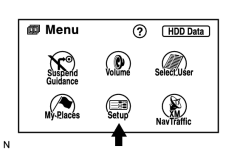
(a) Enter the "Menu" screen by pressing the "MENU" switch. |
(b) Select "Set up".
|
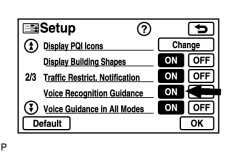
(c) Check that "Voice Recognition Guidance" is not OFF. OK: Voice Recognition Guidance is not OFF. |
|

|
2. |
CHECK MICROPHONE (NAVIGATION CHECK MODE) |
|
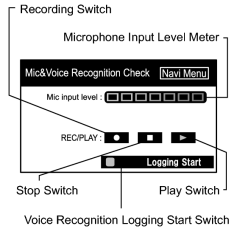
(a) Enter the "Mic&Voice Recognition Check" mode
|

(b) When a voice is input into the microphone, check that the microphone input level meter changes according to the input voice.
(c) Push the recording switch and perform voice recording.
HINT:
The recording limit is 5 seconds.
(d) Check that the recording indicator remains on while recording and that the recorded voice is played normally without noise or distortion.
OK:
All check results are normal.
|

|

|