| Last Modified: 11-27-2007 | 1.6 J | |
| Service Category: Audio/Visual/Telematics | Section: Navigation/Multi Info Display | |
| Model Year: 2008 | Model: LX570 | Doc ID: RM000000POC02QX |
| Title: NAVIGATION / MULTI INFO DISPLAY: NAVIGATION SYSTEM: INSPECTION PROCEDURE (2008 LX570) | ||
|
Vehicle Position Mark is not Updated |
INSPECTION PROCEDURE
PROCEDURE
|
1. |
CHECK MAP DISPLAY |
(a) Check if a touch scroll can be performed on the map display.
OK:
Touch scroll can be performed.
|

|
2. |
CHECK VEHICLE SENSOR (NAVIGATION CHECK MODE) |
|
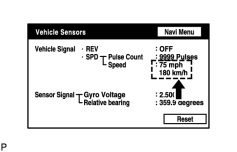
(a) Enter the "Navigation Check" mode and select "Vehicle Sensors"
|

(b) While driving the vehicle, compare the "Speed" indicator to the reading on the speedometer. Check if these readings are almost equal.
OK:
The readings are almost equal.
|

|

|